


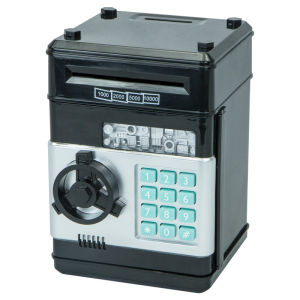
Mini ATM Electronic Piggy Bank Password Money Saving Box
💰 Perfect for Kids to Learn & Save!This electronic money safe is a fun and educational way to encourage children to develop good saving habits from a young age.🌟 Great For:Instilling good saving habits in children from an early ageIntroducing basic mathematics such as addition and subtractionA fun and practical gift for children💵 Product FeaturesAccepts SGD banknotes & other currencies3 voice modes: English / Mandarin / SilentBattery: 3 × AA batteries (provided as a free gift, subject to availability)Size: 185 × 129 × 120 mm🔐 How to Use the Safe-Important: For first-time use, enter the default password 0000 to open the safe.-Enter the 4-digit password. The green light will blink. If the password is incorrect, the red light will blink and the safe will say “PLEASE TRY AGAIN.”-Turn the knob clockwise to open the door. The green light will blink for approximately 10 seconds, accompanied by a door-opening sound.-If the door remains open for more than 10 seconds, the green light will stop blinking and the safe will beep every 20 seconds as a reminder to close the door.-Insert the banknote directly into the note acceptor. To withdraw the money, enter your password to open the safe.-After closing the door, please double-check that it is securely closed.🔑 How to Change the PasswordEnter the current password (default: 0000) and open the safe.Press and hold the “” button. Both the green and red lights will blink.Within 15 seconds, enter your new 4-digit password and press “#” to save it. Both lights will stop flashing.⚠️ Important NotesIf the new password is not entered within 15 seconds, the process will be cancelled. Please restart the procedure.Release the “” button and close the door. You will hear beeping/sound effects.Enter the current password and open the door (default: 0000).Use the switch located at the back of the door to turn the beeping/sound effects on or off.Close the safe door securely after use.❓ FAQ1. What if I forget the password?Don't worry! Simply unscrew and remove the battery cover, then remove the batteries. The password will reset to the default 0000.2. The note acceptor/roller is not working properly. What should I do?For first-time use or after replacing the batteries, please push the banknote further into the slot until it touches the roller. This will reactivate the note-accepting mechanism.Note: A screwdriver is required to remove the battery cover before inserting or replacing the batteries.

The PlayHouse
You May Also Like
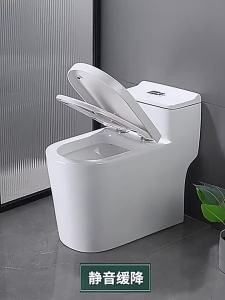
Urea Formaldehyde Thickened Toilet Seat Cover for Old Style Bathrooms

deli | Industrial Multi-Functional Household Plumbing Adjustable Wrench 12 inch

OKLIFE 6 Hooks Row Hooks Retractable Door Rear Hook Stainless Steel Black And Silver Over-The-Door Hooks/Hangers

Waterproof Self-adhesive Floor Leather

Safety Shoes Lightweight Caterpillar Safety Shoes Safety Shoes For Men Hot Selling Style Cowhide Wear-Resistant Breathable Safety Footwear 安全鞋

Temperature-Controlled Digital Shower Set

[Singapore Local Seller] Wireless Home Door Bell with wireless transmission signal up to 120 Meters Range 16 Polyphonic melody / Chords 36 music 2 Adjustable Volume 200~240VAC 120m Transmission Range 12V3A Batteries Required

MOES Smart ZigBee2mqtt Scene Switch 4 Gang Remote Hand-held Zigbee Hub Required No limit to Control for Smart Home Automation

Faucet Robotic Arm Faucet 1080 ° Universal Rotation Faucet Extension Splash-proof Faucet Mechanical Arm Faucet Water Nozzle Faucet Adaptor Kitchen Tap with 2 Water Outlet Modes for Face Washing Gargle Hair Washing

NOBLELUX Soundproof Door Bottom Sealing Strip Self-adhesive Insect Prevention Weather Stripping Professional TPE Door Draft Stopper Living Room

2KG ABC Dry powder Fire Extinguisher with Free Doorstep Disposal old Fire Extinguisher











