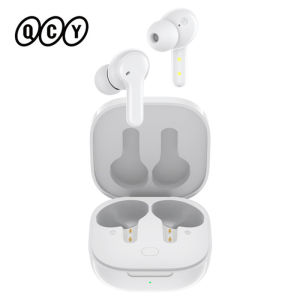
QCY | QCY T13 Bluetooth Headphone V5.1 Wireless TWS Earphone Touch Control Earbuds 4 Microphones ENC HD Call Headset Customizing APP
Talk Wherever You AreQCY T13 Wireless Smart Earbuds4 MICFour noise-canceling microphones for calling40hUltra-long battery lifeQuick charge7.2mmBig dynamic driverV5.1Bluetooth chipAPPCustomizing earbudsSleep ModeAnti-touchTouchPressure-free touch controlTalk Wherever You Are4-Mic Ultra Clear Calls, 3x clearer than ordinary true wireless earbuds.Advanced ENC Technology, Effectively block out 90% of background noise, only transmits your voice.4 MICFour noise-canceling microphones for callingENCDigital noise canceling algorithmQuick charge5 Minutes’ charge equals 1 hour of playback40 Hours PlaybackPlaytime lasts for about 8 hours from single charge. and total 40 hours with charging case.7.2mm Big dynamic driver7.2mm driver delivers HIFI sound combining punchy bass and dynamic, transient analytic force.* Some Android 9.0 phones are within white list setting SBC as default. One of solutions is rooting your phone then add the Bluetooth address into the list yet it’s risky.Bluetooth V5.1 ChipsetBluetooth V5.1 chip, faster, more stable transmission,High quality in Sound and low latency;Elegant LookingThe charging case is Inspired by space capsuleCustomized QCY AppExcept language change,default EQ modes and OTA firmware update,we add Sleep Mode to help you avoid any unintended activation.* Refer user manual to download the app.* The app requires system of android 6.0 or above/iOS 11 or above.* Push earbuds back into charging case to quit Sleep Mode or you can quit it on QCY App.One Step PairingPick up 2 headsets from charging case and they will connect each other automatically, then only one step easily enter mobile phone Bluetooth setting to pair the earbudsEither Earbud Can Work AloneThe L/R earbud can use in singleBoth mono and stereo modes are available.Sensitive Touch ControlMusic,Call, Voice assistant control all at your fingertips.Pause/resume playing :Double touchAnswer/end call:Double touchSkip track backward : Keep touching left earbudIgnore call:Keep touching either earbud for 1.5sSkip track forward : Keep touching right earbudVoice Assistant : Triple touch left earbudWhat’s in the Box: Earbuds, charging case * 1 Eartips * 3 pairs S/M/L(one pair has been assembled) Type-C cable * 1 User manual * 1Parameters:Product name: T13Pairing name: QCY-T13Bluetooth version: 5.1Available system: iOS/ AndroidOperation range: 10mBattery life: Up to 8 hours of listening time(5hr of calling) by single charge; Up to 40 hours play time with charging case.Bluetooth profiles: HFP/HSP/A2DP/AVRCPBattery capacity(case): 380mAhTop-ups by case: 2-3(for both earbuds)Charging port: Type-CFAQ:Q: What should I do if the headset received unabletoturn on?A: Confirm that the charging case has power left, press the button on the case and check if at least one LED is illuminated.If charging case power off, please put the earphones in charge case and charging for 1 hour. Before charging, please Remove the stickers on new earphones.Connect the case with your included USB cable and plug it into a USB power source.Q:What should I do if Sound comes from only one earphone?A:Put both earphones back into the charging caseand close the cover, then take them out again to check whether both ears have sound. If only one earphone still has sound, please restore the factory settings for both earphones.Q:How to solve the problem that the mobile phone prompts that it cannot connect?A:Delete the pairing record on the mobile phone, and then search for pairing and connect again.Q:How to solve the problem that there is no sound when listening to musicor calling?A: There is a settings icon on the right side of the Bluetooth connection name on Android phones. Click to enter, turn off the mobile phone audio and media audio, and then turn them on again. If there is still no sound, please re-pair the earphones with the mobile phone.Q: Why is there a delay in videoor games?A: Affected by factors such as the use environment, network, and mobile phone Codec, there will be different degrees of delay when the mobile phone transmits audio data to the earphone.Q: How to solve the problem of stuckor intermittent sound? A: If there are a lot of Wi-Fi, 5Gor 4G signals, high-power electrical appliances around, it may cause stuck and intermittent sound. Please Change the environment or re-pairing can solve the problem.Other Tips:1. Before using the earbuds, please read the manual carefully and keep it for future references.2. The earbuds need to be fully charged prior to first-time use.3. lf the earbuds are left unused for over two weeks, please recharge.4. Please use the chargers made by qualified manufacturer.5. lf earbuds fail to be found by phone, please re-turn them connectable or restore factory settings. 6.lf a program error of phone occurs, please turn off and on Bluetooth functionor reboot the phone.

Prime Supply_Play Life
You May Also Like
![SG [READY STOCK]Retro Portable Wireless Bluetooth Speaker Vintage Classical Subwoofer Speakers FM Radio Mini Music Player](https://img.lazcdn.com/g/ot/common/d3d07e2c59044a38bc960ac683002dd0.png_300x300q80.png)
SG [READY STOCK]Retro Portable Wireless Bluetooth Speaker Vintage Classical Subwoofer Speakers FM Radio Mini Music Player
EarFun Air Pro 4-Flagship Adaptive ANC Earbuds with Lossless Audio & Auracast.
Fender Portable Bluetooth Speakers - Elie 12 (Olympic White)
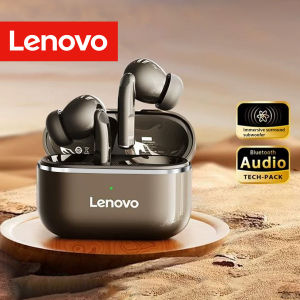
Lenovo | Lenovo EA230 TWS Wireless Bluetooth5.4 Earbuds Earphones With HD Stereo Sound ENC Noise Reduction Low Latency Gaming Mode Touch
Shokz OpenRun Pro 2 Mini Bone Conduction Sports Headphone
Fineblue F920 Bluetooth Headset Collar Clip Earphone Universal Earpiece Wireless Retractable Headphone With Microphone For Portable Phone Calls Incoming Voice Prompt Vibration Reminder Can Connect Two Phones At The Same Time
HyperX | HyperX SoloCast Gaming Microphone Pro Electronic Sports Tap-to-Mute Sensor USB Condenser Gamer Mic for Computer/PC/PS
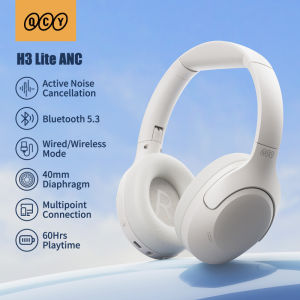
QCY | QCY H3 Lite ANC Wireless/Wired Headphones Bluetooth 5.3 Foldable Over Ear Headset HIFI Sound 60H Playtime Earphones Dual Connect

MCHOSE | Gaming Headphones with Mic for PC 4-Mode 3-Bluetooth Wireless
![[SG STOCK]S258 Wired Mini Audio Speaker Portable Voice Amplifier Natural Stereo Sound Microphone Loudspeaker for Teachers speaker with microphone](https://img.lazcdn.com/psp/20240516/b1bd19d0-e2b8-40b9-82ef-6c5e3723e372_cover.jpg_300x300q80.jpg)
[SG STOCK]S258 Wired Mini Audio Speaker Portable Voice Amplifier Natural Stereo Sound Microphone Loudspeaker for Teachers speaker with microphone

Lenovo | Lenovo YF02 Wired Gaming Headphones 3.5mm/Type-C For Mobile Phones Computers And More HiFi Sound Music Wired Earphones With Mic