For Samsung Galaxy Tab S9 FE 10.9 Inch Case Detachable Keyboard Cover for Samsung Tab S9 FE SM-X510/X516B
Please confirm your machine model before purchasing~For Samsung Tab S9 FE SM-X510/X516B 10.9 inch TabletPlease noteEnglish keyboard: There are only English letters on the keyboard.Multilingual version keyboard: English letters and engraved language letters together.No Touchpad Keyboard size: 10inch(2471506mm)Touchpad Keyboard size: 10inch(2501706mm)Note: The digital tablet and stylus are not included in the package. The detailed description is for reference only. Please refer to the actual product for the color of the product.How to connect keyboard & Mouse?1,Connect the mouse first, then connect the keyboard.2,Mouse:Push the switch to the "Bluetooth" icon, find the Bluetooth connection with "Mouse" in the device Bluetooth list.3,Normal Keyboard:Push the switch in the upper right corner to "ON", press "Connect", and find the Bluetooth connection with "Keyboard" in the device Bluetooth list.4,Touchpad Keyboard:turn on keyboard ,press Fn+C to,then find the Bluetooth connection with "Keyboard" in the device Bluetooth list.FAQQ:What should I pay attention to when connecting the mouse for the first time?A:When the mouse is connected for the first time, you need to press the left button, the right button and the scroll wheel at the same time for about 3-5 seconds.Q: Is the scroll direction of the mouse USB connector and Bluetooth connection the same?A: No, they are different. When using the USB connector, the scroll wheel slides in the same direction as the computer mouse. Bluetooth connection is the opposite.Q: How to switch between different systems?A: Fn+Q=Android, Fn+W=Windows, Fn+E=IOS.Please note that please switch the system before connecting the tablet.Q:The bluetooth keyboard letters are messy?A: Please check the settings according to the prompts,a. Check whether the keyboard language set on the device is English.b. Disconnect the keyboard Bluetooth, click Ignore the connected device, reopen the Bluetooth keyboard, select system, Fn+E (IOS system).Note: Fn+Q=Android, Fn+W=Windows, Fn+E=IOSc. Press the L S Z buttons at the same time to reset the keyboardQ:How to configure the input method for different languages keyboard?A:Take the samsung tablet as example,open "Settings--"ystem"--"Language & input"--"Add New Keyboard". (For other systems, please set them in the system settings according to the tips of the iPad example.)Q:How does the mouse change teh scroll wheel sliding direction on the device?A: The mouse is connected, open "General" - "Trackpad & Mouse" - close "Natural Scrolling".

GlobalTechMart

Review

You May Also Like

20W PD powerbank 20000mah With built in cable portable charger Mini power bank fast charge iphone Android battery

iokex | Wireless Charging Magnetic Stand 15w Fast Charging 17mm Adjustable Head
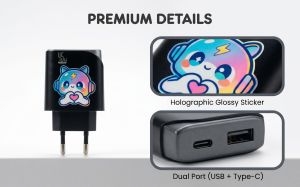
【EU Plug】UGREEN 45W/30W/25W/20W GaN Charger PD3.0 PPS QC3.0 USB C Fast Charger For iPhone 17 16 15 ProMax Samsung S25 iPad Air

Rapoo | Rapoo MT760L/MT760M Multi-mode Rechargeable Wireless Mouse Ergonomic 4000 DPI Support Up to 4 Devices Bluetooth Mouse

CHG | Moisture-Proof Dustproof Continuous Drying Storage Box
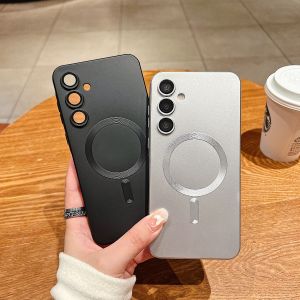
szhaiyu | Lens Protect For Magsafe Phone Case Samsung Galaxy A57 A56 A55 A54 A37 A36 A35 A34 A26 A25 A24 A17 A16 A15 A14 A07 A06 A05 Cover

1-5PCS Soft Full Cover Hydrogel Film For Xiaomi Poco X6 Pro F5 5G X5 5G M6Pro Xiaomi Poco C65 X6 F6 M6 Screen Protector Clear HD
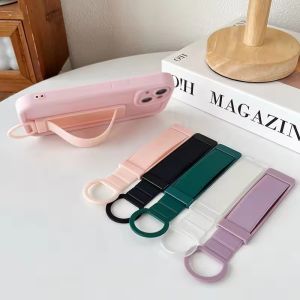
Universal Wrist Band Cell Phone Bracket Portable Finger Grip Mobile Phone Holder Sticked Socket Stand For Xiaomi IPhone 16 17
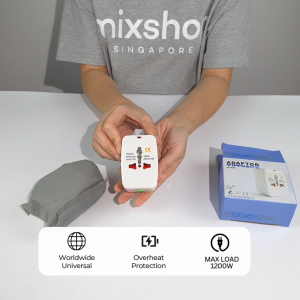
mixshop Worldwide Universal Travel Adapter/Type C/USB/US UK EU AU Adapter

SG stock Colour 16cm/6-inch Ring Fill Light clamp Desktop Adjustable 1m 2.1m Tripod Stand Dimmable Mobile Phone Selfie

Uhada | Elegant Leather Watch Band for Women