Yilin | RGBIC LED Strip Immersive Computer Backlight PC/TV Monitor Screen Color Sync Light Strips Smart Software Control Ambient Lamps
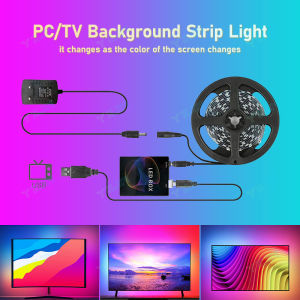
Warm Prompt: If the product does not work properly, please make sure to contact us first, instead of opening a dispute or writing negative feedback directly, we will definitely help you solve the problem!(↓If you encounter any problems, please click on the picture to enter the YILIN Official Storeand contact customer service for help!!!↓)RGBIC LED Strip Immersive Computer Backlight PC/TV Monitor Screen Color Sync Light Strips Smart Software Control Ambient LampsNote:Do not work for PS4/5 or other game box~it only works on Android TV, Sam sung/L G/ TC L/ TOSHI BA/ HISEN SE, Those TV are NOT belong to Android Operating System.If you want to use it with non-Android TV, you must connect an extra Android TV box to your TV first, then can be used with our product.About software:FOR PC:Windows: Ambibox or Prismatik (https://drive.google.com/file/d/1aR1z_wcBfGw2ixTBYI01CshD_q8RMxxc/view?usp=sharing) or:(https://drive.google.com/drive/folders/1AFZ0dOTx-KgijjCOf6T0NR26M1eVFidx?usp=sharing)Raspberry Pi: Openelec/libreelec+Hyperion (https://www.youtube.com/watch?v=kBDaC_c6VfI)Linux PC: use PrismatikFOR TV:Android TV/TV boxs (Android 5.1 to 9.0 version): Ambient light Application for Android (Paid software)(Xiaomi is not recommended!!!!)(Or, the video signal of the computer is output to TV, TV as monitor.)(Or, install or run Openelec/libreelec+Hyperion on your TV/TV box.)Important !!The analog TV signal is not processed by the Android OS level, so the backlight application will not work with regular TV channels. The backlight works only with Android OS applications that do not use protected content. 4K performance depends only on your hardware.Unfortunately, programs such as YouTube and Netflix use protected content (DRM), this application has no ability to work with them.Warm Prompt: The setup of this item is a bit complicated, if the product does not work properly, please make sure to contact us first, instead of opening a dispute or writing negative feedback directly, we will definitely help you solve the problem!USE IT ON COMPUTER:Connect everything well and set up capture area in Ambibox first. If everything is ok after testing, then you can stick the strip on the monitor and cut LED strip by demand.Install and Ambibox set up guide:https://youtu.be/UAUyKvEt7aEStep 1: Install LED light on your monitorStep 2: Setting up the Ambibox Capture Software2.1. Ambibox software(Shareware);Download link:https://drive.google.com/file/d/1aR1z_wcBfGw2ixTBYI01CshD_q8RMxxc/view?usp=sharing2.2. Run the Ambibox software, when installing, it recommends to use PlayClaw, I wouldn't recommend to using it.2.3. Select device and set this as "Adalight", under menu of "Intelligent backlight display", select the Port and the COM Port that your device has been detected. If select correctly, you can see Device Status: Connected, also down the bottom left it will say Adalight: connected. If cannot find USB driver/COM port, please download USB CH340: https://drive.google.com/file/d/1GS5FrjN5620I_RKJMOe5IAGNSqlke9jC/view?usp=sharing2.4. Once you setted up, you can select the "Wizard capture zones" which will automatically generate all capture zones for you.PRO TIPS: if you find your colours are washing out or seem very white rather than colourful, adjust your gamma settings, if you getting a white backlight on a pure black screen, increase the size of sample zones, It will take a bit of fine tuning but worth it!USE IT ON Android TV:Operational procedures:Step 1: Install LED strip light on your TVStep 2: Purchasing a Paid Software on Google Play: Ambient light http://ambilight. tender-complex.ru/en/software_setup/Needs: Android TV/TV boxs(Android 5. 1/6/7/8/9): 'Ambient light Application for Android' Paid software)Note: Please confirm if your TV/TV boxcan run this app before purchasing.(Or, the video signal of the computer is output to TV, TV as monitor.)(Or, install or run Openelec/libreelec+Hyperion on your TV/TV box.)The analog TV signal is not processed by the Android OS level, so the backlight application will not work with regular TV channels. The backlight works only with Android OS applications that do not use protected content. 4K performance depends only on your hardware.Specification:Voltage: DC5VLED Type: SMD5050IC Model: WS2812BLED Quantity: 30/60 LEDS/mWaterproof: IP30 not waterproofSupport:Windows, Android, Mac OS, Linux, Raspberry piLight color: RGB-IC (display multiple colors at the same time)Control method: APP/physical buttonsSize:1M For 17-22inch, 2M For 22-32inch3M For 32-43inch, 4M For 43-60inch5M For 60-80inch

Prime Supply_Play Life
Review
You May Also Like

【SG】Fruit-shaped Fragrance Scented Gel Air Fresheners Aroma Deodorant Creative Fruits Air Freshener for Room/Toilet/Car
LANTU 120cm Remote Control Dimmable White LED Ceiling Light Modern Square Fixture for Living Room Bedroom Lighting Fixture
SAINAHEPAN | Waterproof Recessed Downlight for Indoor Use

JIASHIDA | French Cream Style Romantic Flower Chandelier
1/10pcs Solar LED Lights Outdoor Stainless Steel Stick Lights Solar Powered Landscape Lighting Roads Gardens Courtyards Lights
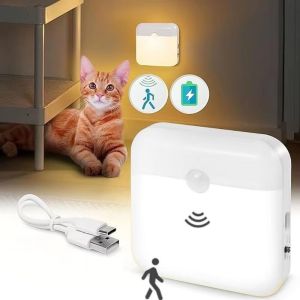
UMBRAULI Wireless LED Night Light Rechargeable Square Wall Lamp Home Accessories Human Induction Motion Sensor Light For Bedroom
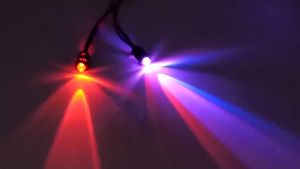
DC3V-24V Pre-Wired LED Bulb 10/20PCS Transparent LED Bead with Base Indicator Light for DIY Ship Model Toy Car Hobby Decoration
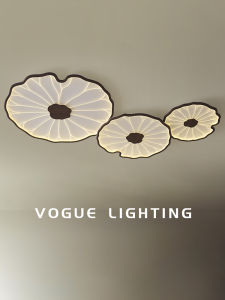
WOGU | Zen Chinese Style Ceiling Light Wood Texture Design

Crochet Sunflower Rose & Tulip Eternal Flower Bouquet – Handmade Teacher’s Day Gift Everlasting Flowers Table Decor
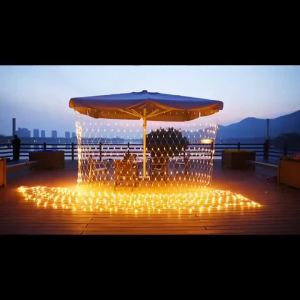
Led Net Mesh String Lights 8 Modes 220V Street Garlands Christmas Decorations Outdoor New Year Wedding Party Garden Bush Decor
LED Touch Square Quantum Night Light Dimmable Type-C Eye Care Night Lamp Bedroom Bedside Study Reading Ambient Gift Home Decor