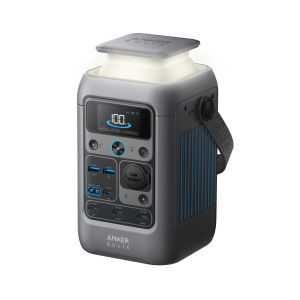
Anker Powerbank SOLIX C300 DC 90000mAh/288Wh Power Bank 300W Outdoor Generator 7-Ports Portable Power Station A1726
Anker Official By Tech House1. 02-K2 Changi Airport T2 (Near T2 Departure Hall Roll 1)2. B2-K3 Changi Airport T3 (In front of Kopitiam)3. 02-K2 Novena Square4. 02-439 Suntec City (Tower 5)5. 01-23 Chinatown Point6. 02-38A Junction 87. 04-03 Tampines Mall8. B1-44 Westgate9. B1 Push Cart 21 Jurong Point (Near Starhub)10. 03-21/22 Jurong Point JP211. 03-K02 Causeway Point12. 03-18 Compass One13. 02-216A VivoCity14. 04-K1/K2 Serangoon NEX15. 02-K4 Parkway Parade16. Takashimaya Level 3 Mens Department(Bulk purchase is available, please chat with us)Model: A1726Cell Capacity: 288Wh / 90,000mAhSolar Panel Input: 11-28V=8.2A Max (100W Max)USB-C2 Input: 9V=3A / 15V=3A / 20V=5A / 28V=5A (140W Max)USB-C3 Input: 9V=3A / 15V=3A / 20V=5A / 28V=5A (140W Max)Car Charger Output: 12V~10AUSB-A Output: 5V=2.4A (12W)USB-C1 Output: 5V=3A / 9V=3A / 15V=3A / 20V=5A (100W Max)USB-C2 Output: 5V=3A / 9V=3A / 15V=3A / 20V=5A / 28V=5A (140W Max)USB-C3 Output: 5V=3A / 9V=3A / 15V=3A / 20V=5A / 28V=5A (140W Max)USB-C4 Output: 5V=3A (15W Max)USB-A + USB-C4 Output: 5V~4A (20W)Total Output: 300WDischarging Temperature: -20°C–40°C / -4°F–104°FCharging Temperature: 0°C–40°C / 32°F–104°FDimension: 12.4×12.0×20.0 cm / 4.88×4.72×7.87 inNet Weight: 2.8 kg / 6.17 lbBefore using C300 DC for the first time, recharge it to activate the powerstation.Ways to Activate:(1) Charge via USB-C: Use an 18W or higher wall charger. (Only the USB-C2 and USB-C3 ports can be used to activate)(2) Charge via MPPT: Use a solar panel with output between 11-28V.Note:- Recommend to use the included 140W USB-C to USB-C charging cable and your own cell phone charger to activate.- Use any USB-C PD charger with 18W or higher output. For full-speed charging, two 140W (280W total) charging ports are required.- Only use 11-28V solar panels with an XT60 connector. It is incompatible with Anker SOLIX PS30 (or other 5V~3A USB-C panels), PS200, PS400. We recommend 100W or 60W Anker Solar Panels. Warning: Anker Panels over 100W will cause a device malfunction.- When powered on, press the main power button to turn the screen on or off.- The screen will automatically turn off after 30 seconds of lighting up. The auto-off time can be set in the Anker app.- The power station will power off automatically if the output buttons are turned off and no power loads aredetected for 2 hours. The standby duration can be set in the Anker app. We recommend not setting this to "never,"so that the product can shut down on its own and save power in a long-term unused state.

iShop
Review

You May Also Like
【LOCAL STOCK-Deliver in 2-3 days】P15 Mini Selfie Stick Mini Extendable Phone Grip Tripod With Bluetooth Remote Shooting Vlog Video,3In1 Portable Telescopic multifunction

Magnetic New Case Lens Film Heat Dissipation Ultra-thin Anti-drop Phone Case

SUOYIN | Ice-cooling Magnetic Thin Phone Case Full Camera Protection Anti-fall Matte Feel Kickstand
LiItoKala Lii-CH4 1.5V AA AAA Lithium Rechargeable Battery Charger High Capacity 2600mAh 2800mAh for Digital Camera Mobile Phone
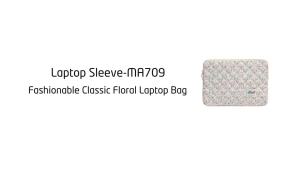
Cute Floral Quilted Laptop Sleeve 14/16 Inch High-Quality Protective Laptop Case Portable Laptop Bag for Lenovo/Acer/Dell

Peak Design Everyday Camera Backpack Zip 15L
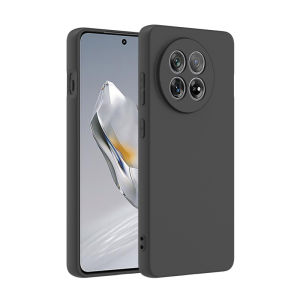
For OnePlus 13R Case Matte Soft Silicone Back Cover For OnePlus13R 5G Phone Case

WEIDONGFANG | Magnetic Cable Organizer Earphone Winder Anti-Tangle Portable

IKEA SKÅDIS Pegboard | Universal Controller Holder | PS Xbox Switch | by 3DPSolver

Ulanzi TA10 3-Section Magic Arm Handle Grip Camera Mount

Veelax Redmi Pad SE Case - Military Grade Magnetic Smart Cover with Pencil Holder Compatible XIAOMI Pad 6/6 Pro