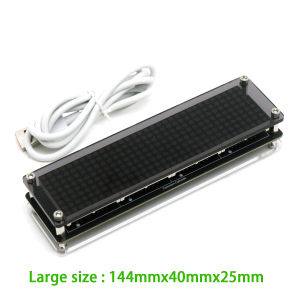
ESP8266 WIFI Clock W Second Dot Matrix Clock Wireless Network Timing LED Digital Display TIME 12/24-hour Adjustable Brightness
WiFi Dot Matrix Clock with ESP8266 Network Time SyncAuto Time Calibration • Adjustable Brightness • Multi-Color OptionsBefore making purchase, please refer to the advertisement for instructions on how to connect to the WiFi video and the instruction manualKey SpecificationsFeatureLarge ModelSmall ModelDot Matrix ModuleF3 (1088AS 32×32mm)F19 (788AS 20×20mm)Dimensions144×40×25mm96×26×27mmPixel ColorsRed / Green / Blue / White (selectable)Power SupplyUSB Type-C 5V DCTime Format12-hour / 24-hour (auto-switching)Brightness10-level adjustable (day/night modes)Core TechnologiesNetwork Time Protocol (NTP): Automatic time sync via WiFi (ESP8266 chipset)High-Visibility Display: 0.8-1.2mm pixel pitch for crisp readabilitySmart Operation:✓ Self-reconnects after power outage✓ Energy-saving dimming schedulePackage ContentsWiFi Dot Matrix Clock ×1USB Type-C Cable ×1LED matrix clock manual The power supply voltage required for this clock is 5V. It can be powered by using the provided USB cable and plugging it into the phone charger, computer USB interface, TV USB port, power bank, etc. If the display is abnormal or unstable, it may be due to insufficient power supply. Please replace the power supply.After powering on, searching for the WIFI signal with your phone will find a signal starting with MatrixClock. Connect it, then open a browser, enter the IP address in the address bar: 10.10.10.1, and confirm to open the configuration page, as shown in the following figure:After the configuration is completed and the clock restarts, WI-FI will be displayed, indicating that a WIFI connection is in progress. If the connection fails, Err will be displayed!, We need to reconfigure and check if the WIFI name and password are correct. If successful, it will display OK!. This clock is equipped with an RTC clock chip and can work without networking. However, when the time is incorrect, it needs to be connected to the network for time correction. After correction, it can be disconnected from the network. A clock that is not connected to the network will have a certain degree of error like a regular clock. It is best to always connect to the network and keep it synchronized with the network time, without any errors. The clock is equipped with a gravity sensing switch, and the display will flip along with the clock.

GlobalTechMart
Review

You May Also Like

7 Inch Wireless Carplay Android Auto Car Radio For Toyota RAV4 2006-2012 BT IPS GPS Navigation WIFI RDS FM Car Multimedia Stereo

4x4 Pickup Truck Backup Camera with Fisheye Lens & Adjustable Guidelines - Color Night Vision for Toyota Hilux for GMC
HD Rear View Backup Camera AHD or CVBS License Plate Fits Honda Odyssey 2009-2013 100K+ Similar Items Sold
HAOLIDE 12V LED Motorcycle Fog Spot Lights Headlight Driving Lamp Dual Color Strobe Switch off-road use for R1200GS F800GS IP68

3in Recorder Mini 4K Dashcam GPS WlFl Front Optional 2.5K Rear 24H Parking Camera ADAS DashCam Sony Chip Dual Lens Night Vision

Elastic Trunk Cargo Storage Net Heavy Duty Back Seat Storage Mesh Bag Shock Fixing Organizer Stop Luggage Rolling Vehicle

longrunl | Fully Synthetic SN 5W40 Engine Oil 4L

KEVANLY | 2x 1157 LED Brake Lights Bay15d P21/5W LED Stoplight 33SMD Motorcycle Brake Light Signal Lamp DRL LED Car Driving Lights 12V

7Pcs Clear Divided Hardware Storage Box Kit

YOULE | Temperature-Resistant Waterproof Fire-Retardant Insulating Electrical Tape

Oxygen Sensor 226A0-5M301 for Nissan Almera Tino 226A0-AX000 0258005276 0258005307