


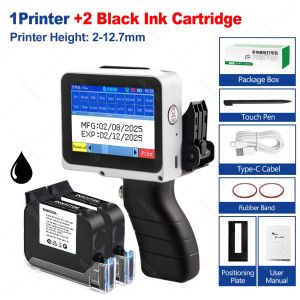
12.7mm Mini Portable Inkjet Printer with Grips 28 Languages Coding Machine for Plastic Text Label Batch Number Logo Date Print
Packing:1. One machine without ink cartridges2. One machines +1 black ink cartridge3. One machines +2 black ink cartridgeDescriptionNon-encrypted: Local purchase of ink cartridges is more convenient.Supports more than 25 languages: Meets the needs of a diverse global customer base.Built-in encoder: More stable and efficient.Embedded intelligent operating system: Easy to operate and user-friendly.Removable handle design meets the needs of different scenarios, is portable and stylish, and follows ergonomic principlesFeatureThis device comes in color: whiteThe handle of this device is detachableThe machine is not encrypted, You can also buy cartridges locally.Printing height: 2-12.7mmPrinting area: 1-3 linesSystem languages: 25+ languagesPrint Resolution: 600DPIPrint content: date, time, QR code, barcode, serial number, etc.Processor: 4 coresTouch screen: 2.8-inchPrinting: graphics, various signs, pictures, patterns. Graphics can be imported via Type-CNet weight: 0.6kgCartridge Type: Fast Drying Solvent InkInk Color: Black(optional)Storage: 1000 messagesPrinting speed: 50-80 m/minBattery life: 10 hours continuous printingQ&A(Questions You Concern Most)1. How to better extend the life of the printer?A: Before installing and removing ink cartridges, be sure to turn off the printer.2. How to better protect the ink cartridge nozzle?A:①When not using ink cartridges, please close the protective cover in time.②Dip a soft paper towel with a small amount of alcohol before using, and then gently wipe the nozzle in one direction.3. Why does the printer screen not work?A: When you find that the screen of the printer is not working, please calibrate the screen of the printer.4.Can the printer print on the bottle?A: Yes, we will provide you with a positioning plate for free. Please consult customer service for specific steps.5. What should I do if the printer cannot print?A:①Check whether the rubber ring on the left side of the printer is off (not in the groove).②Check if there the ink cartridge is installed properly.③Switch the nozzle of the printer in the settings.④After turning off the printer, reinstall the ink cartridge.⑤If you have completed all the above operations and the machine still cannot operate normally, please contact customer service in time.6. The printer can work, but the printing effect is not clear, what should I do?A:①Check whether the ink cartridge nozzle is clean and dry, and wipe the nozzle carefully with a clean soft tissue.②Take out the ink cartridge when the printer is off, shake the cartridge several times, and stick a clean tissue on thesurface of the nozzle to divert the ink.(Ask customer service for operation videos)③Switch the nozzle of the printer in the settings.④If you have completed all the above operations and the machine still cannot operate normally, please contact customer service in time.7. What should I do when there is a printer phenomenon of wire drawing?A:①The ink cartridge is quick-drying. When there is a phenomenon of wire drawing, please wipe the nozzle carefully with a clean soft tissue and switch the nozzle of the printer.②When not using the ink cartridge, please install the cover in time8. Can the printer be charged?A: Yes.①Please, use our special charger to charge the printer.②When the printer is stored for a long time and not in use, it is recommended to charge and discharge it every three months safely.

Global Merch Park
Review

You May Also Like
Dual-Use A4 Thermal Printer Available in Black & White Wireless Bluetooth for Tattoos & Documents

eSun eTPU-95A 1.75mm 1KG 3D Printer Filament TPU 95A Flexible Printing Material FDM Plastic eTPU Flex

Bambu Lab A1 3D Printer Support Multi-Color 3D Printing High Speed & Precision Full-Auto Calibration & Active Flow Rate Compensation
MT53 Mini Color Photo Printer Portable Bluetooth Mobile Pocket Printing Handheld Thermal Machine For Take A Photo Print It

eSun ePLA-LW 1.75mm 1KG 3D Printer Filament Light Weight PLA Printing Material FDM Plastic Plane Model Drone LW ePLA

Phomemo T02 Bluetooth Portable Thermal Label PrinterGreat For PhotoNotesDIY StickerGiftPrint pod

NEW HP Color LaserJetPro MFP 3303sdw -Print copy scan and automatic Duplex printing ***Free $50 eVouchers *** mfp 3303sdw

NIIMBOT Label Printer B1 20-50mm Inkless Wireless Bluetooth Direct Thermal Sticker Price Tag Maker Labelling Machine Labeller for Home and Office

Phomemo M200 Bluetooth Thermal Label PrinterSupport 20-80mm Print WidthGreat For BarcodePrice TagSticker

Bluetooth Thermal Printer Mini Portable Mobile Notes Printer Pocket photo Printer
Eyoyo | Eyoyo Mini Barcode Scanner USB Wired/Bluetooth/ 2.4G Wireless 1D 2D Scanner QR PDF417 EAN13 Data Matrix Bar Code Reader











