


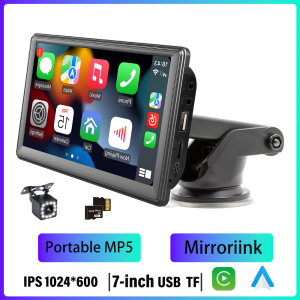
BQCC | BQCC 7inch Portable Car Player Mirrorlink BT Wireless CarPlay Android Auto GPS Navigation Rear View Camera
BQCC 7inch Portable Car Mirrorlink BT CarPlay Android Auto GPS Navigation Rear View CameraWelcome to my store ! Have a good shopping time !?Loving life, loving shopping.100% brand new and high quality.Why choose BQCC?1. Fast DeliveryAfter your payment is verified, our local European and American stores will ship from our local warehouses in the EU and the US within 24 hours. Whether you are in Europe or the US, our delivery service can meet your needs!2. Quality AssuranceAll our products go through strict quality checks before shipping. You can rest assured that the quality is top - notch!3. Caring After - sales ServiceIf your product malfunctions within one year of receipt, don't worry. Just reach out to our 24 - hour customer service team first. Once verified, we'll send you a replacement right away!4. BQCC Brand Introduction: BQCC is one of the top ten brands with more than 2 million fans. In the past ten years, we have served more than 5 million users worldwide and are deeply loved by customers. We are constantly committed to the innovation of car multimedia player radio hardware and software, aiming to bring you a unique and personalized experience. We also continue to update firmware, software, user interface and navigation map. If you encounter any product quality issues, please feel free to send an email to bqcc.cpyu@gmail.com. We will respond promptly and help you!FeaturesFreely Rotating Screen :Whether you prefer a horizontal view for seamless navigation or a vertical one for easy operation, this screen rotates effortlessly to match your needs. It adapts to your every move, making interactions smoother than ever.Wireless Convenience :Say goodbye to messy cables. It fully supports Wireless Carplay and Android Auto, allowing you to connect your phone in an instant. Access your favorite apps, music, and contacts without the hassle, keeping your focus on the road.Versatile Audio Outputs:With AUX, BT, FM transmission, and SPK four-way audio output, you can enjoy your music and audio content in any way you like. Connect to your car's speakers, headphones, or other devices – the choice is yours.Ample Storage :Boasting a 64GB memory, there's plenty of space to store your maps, music, podcasts, and more. No need to worry about running out of room; it's ready to keep up with your busy lifestyle.Premium Build :Crafted from high-grade ABS heat-resistant plastic, this Carplay is built to withstand the rigors of daily use. It stays strong even in extreme temperatures, ensuring durability and long-lasting performance.Smart Navigation :Let it guide you with precision. The intelligent in-car navigation gets you to your destination efficiently, avoiding traffic and finding the best routes. It's like having a reliable co-pilot by your side.With our 7-inch Carplay, driving becomes more enjoyable, convenient, and smart. It's designed to adapt to you, making every journey a pleasure. Get ready to redefine your in-car experience – (as you wish)!.Basic ParametersModel: B500A (Type-C 5V)Type: Portable Car MP5System: Allwinner Melis SystemSoftware Solution: F133Radio and Transmitter Frequency Range: 87.5-108.0MHz, 88.60/89.50/91.50/93.00/93.90/95.10MHzRadio and Transmitter IC: AB5602FAmplifier IC: CS8571EOutput Power: Built-in 1W SpeakerPower Input Voltage: 12V-24VOperating Voltage: 5VOperating Temperature: -10-60°CBluetooth Version: Version 5.0 (Default Name: SWL-BT)Wi-Fi Frequency: 2.4G/5G Dual Band (Only available when connecting to wireless Android Auto and wireless Apple CarPlay; no Wi-Fi Internet access)GPS Signal: Not supportedPerformance ParametersCPU: F133RAM: 1Gbit DRAMStorage: NoneDisplay Resolution: 1024x600Screen Size: 7-inch IPSDimensionsInstallation Dimensions: 65x65mmCase Dimensions: 178x108mmDevice Depth: 18mmColor Box Dimensions: 215x103x142mm (Color Box)Carton Dimensions: 543x450x308mmQuantity per Carton: 20WeightUnit Weight: 0.57kgCarton Net Weight: 11.40kgCarton Gross Weight: 12.60kgFunctional SpecificationsMobile Connectivity: Supported: √, Not Supported: ×Apple CarPlay: Wired √, Wireless √Android Auto: Wired √, Wireless √iPhone Screen Mirroring: Wired √, Wireless √Android Screen Mirroring: Wired √, Wireless √Reversing Camera: Supports CVBS backup camera (optional)Video playback warning: SupportedSteering wheel controls: Not supportedVideo output: Not supportedOffline maps: Not supportedDashcam: Supported (USB dashcam, optional)Built-in speaker: SupportedGPS navigation: Not supportedUSB port: USB 2.0TF card: SupportedType-C port: Power portReset button: Not supportedAUX port specificationsAudio output: Supported (3.5mm)Reversing video input: Supported (3.5mm)Format specificationsAudio formats: MP3/AAC/APE/OGG/M4A/RA/WAVVideo formats: H263/H264/H265/DIVX HD/AVI/FLV/MKV/MPEG/MP4/WMV9/VC/ASF/TS/QTImage formats: JPEG/PNG/BMP/GIF/TIFFLanguage specificationsEnglish, Chinese, Traditional Chinese, French, German, Arabic, Italian, Japanese, Portuguese, Russian, Spanish, Hebrew, Polish, Turkish, Czech, Korean, Greek, DutchOther ParametersFactory default password: 113266Basic functions1. Radio frequency transmission (set the original car radio's reception frequency to the selected frequency of this unit. The unit's audio signal can be amplified and output to the speakers through the original car's head unit)2. SD card, USB flash drive (audio/video/image)3. AUX audio output4. Bluetooth5. Wired and wireless mobile screen projection, wired and wireless Android Auto, wired and wireless Apple CarPlay6. Rearview camera (optional)7. Dashcam (optional)FAQ:Q1.Why the car radio can't turn on?1>Please check the Voltage of the car radio: DC 12V2>When you test this car radio, you can combine the red and yellow wires and connect them to the positive side of the power supply. The black line to the negative power supply.3>Replace the same type of insurance to test the car radio.Note: Please must use our power cables to connect our car radio, it is not possible to insert the original car plug directly into our machine.Q2.Why the car radio will show time after we turn off this?>That time clock is a function for the car radio, that can't be removed. In fact, a car radio had been turning off, saves time is more convenient for people to see,>If you didn't need this, you need to unplug the power positively and negativelyQ3.Why hasn't sound in the car radio when playing music?>1. When you are not using our original audio cable, please check if your audio cable is suitable for our camera.>2. Please check if there is any collision between the lines.>If the line is connected, there will be no sound when the speaker cable touches the speaker cable. There is also no sound when the power cord touches the speaker cable.>If the problem is still here, please use a single speaker to connect a group of audio cables to test the car radio. The four-speaker cables are connected separately to see if there is any sound.Q4.Why can't search FM?>1. No radio antenna was inserted.>2. Please check if the radio antenna is plugged in. Please insert more antennas several times to make it well contacted.>3. The signal of your location is not good. Please go to a better place to test again.>4. The radio antenna on the car is broken/has no effect; please replace the radio antenna and test it again.Q5.Why can't connect the Bluetooth to the car radio?>1. Open the phone settings interface, open the Bluetooth in the Bluetooth function, search for Bluetooth devices, and find the player's Bluetooth model to be paired; if you need a pairing code, enter 0000; if not, try 1234 or 123456.>2. Please try to use another mobile phone to test this function. All methods are correct and still cannot use Bluetooth, Please unplug the plug on the back of the player and plug it in after 3 minutes.Q6. How to update GPS Map?>1. First of all, you need to download the map update APK from our website or anywhere else, or use a mobile phone to do WIFI hotspots to download and install directly. You can also use online navigation. Then you need to copy them to the GPS ROM and set the navigation path to the navigation program by setting.Q7.Is it possible to listen to music or radio while using navigation ?!>1. Yes, it is possible to listen to the radio or music while using the navigation system. Clayton devices are using a unique technology that makes listening to music happen when you are using the navigation system.Q8.Do these units support steering wheel control ?!>1.Yes of course. For each different car model, there is a different CAN-Bus ( Optional ) that comes with the unit to match the unit to the vehicle amplifier and steering wheel control.Q9.Can we install the DVD Units ourselves?>1. We will provide all the wires for the navigation, Power wire (Plug and play), RCA wires (with 7 ports), Reversing video input wire & wifi & Bluetooth antenna, GPS antenna, two USB wires>2. It is preferred that the installation be done by a professional person. We are not responsible for the damages that might occur to the dashboard of the car while installing the device. So it is better that a professional person installs the unit on the cars.

Prime Supply_Play Life
Review

You May Also Like

(Local SG Stock) HONDA VEZEL JAZZ FIT CITY FREED Shuttle HRV GRACE Ballade AIR FILTER SET (CABIN and ENGINE)

29650-2U500 296502U500 NEW Nitrogen Oxygen Nox Sensor For Hyundai Kia

TRANSPEED TF-80N TF80 Automatic Transmission Oil Filter For FORD MONDEO DIESEL 6SPD 59710SN 197944-TR

ZHENGYU | Rainproof Windproof Waterproof Mens Motorcycle Rain Suit for Delivery Riders

For 2018-2023 Jeep Wrangler JL Rear Cargo Storage Rack

Upper Radiator Coolant Filler Neck Upgraded Aluminium Engine Radiator Outlet Flange Waterpipe Fit for Nissan Teana Altima 2007-2012 Maxima 215019-HA0A

Car Seat Hook for Mercedes-Benz E-Class C-Class B-Class GLA GLB GLC AMG Interior Accessories

【✅SG stock】360 Rotation Vacuum Suction Cup Phone Holder Foldable Magnetic Car Phone Mount for Car/Gym/Mirror

T2P Motorcycle Chain Brush Bike Bicycle Sprocket Cleaner Clean with 3-sided Bristles Multi-Purpose

Osram | OSRAM 2PCS H1 55W Car Halogen Headlight Classic 12V 3200K Auto Standard Lamp P14.5s 64150 Fog Light Bulb 1550lm 1:1 OEM Quality

MeeGoo Magnetic Phone Holder 360° Rotation Foldable Vacuum Suction Cup Car Phone Mount Portable Mini Phone Bracket











