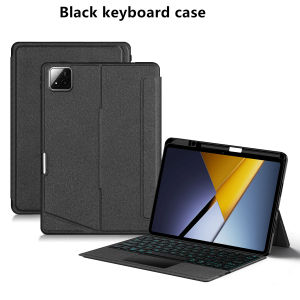
AJIUYU | TouchPad Keyboard For Xiaomi Poco Pad X1 2025 Case for XiaoMi Pad 7 8 Mipad 7 8 Pro 11.2" Tablet Smart Keyboard Cover Pen Holder
This is an detachable keyboard case, TPU soft shell protective case, which can effectively protect your tablet. The keyboard and protective case can be separated .Keyboard with Backlight and TouchPad.Bluetooth connection, with touch pad, with backlight,Horizontal and vertical support.Note 1:You need to upgrade Tablet to version 15.0 or higher to use the touchpad.Note 2:Please check in the size and detail model of your Tablet. it is very importtant ! ! !How To Verify Your Tablet Model1.Find the "Settings"--Click the "About"--Find the "Model"2.Please select the correct model number for your tablet purchase after viewing it.Applicable Models:For Xiaomi Pad 7 / 7 Pro (Mi Pad 7 / Mi Pad 7 Pro) 11.2 inch Tablet 2024.For Xiaomi Pad 8 / 8 Pro (Mi Pad 8 / Mi Pad 8 Pro) 11.2 inch Tablet 2025.For Xiaomi Poco Pad X1 11.2 inch Tablet 2025.Note: The above models of keyboard covers are universal,Attention: Please note that the Xiaomi Poco Pad X1 11.2-inch is compatible with the Xiaomi Pad 8 8Pro 11.2 and Xiaomi Pad 7 7Pro 11.2 inch models. For example, if you purchase the Xiaomi Poco Pad X1 11.2-inch model and receive a product package that says Xiaomi Pad 7/8 Pro, it is not that we shipped the wrong product, but rather because the product is compatible with these models.Attention Please:English versionkeyboard : There are English letters on the keyboard only.Multi-language versionkeyboard : English letters and carved language letters together ..【For example, if you choose French, the keyboard will display English and French letters. Please note that the same letters will not be engraved repeatedly】(Due to the difference in the number of keyboard keys compared to a normal office keyboard, some special character engraving positions are the same, which is a normal phenomenon)The keyboard Core defaults to English, and the characters engraved on the keyboard are only a Surface display.so in some countries, even if the input method is switched, the special symbols do not necessarily match the keyboard function layout(You can hold down the Shift combination).If you mind, please do not purchase!!.【1】Method to connect Bluetooth: Turn on the keyboard switch, press theFn+Cbutton for about 2-3 seconds, the blue light on the keyboard indicator will flash, and then search for your tablet's Bluetooth connection keyboard.【2】Switch language:Xiaomi tablet language settings: After connecting the keyboard - Open settings - Pen and keyboard - Physical keyboard - Set keyboard layout - Select desired language【3】Input method switching: ctrl+spacebar.(Choose the language you need)【4】Type-C charging interface,Wireless Bluetooth connection、Adjustable bracket Stand.【5】For detailed instructions, please read the user manual. If you have any questions, you can contact "Online Services" for consultation .The resolution of the machine is different, and there may be color differences in the images, which is a normal phenomenon. The actual product received shall prevail..After receiving the keyboard, fully charge it before use (approximately 4 hours) !The back bracket needs to be manually opened~~

Prime Supply_Play Life
Review

You May Also Like
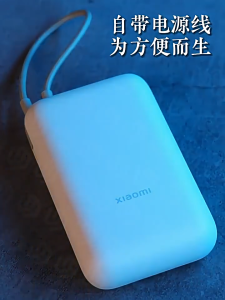
【CCC certification】10000 mAh Xiaomi wired power bank 22.5w two-way fast charging portable power bank 3c小米充电宝

High-Power Long-Range WiFi6 Wireless Bridge 16km Transmission

Color Liquid Ink Luxury Fashion Full Lens Protective Case for Samsung Galaxy S26 S25 S24 A56 A36 Plus Ultra
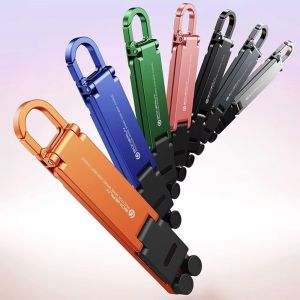
GAZELLET Ultra Lightweight Keychain Phone Holder Anti-Slip Multi-Angle Adjustable Folding Phone Stand Multiple Colors Plastic Portable Phone Holder Travel
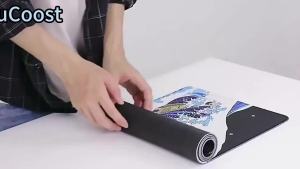
Bandai | HD printing Roronoa Zoro Luffy One Piece Gaming XXL computer Mouse Pad anime Mousepad Office Keyboard overlock Non-slip Desk Mat

X7C Screen For Honor X7C ALT-AN00 Lcd Display Touch Screen Digitizer Assembly Replacement with Frame For Honor X7C Display
![SG[In Stock] MXD 3-in-1 Magnetic Power Bank 10000mAh Wireless Portable External Battery with Stand for MagSafe PowerBank For iPhone 12-17 iwatch](https://img.lazcdn.com/g/ff/kf/Se40aab1d1f664bd68fc09c47a6765304J.png_300x300q80.png)
SG[In Stock] MXD 3-in-1 Magnetic Power Bank 10000mAh Wireless Portable External Battery with Stand for MagSafe PowerBank For iPhone 12-17 iwatch

Asina | Trendy Feminine Style iPhone Case Ultra-thin Drop-resistant
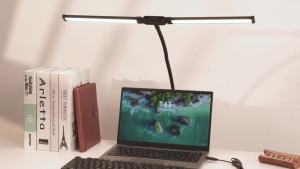
PULUZ | PULUZ Double Head LED Desk Lamp Flexible Gooseneck Tube with Clip Fill Light 10-level Adjustable Eye Protection Table Lamp Light
![SG [In Stock]3C certified genuine Remax RPP-87 20000mAh laptop power bank 65W+22.5W super fast charging](https://img.lazcdn.com/g/ff/kf/S508c28a5395741619ebca89096f3135cw.png_300x300q80.png)
SG [In Stock]3C certified genuine Remax RPP-87 20000mAh laptop power bank 65W+22.5W super fast charging

DANYCASE | For iPad 10th Generation Case For iPad Air 6 M2 2024 11in 13in M4 Pro 11 12.9 Air 4 5 10.9 iPad 10.2 7 8 9th 9.7 Mini 6 7 Cover