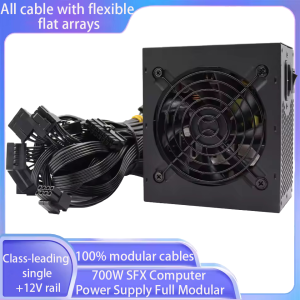
T.F.SKYWINDINTL(TFSKYWINDINTL) | 700W 90-264V Power Supply SFX Fully Modular 80 Plus PSU For PC Font Computer Office Power Supply Source For Gaming Office Home
ATX Power Supply Rear Switch: What It Actually DoesWhy can’t my ATX power supply start when I toggle the rear switch?Many users mistakenly regard the rear switch of the ATX power supply as the power-on button. In fact, its function and the correct startup method are as follows:Rear Switch Function: It only controls the connection/disconnection of AC mains power.When set to ON: The power supply is connected to the mains and enters a low-power standby state, waiting for the startup signal from the motherboard.When set to OFF: The power supply is completely disconnected from the mains, and no power is supplied to any component.Correct Startup Steps:Step 1: Flip the rear switch to ON and plug in the power cord.Step 2: Press the power button on the computer case.Step 3: The motherboard sends a startup signal to the power supply, which then starts to output power to all hardware (motherboard, CPU, etc.).Warning: Frequent toggling of the rear switch may cause power surges and damage the power supply or motherboard.ATX Power Supply DOA (Dead on Arrival) Troubleshooting GuideWhat should I do if my ATX power supply is dead on arrival and not working at all?If your ATX power supply is non-functional upon receipt, please follow these troubleshooting steps before contacting customer service:Check the Rear Switch FirstConfirm the rear AC switch is set to the ON position. The power supply cannot enter standby mode if the switch is OFF.Verify Power ConnectionPlug the power cord into a different wall outlet (avoid power strips with overload protection to rule out socket issues).Ensure the 24-pin motherboard power connector and 4/8-pin CPU power connector are fully inserted and locked.Check for Short CircuitsMake sure there are no loose screws or metal debris inside the case that could cause a short circuit (a short circuit may trigger the power supply’s protection mechanism and prevent it from starting).Provide Detailed Fault InformationIf the power supply still does not work, please record:A video showing the rear switch position, power cord connection, and the result of pressing the case power button.Photos of the power supply’s appearance and connector pins (to check for shipping damage).WarningWarning Instructions for Voltage Selector SwitchWARNING: This equipment is equipped with a 110V/220V voltage selector switch. The operation of voltage switching is directly related to the safety of the equipment and the personal safety of users. It is imperative to strictly follow the requirements of this instruction for operation; any unauthorized operation is strictly prohibited!When the equipment is connected to a 220V power supply, if the voltage selector switch is mistakenly toggled to the 110V position, the internal circuit of the equipment will bear a current far exceeding the rated value due to voltage mismatch. This will instantly cause a circuit overload, resulting in a sharp heating of components, which in turn will lead to the equipment smoking and, in severe cases, a direct explosion. This may cause major safety accidents such as fire and electric shock to the surrounding environment and personnel.To ensure the safe and stable operation of the equipment and avoid safety risks, please be sure to confirm that the input voltage of the power supply is consistent with the position of the voltage selector switch before connecting to the power supply: when connecting to a 220V power supply, the switch must be set to the 220V position; when connecting to a 110V power supply, the switch must be set to the 110V position. Please carefully check before operation and only turn on the power after confirmation.Any equipment damage, safety accidents and related losses caused by violating this warning instruction and incorrect operation of the voltage selector switch shall be borne entirely by the person who performed the unauthorized operation.700W SFX Computer Power Supply Full Modular1.Support Standard SFX form factor,High-quality PSU that's compatible with all SFX cases and suitable for mini-ITX system builds.2.100% modular cables. All cable with flexible flat arrays3.Class-leading single +12V rail. Strict 3% Voltage regulation and low ripple & noise

Prime Supply_Play Life
Review

You May Also Like

RTL8188 150Mbps Mini USB WiFi Adapter for Raspberry PiWireless Network Card Adapter WiFi Dongle for Desktop Laptop PC Windows
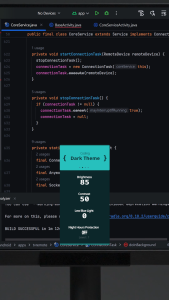
BenQ RD280UG 28" 4K+ 120Hz Programming Monitor | Coding Modes | USB-C | MoonHalo | 2000:1 | Daisy Chain

other | New For Dell XPS 15 9550 9560 9570 M5520 M5510 LCD Screen Hinge Shaft Axis L+R

【ASUS Local Warranty】2024 ASUS ProArt P16|P13 Laptop | Ryzen AI 9 HX 370 RTX4060/RTX4070 | 13"/16"inchs 4K OLED Touch Screen | ASUS ProArt Laptop | ASUS Laptop

【Lenovo Local Warranty】2024 Lenovo Legion Y9000P Gaming Laptop | Intel Core i9-14900HX RTX4060/4070 | 16"inchs 240Hz Screen | Lenovo Legion Laptop | Lenovo Y9000P

MACHINIST | MACHINIST H61 Motherboard Intel Core I5 3570 CPU LGA 1155 Processor And DDR3 8GB(2*4GB) RAM Memory (Optional Combo)

2024 Honor MagicBook Art 14 Laptop | Intel Core Ultra5 125H/Ultra7 155H Snapdragon X Elite | 14.6"inchs 3.1K OLED Touch 120Hz Screen | Honor MagicBook Laptop | Honor Laptop

ASUS | White Transparent ATX Full Tower Case

WiFi6E Intel AX210 Bluetooth 5.3 Triple Band 2.4G/5GHz/6GHz WiFi Card 802.11AX AX200 PCI Express Wireless Network Adapter PC

【Local delivery】ZOOMEDIN 14 Inch 16:10 Widescreen 1200P FHD 360-Degree Foldable Portable Monitor for Laptop PS5/4 Xbox Switch Phone PC.
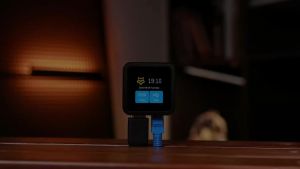
SHCHV | Luckfox PicoKVM Remote Management Tool 1920x1080 60fps HDMI-compatible Video 1.54 Inch Touch Screen TF Slot for Device Control