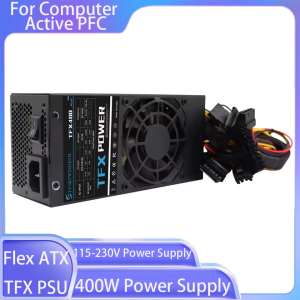
T.F.SKYWINDINTL(TFSKYWINDINTL) | 1PC 400W Power Supply Flex ATX For Computer Active PFC Computer TFX PSU For Desktop Small PC Case 115-230V Power Supply
ATX Power Supply Rear Switch: What It Actually DoesWhy can’t my ATX power supply start when I toggle the rear switch?Many users mistakenly regard the rear switch of the ATX power supply as the power-on button. In fact, its function and the correct startup method are as follows:Rear Switch Function: It only controls the connection/disconnection of AC mains power.When set to ON: The power supply is connected to the mains and enters a low-power standby state, waiting for the startup signal from the motherboard.When set to OFF: The power supply is completely disconnected from the mains, and no power is supplied to any component.Correct Startup Steps:Step 1: Flip the rear switch to ON and plug in the power cord.Step 2: Press the power button on the computer case.Step 3: The motherboard sends a startup signal to the power supply, which then starts to output power to all hardware (motherboard, CPU, etc.).Warning: Frequent toggling of the rear switch may cause power surges and damage the power supply or motherboard.ATX Power Supply DOA (Dead on Arrival) Troubleshooting GuideWhat should I do if my ATX power supply is dead on arrival and not working at all?If your ATX power supply is non-functional upon receipt, please follow these troubleshooting steps before contacting customer service:Check the Rear Switch FirstConfirm the rear AC switch is set to the ON position. The power supply cannot enter standby mode if the switch is OFF.Verify Power ConnectionPlug the power cord into a different wall outlet (avoid power strips with overload protection to rule out socket issues).Ensure the 24-pin motherboard power connector and 4/8-pin CPU power connector are fully inserted and locked.Check for Short CircuitsMake sure there are no loose screws or metal debris inside the case that could cause a short circuit (a short circuit may trigger the power supply’s protection mechanism and prevent it from starting).Provide Detailed Fault InformationIf the power supply still does not work, please record:A video showing the rear switch position, power cord connection, and the result of pressing the case power button.Photos of the power supply’s appearance and connector pins (to check for shipping damage).WarningWarning Instructions for Voltage Selector SwitchWARNING: This equipment is equipped with a 110V/220V voltage selector switch. The operation of voltage switching is directly related to the safety of the equipment and the personal safety of users. It is imperative to strictly follow the requirements of this instruction for operation; any unauthorized operation is strictly prohibited!When the equipment is connected to a 220V power supply, if the voltage selector switch is mistakenly toggled to the 110V position, the internal circuit of the equipment will bear a current far exceeding the rated value due to voltage mismatch. This will instantly cause a circuit overload, resulting in a sharp heating of components, which in turn will lead to the equipment smoking and, in severe cases, a direct explosion. This may cause major safety accidents such as fire and electric shock to the surrounding environment and personnel.To ensure the safe and stable operation of the equipment and avoid safety risks, please be sure to confirm that the input voltage of the power supply is consistent with the position of the voltage selector switch before connecting to the power supply: when connecting to a 220V power supply, the switch must be set to the 220V position; when connecting to a 110V power supply, the switch must be set to the 110V position. Please carefully check before operation and only turn on the power after confirmation.Any equipment damage, safety accidents and related losses caused by violating this warning instruction and incorrect operation of the voltage selector switch shall be borne entirely by the person who performed the unauthorized operation.SpecificationSupport standard TFX form factor400W continuous power output at 50°C operating temperature rated for 24/7 operationHigh efficiency and voltage from 90v-264vSilent running 80mm fan with 18 dBA minimumMultiple protection circuitrySingle PCI-E 6+2pin connectors support

Prime Supply_Play Life
Review

You May Also Like

Brand New XPRO 360 Airbook | 13.3 Inch Laptop | Touch Screen Laptop | 360 Flip Laptop | 12GB RAM | Win 11 | MS Office | Local Seller | Fast Shipping
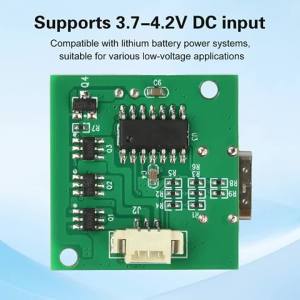
Aideepen | DC 3.7-4.2V Brushless ESC Mini Brushless Motor Speed Controller Handheld Fan Mini Heatsink Driver Board Six-Speed Adjustment
Lenovo Xiaoxin 14 360 Laptop/Lenovo Xiaoxin Laptop/Ultra7 255H 24GB 1TB SSD Notebook/14inch 360° Flip Handwritten Touch Screen Laptop/ 联想小新 14

Windows 11 Pro Intel Core i9 8950HK Mini PC 16GB DDR4 1TB SSD PC Gamer Computer Dual WIFI 6 BT5.2 4K HD Mini Gaming PC Desktop

【Lenovo Local Warranty】2024 Lenovo Legion R7000 Gaming Laptop | AMD R7-8745H/R7-7840H RTX4050/4060 | 15.6"inchs 2K 144Hz Screen | Lenovo Legion Laptop | Lenovo R7000

1300Mbps USB WiFi Adapter USB3.0 Dual Band 5G 2.4G WiFi Encryption Dog Dual 5dBi Antenna Desktop Laptop Wireless Network Adapter

Aideepen | DIY Pixel Game Console Production Parts DIY Brazing Project Game Kit 51 Single Chip Game Console with Acrylic Shell USB Cable

【Lenovo Official Warranty】Lenovo xiaoxin 14 pro / 16 pro GT AI Ultra 9 285H/Ultra 5 225H 16"/14"inchs 2.8K 120Hz OLED Screen 100% sRGB OLED 1TSSD Lenovo Xiaoxin Laptop Lenovo Laptop

【ASUS Local Warranty】2024 ASUS Tianxuan Air Gaming Laptop | AMD Ryzen AI9 HX 370/R7-8845H | 14"inchs 2.5K 165Hz OLED Screen | ASUS TUF A14 | ASUS Gaming Laptop

LANLIPU | Portable Expand Display Touch Screen

Fenvi | FENVI 1800Mbps WiFi 6 USB Adapter Dual Band 2.4G/5Ghz Wireless WiFi Receiver USB 3.0 Dongle Network Card For Laptop PC Win 10/11