


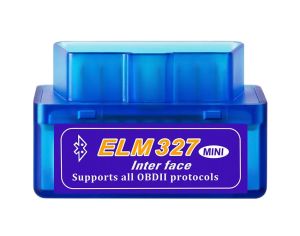
ELM327 OBD2 Scanner 16-Pin Interface V2.1 for Android Mini Code Reader Diagnostic Tool with Real-time Data Vehicle Error Codes
Product Title:New Mini ELM327 Bluetooth V2.1 OBD2 Car Diagnostic Scanner Tool for Android/Symbian (OBDII Compatible)Product Overview:The Mini ELM327 Bluetooth V2.1 is a newly developed, compact wireless diagnostic tool designed for OBDII-compliant vehicles. It allows you to read and clear engine fault codes directly from your smartphone, tablet, or PC via Bluetooth, making basic car diagnostics simple and convenient.Key Features & Benefits: Wireless & Compact: Mini size, plug-and-play via Bluetooth. No cables needed for connection to your device. Broad Compatibility: Works with most OBD2 protocol gasoline vehicles (1996 and newer in the US, 2001 and newer in Europe, and similar standards elsewhere). Comprehensive Diagnostics: Read Diagnostic Trouble Codes (DTCs), both generic and manufacturer-specific, with definitions for over 3000 codes. Clear trouble codes and turn off the Check Engine Light (MIL). Display real-time sensor data (PID). Multi-Platform Support: Includes compatible software for Android, Symbian, Windows PC, Windows Smartphone, Palm, and PDA. Wide Protocol Support: Fully supports all major OBD-II protocols: SAE J1850 PWM & VPW ISO 9141-2 ISO 14230-4 (KWP2000) ISO 15765-4 (CAN) Specifications: Model: MINI ELM327 Bluetooth Hardware Version: 1.5 Software/Firmware Version: 2.1 Connection: Bluetooth V2.1 Default Pairing PIN: 1234 or 0000 Interface: 16-pin OBD-II female connectorPackage Includes: 1 x Mini ELM327 Bluetooth V2.1 OBD2 ScannerImportant Notes & Compatibility: Software Download: The physical CD may not be included. If needed, you can download the necessary software from the following link: https://mega.nz/folder/6JZigKLa#p5E-b7-AucIAYjB2C-A2FA Vehicle Compatibility: No single OBD2 scanner works with all cars. This device supports most OBD2 gasoline cars. It is NOT compatible with diesel vehicles. If the device does not connect to your car, please try it on another newer model vehicle for testing. Requires OBD-II App: This is a hardware tool. You must install a compatible OBD2 diagnostic app (e.g., Torque Pro for Android, OBD Auto Doctor for PC, etc.) on your device to use its functions.Suggested Use:Ideal for car owners, enthusiasts, and basic DIY diagnostics to understand check engine lights, monitor vehicle health, and reset error codes after repairs. ①-Open the setting of your Android , and search wireless from ELM327 : OBDII ,then input password 1234②-1.Open your Torque---setting2.OBD2 Adapter Settings3.Connection Type---choose wireless---back4.Choose wireless DEVICE---OBDII[00: 1 D: A5: 02: 6F: 03]5. Select Quit, then reopen the software and waiting for connection PC Show:

kmind tech
Review

You May Also Like

XIWUSHOUJIANG | Waterproof Water-absorbent Portable Umbrella Bag

SEAMETAL Car Long Stem Funnel Oil Fuel Filling Tools Anti-splash Plastic Funnel Auto Accessories Motorcycle Refueling Tools

For ZONTES 368G T310 368E 368D 368M 368K 350E 350M 350D 400G 703F G1 125 155 200 150X 310X 310M 310T Motorcycle Laser Stickers
NaviFly 2din 7" Screen Wireless Carplay Car Radio Android 15 Auto Stereo For Fiat 500X 2014-2020 BT Multimedia Player Navigation

Wireless Portable Air Pump

YIMING | Blackout Sunshade Insulated Roller Shade

SEAMETAL Car seats Hooks back hanger leather+metal hook super load -bearing 20 kg Car Hooks

Car Holder Stand Rear Seat Headrest Bracket for Smartphone and tablet
Zippo USA Eagle & Flag Design Navy Blue Matte Windproof Pocket Lighter |Zippo 48189 (Lighter Without Fuel Inside)
1080P Car DVR USB ADAS Dash Cam For Android Player Car Radio DVD Navigation Head Unit Auto Audio Voice Alarm LDWS G-Shock

💎SG stock💎 Glass cleaner spray / Powerful remove water stains / Remove watermark Acid rain remover / Glass waterspot remover / Glass stain cleaner / Glass stain remover 玻璃清洁剂











