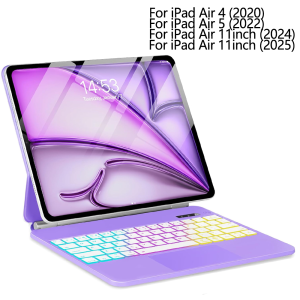
Magic Keyboard for iPad Air 11 M4 2026/ M3 2025/M2 2024 Case Keyboard for iPad Air 4th 5th Generation 10.9 Folio Smart Cover
How to input the language you want??Dear when you get the goods ,please open the keyboard power and bluetooth according to our manual or video or product description.If you don't know how to open keyboard bluetooth ,you can contact our service to get help.When you connect the keyboard with tablet ,please find your tablet" keyboard" setup .Then you need to setup your tablet "keyboard" and "physical keyboard" language to English and AZERTY or Spanish or Portuguese or other language at the same time .Only you setup your tablet well ,then when you click shift+space or ctrl+space or language switch key to switch the keyboard language ,you can input the characters you need correctly.Compatible Models:Detail model for Apple iPad Air 4 (2020) A2324 A2325 A2072 A2316Detail model for Apple iPad Air 5 (2022) A2588 A2589 A2591Detail model for Apple iPad Air 11inch (2024) A2899 A2900 A2902 A2903 A2904Detail model for Apple iPad Air 11inch (2025) A3266 A3267 A3270Product Parameters:1. Bluetooth Stand: 3.0 version2. Battery: Lithium battery 420mAh3. Stand-by time: 180 days4. Working Time: 3 hours (with backlit on),100 hours (with backlit off)5. Working Voltage: 3.3 - 4.2V6. Charging current:<225 mA7. Effective distance: 10 meters8. Backlit Light: 7 colors backlit9. Charge Port: Type-c10. Material: PU Leather11. Color: Black,Purple12. Indicator LCD: please open the keyboard power first. Then Press fn and C at the same time to open Bluetooth, keyboard with connect with ipad.13. Charging times: 2.5 hoursProduct features:1. Wireless connection without password, more convenient operation2. Ultra slim design concept, easy to carry.3. With energy saving sleep mode4. With touch pad function operation is more convenient5. Power indicator function

GlobalTechMart
You May Also Like
![Compatible with MagSafe[Metal Camera Bumper & Button] Slim Anti-Scratch Translucent Frosted Hard PC Back Shockproof Phone Case for Samsung Galaxy S26 UltraS26+S26S25 UltraS25+S24 UltraS24+S23 UltraS23+](https://img.lazcdn.com/g/ff/kf/S995499a104b94e3f9922464a961125c53.jpg_300x300q80.jpg)
Compatible with MagSafe[Metal Camera Bumper & Button] Slim Anti-Scratch Translucent Frosted Hard PC Back Shockproof Phone Case for Samsung Galaxy S26 UltraS26+S26S25 UltraS25+S24 UltraS24+S23 UltraS23+
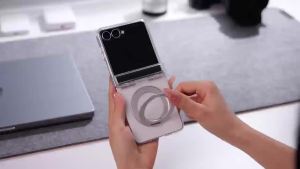
szhaiyu | For MagSafe Tempered Glass Screen Protector Case for Samsung Galaxy Z Fold 8 7 6 5 4 Fold8 Ultra Transparent Hinge Protect Cover
Cabletimes | CABLETIME 3 in 1 HDMI Switcher 4K 60Hz HDMI Splitter for HDTV Xiaomi Mi Box PS5 3 in 1 Output HDMI Switch for Laptop Macbook
Purple Gold Marble Art For iPhone 17 16 15 14 13 Pro Max Air 17e Hard tpu Bumper Cover Coque Case Blank

NexusClick 61 Keys Magnetic Gaming KeyboardHot Swappable RGB Mechanical Wired Keyboard PBT Keycaps Mini 60% Layout Pro Esports

Homepeas® Adjustable Laptop/Tablet Stand Foldable Triangular Standing Stand Portable Notebook Stand Cooling Rack

KULECHAOWAN | cute Love Deepspace Sylus chibi art Non-slip Lockedge Speed Version Game Computer Keyboard Office Table Mats Deskpad Home Decor
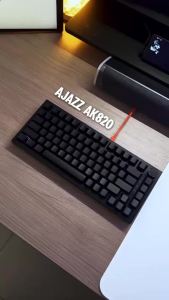
AJAZZ | Ajazz AK820 Wired Gaming Mechanical Keyboard Side Engraved Keycap Adjustment Knob Computer Office Mechanical Keyboard DIY
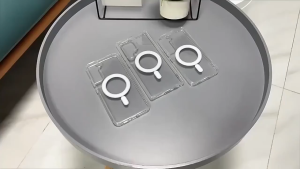
【🔥SG STOCK🔥】RICHMENTMALL Wireless Charging Case For Samsung Galaxy S26 Ultra Edge Crystal Clear Wireless Charging Magnetic Phone Case

Sanrio Hello Kitty Mini Humidifier With Nano Fine Mist ABS Material GS43
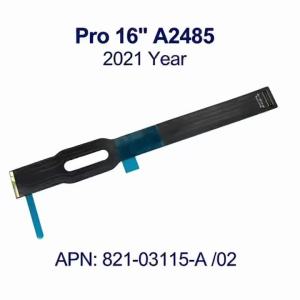
New Touchpad Cable For Macbook Pro 16” A2485 821-03115-A/02 Trackpad Flex Cable 2021 Year