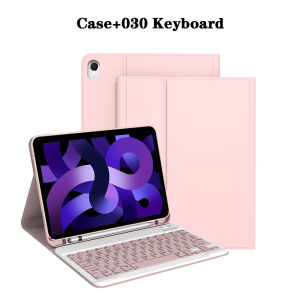
Tablet Case for iPad Air 11 inch(M2/M3/M4)Detachable Keyboard Case for iPad Air 4th/5th Gen 10.9 lnch with Case Pencil Holder
The tablet case in this link is only compatible with models:iPad Air 4th Generation 10.9-inch(2020 Model:A2072/A2316/A2324/A2325)iPad Air 5th Generation 10.9-inch(2022 Model:A2588/A2589/A2591)iPad Air 11-inch(M2)2024/(M3)2025(M2:A2902/A2903/A2904)(M3:A3266/A3267/A3270)iPad Air 11-inch (M4)2026(Model:A3459/A3460/A3463)How to verify tablet model1. Go to the back and find your specific model.2. Find "Settings" - Click "About" - Find "Model"3. Please purchase the correct compatible model case according to the tablet after viewing.Note:The digital tablet and stylus are not included in the package. The detailed description is for reference only. Please refer to the actual product for the color of the product.How to connect keyboard and mouse?1. Connect the mouse first, then the keyboard.2. Mouse: Push the switch to the "Bluetooth" icon and find the Bluetooth connection with the "mouse" in the device Bluetooth list.3. Keyboard: Push the switch in the upper right corner to "ON", press "Connect", and find the Bluetooth connection with "Keyboard" in the device Bluetooth list.4. Touchpad keyboard: Open the keyboard, press Fn+C, and then find the Bluetooth connection with "Keyboard" in the device Bluetooth list.FAQQ:What should I pay attention to when connecting the mouse for the first time?A:When the mouse is connected for the first time, you need to press the left button, the right button and the scroll wheel at the same time for about 3-5 seconds.Q: Is the scroll direction of the mouse USB connector and Bluetooth connection the same?A: No, they are different. When using the USB connector, the scroll wheel slides in the same direction as the computer mouse. Bluetooth connection is the opposite.Q: How to switch between different systems?A: Fn+Q=Android, Fn+W=Windows, Fn+E=IOS.Please note that please switch the system before connecting the tablet.Q:The bluetooth keyboard letters are messy?A: Please check the settings according to the prompts,a. Check whether the keyboard language set on the device is English.b. Disconnect the keyboard Bluetooth, click Ignore the connected device, reopen the Bluetooth keyboard, select system, Fn+E (IOS system).Note: Fn+Q=Android, Fn+W=Windows, Fn+E=IOSc. Press the L S Z buttons at the same time to reset the keyboardQ:How to configure the input method for different languages keyboard?A:Take the samsung tablet as example,open "Settings--"ystem"--"Language & input"--"Add New Keyboard". (For other systems, please set them in the system settings according to the tips of the iPad example.)Q:How does the mouse change teh scroll wheel sliding direction on the device?A: The mouse is connected, open "General" - "Trackpad & Mouse" - close "Natural Scrolling".

GlobalTechMart
Review

You May Also Like
![LEOBOG AMG65 Mechanical Keyboard [fully built] [dual customizable LCD screens] [tri-mode connectivity]](https://img.lazcdn.com/g/ff/kf/S140eefcebc194759887cdc3e367f87b7n.png_300x300q80.png)
LEOBOG AMG65 Mechanical Keyboard [fully built] [dual customizable LCD screens] [tri-mode connectivity]

Earpads For Hifiman HE6 HE6SE Headphone Soft Comfortable Earcushions Pads Foam

Roadfisher Brown Drawstring Genuine Leather Camera Bag Insert Storage Pocket Pouch For Canon Nikon Fuji Leica A7 Ricoh

10/30/50/70/110pcs Kailh Hot Swappable Shaft Base Connectors Suitable for Outemu Mechanical Keyboard Shaft DIY Connectors

Magnetic Silicone Strap for Redmi Watch 6Active/6Lite/6 5 4 Sport Two Tone Wristband Bracelet for Xiaomi Band 8 9 10 Pro Correa

Professional Live Streaming Photography Light
![[OKLIFE. SG]Wooden Monitor Stand Ergonomic Computer Stand Wooden Monitor Riser with Storage Shelves for Home Office](https://img.lazcdn.com/g/p/2374e64bdee116f2fc011546aa2d62fe.jpg_300x300q80.jpg)
[OKLIFE. SG]Wooden Monitor Stand Ergonomic Computer Stand Wooden Monitor Riser with Storage Shelves for Home Office

For iPad Pro 11 inch 2024 5th Generation For iPad 10 9 8 7 Air 5 4 3rd Generation Transparent Acrylic Bluetooth Keyboard Case

Ulanzi MT30 Flexible Tripod Magnetic Phone Holder Gorilla Octopus Stick for Smartphone Camera

MOFII Wireless Keyboard Mouse Set with USB Dongle
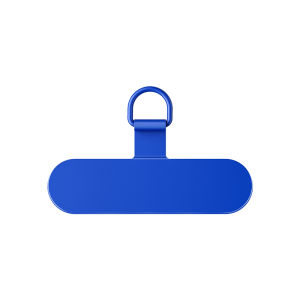
X | Durable Thin Anti-Lost Phone Lanyard Clip Stainless Steel