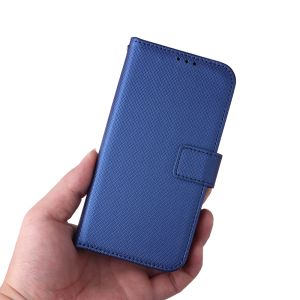
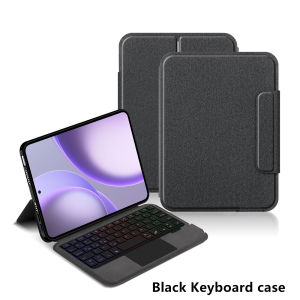
AJIUYU | Magic Keyboard Case for OPPO Pad Mini 2026 8.8 inch Tablet Stand Cover Folio for oppo pad mini OPD2515 8.8" Smart Keyboaard case
The video on the main image page is for reference onlyThis is an "all-in-one" keyboard case, TPU soft shell protective case, which can effectively protect your tablet. The keyboard and protective case cannot be separated .Keyboard with Backlight and TouchPad.Bluetooth connection, with touch pad, with backlight.Note 1:You need to upgrade Tablet to version 15.0 or higher to use the touchpad.Note 2:Please check in the size and detail model of your Tablet. it is very importtant ! ! !Note 3:After Open the Power, Please Click "Fn" and "C" 【Fn+C】Button Together to Open the Keyboard's Bluetooth. It is Very Important.How To Verify Your Tablet Model1.Find the "Settings"--Click the "About"--Find the "Model"2.Please select the correct model number for your tablet purchase after viewing it.Only For OPPO Pad Mini 8.8 inch 2026 (OPD2515)Please confirm your machine model before purchasing~Attention PleaseEnglish versionkeyboard : There are English letters on the keyboard only.Multi-language versionkeyboard : English letters and carved language letters together .【For example, if you choose Spanish, the keyboard will display English and Spanish letters. Please note that the same letters will not be engraved repeatedly】(Due to the difference in the number of keyboard keys compared to a normal office keyboard, some special character engraving positions are the same, which is a normal phenomenon)(The keyboard Core defaults to English, and the characters engraved on the keyboard are only a Surface display.so in some countries, even if the input method is switched, the special symbols do not necessarily match the keyboard function layout.If you mind, please do not purchase)Due to the keyboard material, the carved characters are dark gray.【1】Bluetooth connection method: Turn on the keyboard switch, then press and hold Fn+C for about 2-3 seconds to start Bluetooth. The indicator light flashes blue. Then turn on your machine's Bluetooth and click"Wireless Keyboard Or BT Keyboard Connection" to connect【2】After connecting Bluetooth,Take the samsung tablet as example,open Settings--ystem--Language & input--Add New Keyboard. (For other systems, please set them in the system settings according to the tips of the iPad example.)【3】Input method switching: ctrl+spacebar.(Choose the language you need)【4】Type-C charging interface,Wireless Bluetooth connection、Adjustable bracket Stand.【5】For detailed instructions, please read the user manual. If you have any questions, you can contact "Online Services" for consultation .The resolution of the machine is different, and there may be color differences in the images, which is a normal phenomenon. The actual product received shall prevail..Note: Tablet and Pencil are not included in the packaging.Note: The back bracket needs to be manually opened !!

Prime Supply_Play Life
Review

You May Also Like

3M | High Flow Under Sink Direct Water Machine
Snap & Go CCC 3C Magnetic Wireless 20000mAh PD 22.5W Fast Charging 3C Mini Portable

Game Controller Adapter For Nintendo Switch Gun Attachment
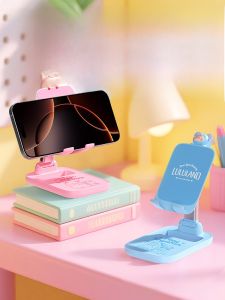
Rock | Portable Adjustable Foldable Phone & Tablet Stand
Sanwa Supply | Wireless Flat Quiet Office Fashionable Universal Mouse

NEEWER CA007 Camera Top Handle Mount with 3/8" ARRI Locating Pins for Camera Cage Video Rigs
Replacement Screws For PSP1000 Game Console Complete Set Of Screws PSP2000/3000 Universal Host Shell Motherboard Screws
AULA | Mechanical Keyboard Music Rhythm RGB Gaming Keyboard 8K Return Magnetic Switch High Performance AULA HERO 84 HE Wired Keyboard
Essager 100W Cable USB C to Type C to Lighting PD Fast Charger Data 2 in 1 Quick Charging Cord For Tablet Laptop Macbook iPhone16 15 Samsung Huawei Xiaomi Phone
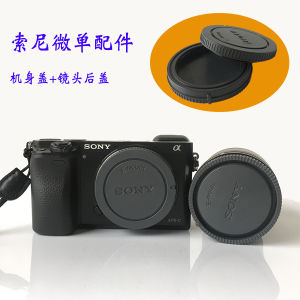
Sony Camera Lens Cap Front Cover Body Rear Cover Compatible with ZVE10 A6300 A6400 A7S3 A7C A6700 Digital Photography Accessories
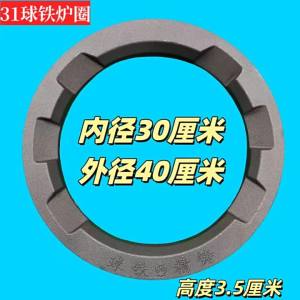
Commercial Thickened Ring