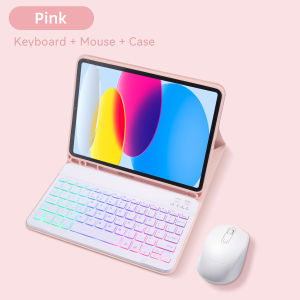
DANYCASE | Bluetooth Backlight Keyboard Case for iPad A16 Case 11th 10th Gen for iPad Air 11 M2 M3 M4 2026 Smart Cover Magnetic Case
Compatible with Multiple ModelsDesigned to fit 2024 iPad Air 11-inch (M2), this case is a versatile accessory for your device.Waterproof MaterialCrafted from TPU, this case offers waterproof protection, keeping your iPad safe from spills and splashes.Fashionable Solid PatternWith its solid pattern, this case adds a touch of style to your tech gear while providing essential protection.Includes BatteryThis case comes with a built-in battery, offering convenience and extended usage without needing extra power sources.Magnetic Smart CoverThe magnetic smart cover ensures a secure fit while allowing easy access to all buttons and ports.Note: Pens not included, Pens not included, Pens not includedNote: No French Keyboard No AZERTY KeyboardQ: The picture shows that there is a language keyboard, but there is no option, how should I choose a keyboard?A: After payment, please contact the store to replace the keyboard. The keyboards currently available are English,Russian, Korean, Spanish, Arabic, Portuguese, and Hebrew; there are no other language keyboards. (iPad mini only has English keyboard)Q: I don't know which model is right when I buy it, what should I do?A: Please consult the store and store staff will assist you to verify and tell you about the options.Q: I see a stylus on the picture, is the stylus included?A:The picture of the stylus is for display use and is not included, the pen is not included.Please verify your iPad model before purchasing, thank you!iPad Connect mouse This is the specific step: Accessibility--Touch--Assistive Touch--DevicesTyping is silent and comfortableMute buttons, Comfortable Typing, Very Suitable For Study or Office use.With built-in pencil holder1. Use time : 100 hours 2. Backlit moed : 5 hours 3. Standby time : 100 days 4. Charging time : 3-4 hours1. Internet Surfing 2. Chat with 3. Work 4. Portable1. Anti-lost pen tray 2. Easy access to pen 3. Nano silicone soft back 4. Honeycomb cooling1. Push the button to "On" and Press "Connect" The "Bluetooth" light turns on.2. Open the Bluetooth from setting and find the "Bluetooth Keyboard" then click and connect.3. Fn + A ( Android ), S ( Windows ), D ( IOS ), select the corresponding system.

Prime Supply_Play Life
Review

You May Also Like

Metal Buckle Flip With Card Slot Leather Wallet Case For Samsung Galaxy A57 A37 A17 A07 A56 A36 A26 A16 A55 A35 A15 A54 Cover
Luxury Leather Full Coverage Shockproof iPhone Case
Glitter Sparkle Slim Clear Soft Case for IPhone 17 Air 16 15 14 13 12 Pro Max Plus 17Pro 16Pro 17Air i17 Women Girl Phone Cover
500W Desktop Warm Air Heater Portable Fast Heating Lightweight Intelligent Thermostat Overheat Protection Office Household
Spigen 1 Pack Samsung Z Fold 8 Screen Protector Glas.tR EZ Fit HD Galaxy Z Fold 8 Tempered Glass

Fits LG DD14GMWE0 DD20GMWE1 Dehumidifier Add-on HEPA Air Filter Module with Filter Mount
Elecom | Ergonomic Silent Wireless Bluetooth Mouse for iPad Laptop Gaming
KAIHUI | High-End AR Enhanced Camera Lens Protector
![[3c/ccc certification] 2025 new power bank comes with four-wire 22.5W super fast charging mobile phone dedicated ultra-thin and compact portable](https://img.lazcdn.com/g/ff/kf/S117e31533cda4ff69635b2e86ade6f59m.png_300x300q80.png)
[3c/ccc certification] 2025 new power bank comes with four-wire 22.5W super fast charging mobile phone dedicated ultra-thin and compact portable
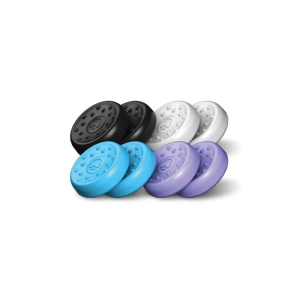
KontrolFreek No-Slip Thumbgrip 8-pack STL BPF Kit (PS & XBX)
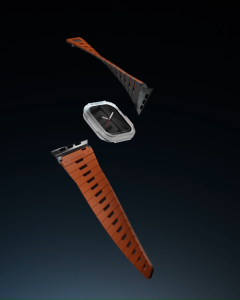
SKINARMA Gemini Magnetic Apple Watch Strap 42/41/40mm / 49/46/45/44mm