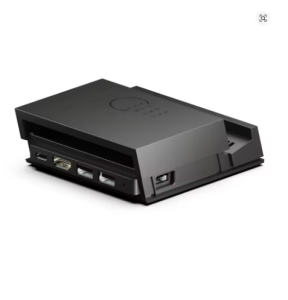
Savage Raven by Skull & Co. Jumpgate Dock USB C Hub Portable Stand Docking Station for Switch 2 and OLED Game Accessories
DescriptionReport this item or sellerPrecautions before purchaseHope you have a wonderful shopping experience!1. Power supply (preferably original power supply, as many power supplies on the market have insufficient voltage, making them unusable)2 TV (older models do not support high definition)3 If used through a mobile phone, it is directly using the kernel, please do not use the base for4 If the USB can charge but cannot cast the screen, take out the core from the base and directly plug it into the switch to see if it can cast the screen normally.5. If you need to update the firmware, please leave your email address and contact customer service. Customer service will send the updated firmwareUsed for laptops and other smart devices·Provide an additional 3 USB 3.0 interfaces·Support the highest 8K@30Hz / 4K@120HzHDMI transmission·Supports up to 100W PD charging·Compatible with Thunderbolt 3 interface·Compatible with iPad Pro·Compatible with Dex/TV out/HDMI MHL functionUsed to implement functions for Switch and Switch2:·Compatible with SWITCH 2 protection for Chu·Supports TV modes of 5V/9V/12V/15V/20V·Support the highest 4K@60Hz / 2K@120HZHDMI transmission·Provide an additional 3 USB 3.0 interfaces·Compatible with regular SWITCH and SWITCH OLED, the detachable Core Drive can be used as a portable mini baseFor Steam Deck and other gaming consoles:·Provide an additional 3 USB 3.0 interfaces·Support the highest 8K@30Hz / 4K@120HzHDMI transmission·Supports up to 100W PD charging·Support ROG Ally 30W Turbo mode·The detachable Core Drive can be used as a portable mini baseHow to install and remove SWITCH 2 from the base1. Press the top cover of the Jumpgate Dock2. The top cover will pop up and rise3. Install your Switch 2 onto the Jumpgate Dock USB-C port with a 5 ° movement angle to facilitate the insertion and removal of the Switch 2 and avoid interface damage4. When disassembling the switch, use one hand to stabilize the Jumpgate Dock, and then use the other hand to pull up the switch

Prime Supply_Play Life
You May Also Like

Pack of 2 Liion Batteries Rechargeable Pack 3.7V 800mAh for Model Toy Remote Control Cars and Accessories

Godox X3Pro Touchscreen TTL Wireless Flash Trigger
Wireless Charger Stand For iPhone 15 14 Samsung S23 S22 Ultra Fold Z Flip Galaxy Watch Active Buds Fast Charging Station Holder
YOUSIDUN | suitable for airpods5 generation protective case wireless charging airpodspro3 magnetic charging airpod5 wireless 2 mobile phone holder pro2max apple headphone protective case

360°Rotating Metal Car Holder Armored Case for IPhone 18 17 Pro Max 16 15 14 13 Pro for Magsafe Magnetic TPU+PC Hard Phone Cover

Customized Resin Translucent Sky Blue Smile Face Keycap Single
AJIUYU | Magic Keyboard For OPPO Pad 4 / 4 Pro 13.2" Magnetic Case For OnePlus Pad 3 OnePlus Pad 2 Pro 13.2 Inch Trackpad Keyboard Case

KIORAFOTO Magnetic Makeup Mirror Phone Ring Cellphone Magsafe Accessories For Apple iPhone 16 15 14 13 12 11 Pro Max Plus & More Smartphones

For Swatch X AP Royal Pop Pocket Watch MOD Parts High-Quality Stainless Steel Watch Case And Silicone Strap Conversion Kit Fit

1-4PCS Privacy Ceramic Membrane For Samsung S25 Ultra S24 S21 FE S22 5G S23 Plus S20 FE M53 M52 M31S Screen Protector Matte Film

Electronic Badge Anime E-Badge Display Pin Touch Screen LED Button Photo Frame With Video Playback Dynamic Smart Badge Fans 2026