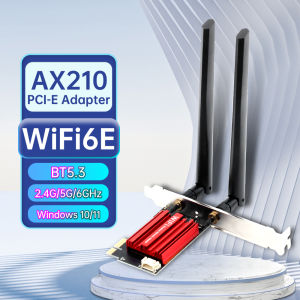
Fenvi | FENVI AX210 WiFi 6E PCI-E Adapter 5374Mbps BT5.3 Tri-Band 2.4G/5G/6Ghz 802.11AX Wireless Network Wi-Fi Card For PC Windows10/11
FENVI AX210 WiFi 6E PCI-E Adapter 5374Mbps BT5.3 Tri-Band 2.4G/5G/6Ghz 802.11AX Wireless Network Wi-Fi Card For PC Windows10/11Specifications:1. Brand: FENVI.2.Model:AX210 PCI-E Wi-Fi adapter3.Chipset: AX210 chipset.4.New Wi-Fi with BT 5.3.5.Standard IEEE: 802.11ax/ac/a/b/g/n.6.Dual Band 2.4Ghz-300Mbps/5Ghz-2400Mbps/6Ghz(160Mhz)-2400Mbps-(The router must on 160Mhz,support 802.11ax)7.Note: Speed up to 2400Mbps (The router must support 802.11ax).8.Support MU-MIMO.Driver download: You can download the driver on fenvi website or Form Intel-website(Search WIFI 6E AX210)Q1: Does it work on AMD chipset motherboard?A: Yes, support work on AMD, if not, please contact Customer Service for help.Q2: Does it support Linux system?A: Sorry, dear. currently we only provide Win 10 and Win 11 driver, no Linux service.Q3: Does it support WiFi and Bluetooth function?A: Yes, both support. But please pay attention to that the drivers for WiFi and Bluetooth are separate and you need to install two drivers.Q4: The bluetooth doesn't work, what should I do?A: Please connect the 9-pin USB cable (black) included in the package to the 9-pin USB 2.0 interface on the motherboard. The white end connects to the pcie network card adapter socket. Then install the bluetooth driver.Q5: The WiFi doesn't work, what should I do?A: ① Check whether the device wifi is recognized by the computer in the device manager. If there is a network controller with a yellow exclamation mark, please install the wifi driver. If the driver is already installed, a yellow warning will still be displayed. Please right-click, click Update, and select the driver file path to manually update.② Check whether there is an M.2 hard disk on the motherboard, which may cause a hardware function conflict. The M.2 hardware in the parallel channel needs to be unplugged.Check that the antenna connection is secure.* For some AMD motherboard computers, you may need to enter the BIOS to set some options of pcie. Set the PCIe speed to Gen3 (Auto, Gen 1, Gen 2, and Gen 3).* If your desktop computer has built-in wifi function, please turn off the built-in wifi when using it on the desktop computer.Q6: How can I get the driver?A: You can download the driver on FENVI website or From Intel website(Search WIFI 6E AX210)Q7: The motherboard has built-in wifi, but wifi 5 is a bit slow, can I buy this adapter for upgrade?A: If your PC has an open PCI-E slot, you can use it to upgrade. But when installing this adapter, you have to disable the built-in card.Q8: The WiFi speed cannot reach 2400Mbps on 6GHz/5GHz? Unrecognized or wifi speed slow down after using for a while?A: ① The Maximum wireless signal rates are the physical rates derived from IEEE Standard 802.11 specifications. Actual wireless data throughput and wireless coverage, and the number of connected devices is not guaranteed and will vary as a result of network conditions, AP limitations, and environmental factors, including building materials, obstacles, volume and density of traffic, and AP location.② You can try different things by changing different pcie slots (pcie×16 available).* Please note that 6GHz Wi-Fi is only available for Win 11 or upgrading to Win 10 Dev version; Speed up to 5GHz/6GHz-2400Mbps; (The router must support 802.11ax,160MHz)

Prime Supply_Play Life
Review

You May Also Like

EHOMEWEI | Foldable Dual 2.5K Portable Touchscreen Display

【Local Warehouse 】ZOOMEDIN 15.6/18.5/21.5/23.8 FHD Wireless & Built-in Battery Portable Monitor Professional Level E-Sports And Designer Level Color Rendering Laptop Extender Monitor for PS5/4 Xbox Switch Phone PC.
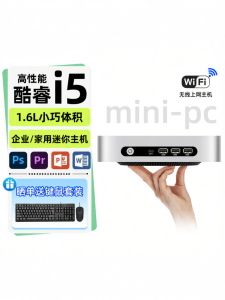
TexHoo | Compact Low Power Mini Desktop PC supports OpenCL

【Local Warehouse】ZOOMEDIN 15.6 1080P FHD Touch Screen Ultra-Slim Portable Monitor for Laptop100% SRGB External monitorDual Speaker Extender Display.USB HDMI VESA with Smart Cover for LaptopPC Phone Xbox PS4/5 Switch【Delivered Whinin 72 Hours】

diymore | 22.5W Fast Charge Power Bank Solder-Free DIY Housing Empty Power Bank Shell for 2pcs 21700 Batteries Detachable Box

GD-2 Thermal Paste 1g-30g | 7.5 W/m·K Non-Conductive | CPU GPU Laptop PC Heatsink Repair
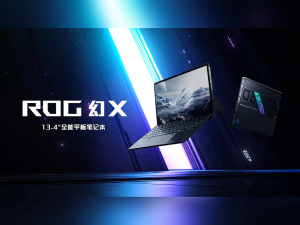
【ASUS Local Warranty】2025 ASUS ROG Flow Z13 2-in-1 Gaming Laptop | AMD Ryzen AI MAX+ 395 8060S/MAX 390 8050S | 13.4"inchs 2.5K 180Hz Touch ROG Nebula screen | Asus Zephyrus X Laptop | ASUS Laptop

【ASUS Local Warranty】2025 ASUS ROG Zephyrus G14 Air Gaming Laptop | AMD Ryzen AI 9 HX 370 RTX5080/RTX5070Ti/RTX5060 | 14"inchs 2.8K 240Hz OLED Nebula Screen | ROG Gaming Laptop | ASUS Laptop

Lenovo Thinkpad L13 Yoga Gen 2 Touchscreen i7-11th Gen 16GB RAM 512GB SSD 13.3inch FHD Screen Windows 11 Pro Microsoft Office Preloaded Refurbished Set Like New

*Local SG Seller* AOC 27" QHD Gaming Monitor (Q27G2S) IPS QHD 2K LED GAMING 155HZ HDMI 2.0 x 2 DP 1.2 | 2560 × 1440 at 155Hz – DisplayPort1.2 | ● G-Sync Compatible ● 1ms ● HDR Mode

[Preloved]💻 Dell Latitude 3390 2-in-1 Laptop | Intel Core i5 8th Gen | 8GB RAM | 256GB SSD | 13.3” FHD Touchscreen | Windows 11 Pro|A grade condition laptop 👌🔥