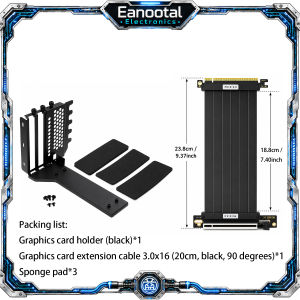
3 Slot GPU Vertical Mount Bracket Black White with Optional PCIe 3.0 4.0 x16 Riser Cable Set
Product Description: Upgrade your PC build with this PCIe x16 GPU riser cable, designed to extend the connection between your motherboard PCIe slot and graphics card. It is ideal for vertical GPU mounting, compact ITX cases, open-frame chassis, test benches, and custom gaming PC builds. This listing includes PCIe 3.0 x16 and PCIe 4.0 x16 options. PCIe 3.0 x16 is a stable and practical choice for mainstream Gen3 systems, while PCIe 4.0 x16 provides up to 2× the bandwidth of PCIe 3.0 when used with a compatible Gen4 motherboard and GPU. Please note that the actual operating speed is determined by the lowest PCIe generation supported by your motherboard, GPU, and riser cable. For full PCIe 4.0 performance, all three components must support PCIe 4.0. Whether you are building a gaming PC, workstation, open-air frame, or small form factor system, this flexible GPU extension cable helps improve installation flexibility and cable routing. Please note: 1.The PCIe4.0extension cable will notturn the PCIe 3.0 motherboard intoPCIe4.0. 2.The actual speed depends on the lowest version of the motherboard, graphics card, and extension cable. 3.If you want to run full PCIe4.0, the motherboard, graphics card, and extension cable must all support PCIe 4.0. 4.PCIe 3.0 users can use it if they buy 4.0,but the speed is stillGen3. 5.Buyerswho are not sure which generation of PCIe their computer supportsshould first check the official parameters of the motherboard and GPU. The differencebetween PCIe3.0x16andPCIe4.0x16 : Feature PCIe 3.0 x16 PCIe 4.0 x16 Transfer Rate 8 GT/s per lane 16 GT/s per lane Effective Bandwidth / Lane ~985 MB/s each direction ~1.969 GB/s each direction Total x16 Bandwidth ~15.75 GB/s each direction ~31.5 GB/s each direction Speed Difference Standard Gen3 speed Up to 2× PCIe 3.0 bandwidth Recommended System PCIe 3.0 motherboard / GPU PCIe 4.0 motherboard + PCIe 4.0 GPU Best For Mainstream gaming PCs, office PCs High-performance gaming PCs, workstation builds Compatibility Backward compatible Backward compatible Which Version Should You Choose? Your System Combination Recommended Version What to Expect Gen3 motherboard + Gen3 GPU Choose PCIe 3.0 x16 Runs at Gen3 speed Gen3 motherboard + Gen4 GPU Choose PCIe 3.0 x16 Runs at Gen3 speed Gen4 motherboard + Gen3 GPU PCIe 3.0 x16 is usually sufficient Runs at Gen3 speed Gen4 motherboard + Gen4 GPU Choose PCIe 4.0 x16 Full Gen4 performance Want more future-ready bandwidth Choose PCIe 4.0 x16 Better for newer high-performance builds The riser cable does not upgrade your motherboard or graphics card speed. The actual operating speed is determined by the lowest PCIe generation among the motherboard, GPU, and riser cable: Motherboard GPU Riser Cable Actual Speed PCIe 4.0 PCIe 4.0 PCIe 4.0 PCIe 4.0 speed PCIe 4.0 PCIe 3.0 PCIe 4.0 PCIe 3.0 speed PCIe 3.0 PCIe 4.0 PCIe 4.0 PCIe 3.0 speed PCIe 3.0 PCIe 3.0 PCIe 3.0 PCIe 3.0 speed

Prime Supply_Play Life
Review

You May Also Like

Black Pink Heart Polka Dot Phone Case for iPhone 18 17 16 15 14 13 12 11 Air Pro Max Plus Double-layer Cover

szhaiyu | 360 Rotate Ring Stand Magnetic Clear Case for Samsung Galaxy Z Flip 8 5G Soft Silicone Shockproof Full Hinge Protection Cover

Muted Plaid Texture Luxury Fashion Full Lens Protective Case for Samsung Galaxy S26 S25 S24 A56 A36 Plus Ultra

Philips TV Remote Control with Netflix Button - Support All Philips TV

Jiaxun | Thickened Stove Ignition Part for Old Table Gas Stoves Left Burner
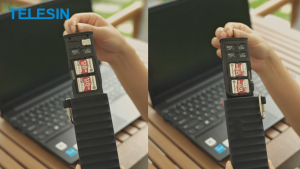
TELESIN Multifunctional Memory Card Reader

AULA | Customizable Triple-mode Wireless Mechanical Keyboard

ZHENGEGE | Swivel Metal Clamp Ultra-thin Does Not Affect Charging Durable Mobile Phone Strap

Tehaola | Scratch Resistant Ceramic Apple Watch Protection Film

szhaiyu | Elastic Wrist Strap Ring Protective Phone Case for Samsung Galaxy Z Fold 7 6 Fold7 Fold6 Shockproof Cover

Potdemiel | Navy Cone Dots For Case For iPhone 17 16 15 Pro Max TPU Anti-Scratch Outer Shell Raised Screen CaseChic