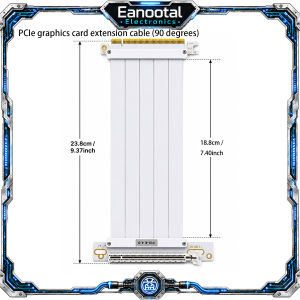
Vertical GPU Mounting Kit 2 Slot Bracket with PCIe 3.0 4.0 Riser Cable Individual Options
Product Description: Upgrade your PC build with this PCIe x16 GPU riser cable, designed to extend the connection between your motherboard PCIe slot and graphics card. It is ideal for vertical GPU mounting, compact ITX cases, open-frame chassis, test benches, and custom gaming PC builds. This listing includes PCIe 3.0 x16 and PCIe 4.0 x16 options. PCIe 3.0 x16 is a stable and practical choice for mainstream Gen3 systems, while PCIe 4.0 x16 provides up to 2× the bandwidth of PCIe 3.0 when used with a compatible Gen4 motherboard and GPU. Please note that the actual operating speed is determined by the lowest PCIe generation supported by your motherboard, GPU, and riser cable. For full PCIe 4.0 performance, all three components must support PCIe 4.0. Whether you are building a gaming PC, workstation, open-air frame, or small form factor system, this flexible GPU extension cable helps improve installation flexibility and cable routing. Please note: 1.The PCIe4.0extension cable will notturn the PCIe 3.0 motherboard intoPCIe4.0. 2.The actual speed depends on the lowest version of the motherboard, graphics card, and extension cable. 3.If you want to run full PCIe4.0, the motherboard, graphics card, and extension cable must all support PCIe 4.0. 4.PCIe 3.0 users can use it if they buy 4.0,but the speed is stillGen3. 5.Buyerswho are not sure which generation of PCIe their computer supportsshould first check the official parameters of the motherboard and GPU. The differencebetween PCIe3.0x16andPCIe4.0x16 :
 Feature
 PCIe 3.0 x16
 PCIe 4.0 x16


 Transfer Rate
 8 GT/s per lane
 16 GT/s per lane


 Effective Bandwidth / Lane
 ~985 MB/s each direction
 ~1.969 GB/s each direction


 Total x16 Bandwidth
 ~15.75 GB/s each direction
 ~31.5 GB/s each direction


 Speed Difference
 Standard Gen3 speed
 Up to 2× PCIe 3.0 bandwidth


 Recommended System
 PCIe 3.0 motherboard / GPU
 PCIe 4.0 motherboard + PCIe 4.0 GPU


 Best For
 Mainstream gaming PCs, office PCs
 High-performance gaming PCs, workstation builds


 Compatibility
 Backward compatible
 Backward compatible
Which Version Should You Choose?
 Your System Combination
 Recommended Version
 What to Expect


 Gen3 motherboard + Gen3 GPU
 Choose PCIe 3.0 x16
 Runs at Gen3 speed


 Gen3 motherboard + Gen4 GPU
 Choose PCIe 3.0 x16
 Runs at Gen3 speed


 Gen4 motherboard + Gen3 GPU
 PCIe 3.0 x16 is usually sufficient
 Runs at Gen3 speed


 Gen4 motherboard + Gen4 GPU
 Choose PCIe 4.0 x16
 Full Gen4 performance


 Want more future-ready bandwidth
 Choose PCIe 4.0 x16
 Better for newer high-performance builds
The riser cable does not upgrade your motherboard or graphics card speed. The actual operating speed is determined by the lowest PCIe generation among the motherboard, GPU, and riser cable:
 Motherboard
 GPU
 Riser Cable
 Actual Speed


 PCIe 4.0
 PCIe 4.0
 PCIe 4.0
 PCIe 4.0 speed


 PCIe 4.0
 PCIe 3.0
 PCIe 4.0
 PCIe 3.0 speed


 PCIe 3.0
 PCIe 4.0
 PCIe 4.0
 PCIe 3.0 speed


 PCIe 3.0
 PCIe 3.0
 PCIe 3.0
 PCIe 3.0 speed

Prime Supply_Play Life
You May Also Like

Dual Bluetooth 2.4Ghz Ergonomic Mouse Wireless with USB Receiver6 Buttons 3 DPI 800/1200/1600 Computer Mouse
Megnetic Milanese Loop Compatible with apple Watch series 10 9 8 7 6 5 4 SE 45mm 41mm 44mm 40mm 42mm 46mm 38mm Strap Compatible with apple watch band Ultra 2 49mm Strap
AP18C7M Laptop Battery For Acer Swift 5 SF514-54G SP513-54N SF313-52 Series 4ICP5/57/79 15.4V 55.9Wh 3634mAh
6.7 For Samsung Galaxy A06 4G LCD SM-A065F SM-A065M Display Touch Screen Assembly For Samsung A06 5G LCD SM-A066B SM-A066B/DS
![[SG] Replacement Charger Compatible with Samsung Watch 8 7 Ultra 6 Classic FE 5 Pro 4 3 Active 1 2 Classic Galaxy](https://img.lazcdn.com/g/ff/kf/S575c425b4ffb413494c95e43680a8874m.jpg_300x300q80.jpg)
[SG] Replacement Charger Compatible with Samsung Watch 8 7 Ultra 6 Classic FE 5 Pro 4 3 Active 1 2 Classic Galaxy
RICHMENT For OPPO Find N6 Case Luxury Plating Magnetic Protective Back Cover case for Find N6 Full Cover Shell
1 Pcs 9H Tempered Glass Screen Protector For Samsung Galaxy Tab A11 2025 A9 8.7 Inch SM-X133 X135 SM-X110 X115 Protective Film
ZXKE True Fiber Case For HUAWEI Mate XT Xts Embedded Iron Sheet Magnetic Car Support Magsafe 600D Aramid Fiber Shell
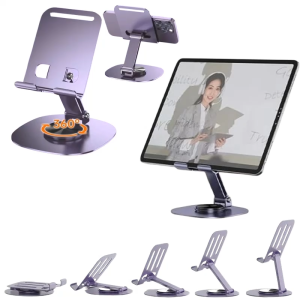
360 ° Rotatable Metal Phone Holder Foldable Tablet Stand Adjustable Mobile Phone Holder Desktop Lazy Phone Tablet Holder
SUPCASE UBMag XT for Samsung Galaxy S25 Ultra Case with Camera Cover Compatible with Wireless Charge Heavy Duty Rugged Case with Built in Kickstand
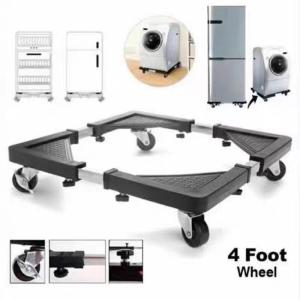
Adjustable Rolling Washing Machine Base Stand