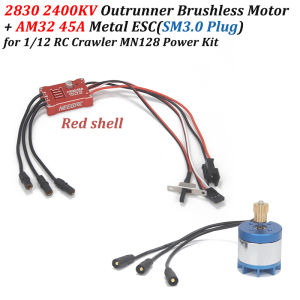
2830 2400KV Brushless Motor AM32 45A Metal ESC SM3.0/T Plug USB/Type-C Adapter for 1/12 RC Crawler MN128 MN86 Upgrade Power Kit
2830 2400KV Brushless Motor AM32 45A Metal ESC SM3.0/T Plug USB/Type-C Adapter for 1/12 RC Crawler MN128 MN86 Upgrade Power Kit Applicable vehicle models: MN128 MN86 380 390 Brushed Motor Car Upgrade KitSpecification:2830 2400KV Motor Specification:Using voltage range: 7.4-12.6VRated voltage: 7.4[VDC]Lipo:2-3SNo-load current: 500 [mA] maxDirection: CCW/CW (viewed from the output shaft end)Insulation grade: Class BBanana Plug:3.5mmNumber of gear teeth: 14TSpecification:AM32 45A ESC Specification:Voltage:7.4-11.1VLipo:2-3SBEC Output:5V/2ABatteryConnector:SM3.0 Plug/T Plug (Optional)Continuous/Peak Current:45A/260AMotor Type:2322/2204/2205Outer rotor motorsCompatible Vehicles:1:18/1:12 Climbing/Off Road VehicleDimensions: 32.525.59.5mmCase Material: CNC Metal CaseUSBLinkFor AM32/BL32, connects the ESC to a computer for configuration or firmware upgrade.Portable and easy to use, simply connect the ESC signal plug, connect the USB Type-C cable to a computer, and install the VCP driver.AM32 firmware is specifically designed for AT32 ARM processors, for controlling brushless motors (BLDC). The firmware is designed to be safe, fast, with a smooth and rapid start, and linear throttle. It is suitable for various vehicle types and flight controllers.Specification:Item Name: AM32 ESC Param Converter USB LinkProduct size: 41.50.8cmPackage size: 4.8831cmQuantity: 1 piecePackage include:1* 2830 2400KV Motor1* AM32 45A ESC1* Param Adapter(Optional)Specifications:Item Name: AM32 ESC Param ConverterInterface:Type-CProduct size: 2.51.130.78cmPackage size: 4.8831cmParameter adjustment instructions1. The 3P plug of the ESC, the white signal line corresponds to S, and the black BEC negative line corresponds to G, plug into the S and G of the parameter adjuster.2. Plug the parameter adjuster into the USB port of the computer (win10 is recommended), and plug in the battery of the ESC.3. In the FreelyRC product manual and tool library, download the parameter adjuster driver (win10 does not require installation), and the parameter adjustment software package Esc_Config_Tool_1.82 (unzip it without installation).4. After ensuring that the parameter adjuster driver is normal (the CH340 serial port device is recognized in the device manager), open the unzipped parameter adjustment software folder and run "SerialPortConnector.exe"5. Operate the software in the order shown belowIn step 2, select the COM number corresponding to the adjuster in the drop-down box.Note: This COM number is different for each computer. You need to select the COM port corresponding to the tuner device on your computer.6. Click the "Connect" button, and an "M1" button will appear in the software interface. Click "M1".7. Start parameter adjustment (example: bidirectional car, turn on FOC)8. Press Save Settings to save the settings and then unplug the ESC.Note:1.Due to the difference between different monitors,the picture may not reflect the actual color of the item. We guarantee the style is the same as shown in the pictures.2.Due to the manual measurement and different measurement methods, please allow 1-3mm deviation.make sure you do not mind before you bid.Thanks!

Prime Supply_Play Life
Review

You May Also Like

Angel Aqua Blue Maid Outfit Maid uniform COSPLAY Womens clothing Costume

TONGMUXING | Educational Magnetic Wooden Toy for Babies 1-3 Years Old

YUGUANG | 3D Floating Educational Globe Model

3Pcs/Pack Wanderer Scaramouche Kabukimono Acrylic Sitting Figure Set Anime Merch Display Standee Home Office Desk Decor Best Friend Gift

Multifunctional Pool Table Snooker Table Home Billiard Pool Table Indoor For Kids Solid Wooden Club Boy Toy 台球桌

Kids Baby Toys Early Learning Education Musical Toy Piano Playmat Larger Size 100CM+ Electronic Music Blanket Animal Instrument Play Blanket Funny Xmas Gifts Toys for Baby Boys Girls

JOOKE | Cute Bunny Plush Toy Pillow
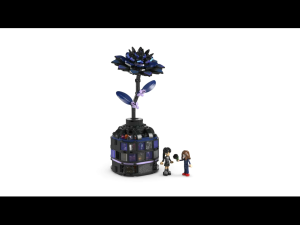
LEGO Wednesday 76784 Black Dahlia Flower (358 Pieces)
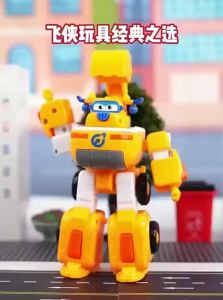
AULDEY | Super Flying Heroes Q-Style Transforming Robot Set Fire Truck Toy

BLOKEES | Saint Seiya Character Theme Assembled Boys Toy Gift

HUPINXIAN | Cute Lamb Plush Toy For Girls Sleep