


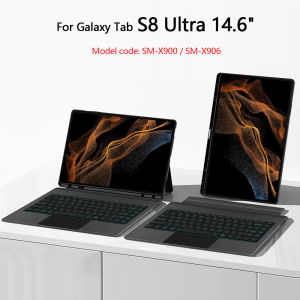
AJIUYU | TouchPad Backlight Keyboard For Samsung Galaxy Tab S8 Ultra 14.6 Inch 2022 Case SM-X900 SM-X906 Detachable Magic Keyboard Cover
This is an detachable keyboard case, TPU soft shell protective case, which can effectively protect your tablet. The keyboard and protective case can be separated .Keyboard with Backlight and TouchPad.Please confirm your tablet model before purchase.If you don't understand your machine model, you can contact usHow To Verify Your Tablet Model1.Turn iPad tablet to the back find your specific model,Par exemple: SM-****2.Find the "Settings"--Click the "About"--Find the "Model"3.Please select the correct model number for your tablet purchase after viewing it.Compatible models and codes:Only For Samsung Galaxy Tab S8 Ultra 14.6 inch 2022(Model code: SM-X900、SM-X906).Please confirm your machine model before purchasing~Bluetooth connection, with touch pad, with backlight,Horizontal and vertical supportNote: Tablet and pencil computer in the figure is a prop, not included .Note 1:Bluetooth connection: Press and hold Fn+C simultaneously to start BluetoothAttention PleaseEnglish versionkeyboard : There are English letters on the keyboard only.Multi-language versionkeyboard : English letters and carved language letters together .【For example, if you choose Portuguese , the keyboard will display English and Portuguese letters. Please note that the same letters will not be engraved repeatedly】(Due to the difference in the number of keyboard keys compared to a normal office keyboard, some special character engraving positions are the same, which is a normal phenomenon)The keyboard Core defaults to English, and the characters engraved on the keyboard are only a Surface display.so in some countries, even if the input method is switched, the special symbols do not necessarily match the keyboard function layout(You can hold down the Shift or AIt combination).If you mind, please do not purchase!!.【The template is for reference only and is not the same product as this link】【1】Method to connect Bluetooth: Turn on the keyboard switch, press theFn+Cbutton for about 2-3 seconds, the blue light on the keyboard indicator will flash, and then search for your tablet's Bluetooth connection keyboard.【2】After connecting Bluetooth,Take the samsung tablet as example,open Settings--ystem--Language & input--Add New Keyboard. (For other systems, please set them in the system settings according to the tips of the iPad example.)【3】Type-C charging interface .【4】For detailed instructions, please read the user manual. If you have any questions, you can contact "Online Services" for consultation .【5】If your keyboard has not been working for a long time, it will automatically disconnect from Bluetooth. You only need to reconnect. If there is a delay in the keyboard or the touchpad cannot be used, please check if your tablet settings system has been updated to the latest versionThe resolution of the machine is different, and there may be color differences in the images, which is a normal phenomenon. The actual product received shall prevail .The packaging specifications are uniform, so the pictures on the packaging box cannot represent the products inside. Please be aware~The back bracket of the keyboard cover needs to be manually opened

Prime Supply_Play Life
Review

You May Also Like

Rock | Portable Adjustable Height Cute Cartoon Live Streaming Tablet & Phone Stand

mengto studio | Cute Silent Wireless Bluetooth Rechargeable Mouse

Original Dust Bags For ILIFE T20S Self Emptying Robot Vacuum Cleaner Dust Bags Vacuum Cleaner/sweeper Accessories Clean Tool
Luxury Luggage Striped Textured Metallic Paint Case for IPhone 17 Air 16 15 14 Plus 13 12 11 Pro Max Shockproof Matte Hard Cover

Anti-Break Charging Line Protector

【🔥SG STOCK🔥】RICHMENTMALL 9H Clear/Privacy Tempered Glass Screen Protector For Honor Magic 8 Pro Full Coverage Anti-spy Glass Screen
Carbon fiber Laptop Sticker Skin Decals Protector Cover for Vivobook Pro15 M6501R 2022 / Pro15 K6502V 2023 15.6-inch
1-10pcs Silicone Right C‑Stick Joystick Cap Replacement For New 3DS New 3DS XL LL Game Console Repair Accessory
LS | For Airtag Silicone Protective Case For Air Tag Kids GPS Tracker Hidden Holder Anti-lost For Children Elderly Clothing Car Bike

RQZN | Multi-purpose Universal Bed and Desk Bracket for Mobile and Tablet

Nijika Keycap (Cherry Profile 108-key)











