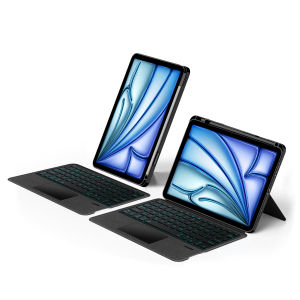
AJIUYU | Detachable Keyboard Cover for iPad A16 10th 7/8/9th Gen 10.2" Air 3/4/5 /Air 11" 13" iPad Pro 10.5/11/12.9/13 Inch Tablet Case
【The main video is for reference only.】This is an detachable keyboard case, TPU soft shell protective case, which can effectively protect your tablet. The keyboard and protective case can be separated .Keyboard with Backlight and TouchPad.Bluetooth connection, with touch pad, with backlight,Horizontal and vertical support.Attention: If there is a delay in the touchpad or unstable Bluetooth connection while using the keyboard, there are two solutions: 1. Upgrade the iPad to the latest system, 2. Turn off Bluetooth and reconnect.Due to multiple model options available on this link, please make sure to confirm your machine model or code before making a purchase in order to select the correct option. If you make a wrong purchase, you will be responsible for it yourself How To Verify Your Tablet Model1.Turn iPad tablet to the back find your specific model,Par exemple: A ****2.Find the "Settings"--Click the "About"--Find the "Model"3.Please select the correct model number for your tablet purchase after viewing it.Compatible models and codes:For iPad Air 11 inch M4 2026(Model Code:A3459、 A3460 、A3463 )For iPad Air 11 inch M3 2025 (Model code :A3266、A3267、A3270)For iPad Air 11 inch M2 2024 (Model code: A2902、A2903、A2904)For iPad Pro 11 2018 1st Generation (Model Code :A1980 、A1934 、A1979 、A2013)For iPad Pro 11 2020 2nd Generation (Model Code :A2228、 A2068、A2230 、A2231)For iPad Pro 11 2021 3rd Generation (Model Code:A2377、A2459、A2301、A2460)For iPad Pro 11 2022 4th Generation(Model Code:A2759 、A2435、 A2761、 A2762)For iPad Air 5th generation 10.9 inch 2022(Model Code:A2588、 A2589 、A2591)For iPad Air 4th generation 10.9 inch 2020(Model Code:A2316、A2324、A2325、A2072)The keyboard cases for the above nine models are universal; they are all compatible with each other, no matter which SKU you choose.For iPad Pro 11 (M4) 2024 (Code:A2836、A2837、A3006)For iPad Pro 11 (M5) 2025 (Code:A3357、A3358、A3359)These two models of keyboard covers are universal !!!For iPad A16 11th Generation 11 inch 2025 (Model code : A3354、 A3355、 A3356)For iPad 10th Generation 10.9 inch 2022 (Model code: A2696、A2757、A2777 )These two models of keyboard covers are universal !!!For Apple iPad Pro 12.9 2022 6th Generation ( A2436 、A2764 、A2437 、A2766)For Apple iPad Pro 12.9 2018 3rd Generation (A1876、 A2014、 A1895、 A1983)For Apple iPad Pro 12.9 2020 4th Generation (A2069 、A2232、 A2229 、A2233)For Apple iPad Pro 12.9 2021 5th Generation (A2378 、A2379、 A2461、 A2462)For iPad Air 13 inch M2 2024 (A2898、A2899、A2900)For iPad Air 13 inch M3 2025 (A3268、 A3269 、A3271)For iPad Air 13 inch M4 2026 (A3461 、A3462 、 A3464)These Seven models of keyboard covers are universal !!!For iPad Pro 13 (M5) 2025 13 inch (Model Code:A3360、A3361、A3362 )For iPad Pro 13 (M4) 2024 13 inch (Model Code:A2925、A2926、A3007)These two models of keyboard covers are universal~For iPad 10.2 inch & 10.5 inchFor iPad 7th generation 10.2 inch 2019 (Model code:A2197 /A2198 /A2200 /A2232)For iPad 8th generation 10.2 inch 2020 (Model code:A2270 /A2428 /A2429 /A2430)For iPad 9th generation 10.2 Inch 2021 (Model code:A2602 /A2603 /A2604 /A2605)For iPad Air3 10.5 inch 2019(Model code:A2152、A2153、A2154、A2123)For iPad Pro 10.5 inch 2017(Model code:A1709、A1701、A1852)The above five models of keyboard covers are universal !!!Note: Tablet and stylus are not included in the packaging!!The keyboard covers for iPad 10.2 inch and iPad 10.5 inch are the bottom pen slots !Attention PleaseEnglish versionkeyboard : There are English letters on the keyboard only.Multi-language versionkeyboard : English letters and carved language letters together ..【For example, if you choose French, the keyboard will display English and French letters. Please note that the same letters will not be engraved repeatedly】(Due to the difference in the number of keyboard keys compared to a normal office keyboard, some special character engraving positions are the same, which is a normal phenomenon)The keyboard Core defaults to English, and the characters engraved on the keyboard are only a Surface display.so in some countries, even if the input method is switched, the special symbols do not necessarily match the keyboard function layout(You can hold down the Shift combination).If you mind, please do not purchase!!.【English + French】【1】Bluetooth connection method: Turn on the keyboard switch, then press and holdFn+Cfor about 2-3 seconds to start Bluetooth. The indicator light flashes blue. Then turn on your machine's Bluetooth and click"Wireless Keyboard“Connection" to connectNote: If you do not use the keyboard for a long time, the keyboard will enter sleep mode and Bluetooth will automatically disconnect.【2】Switch language: Open Settings - Language and Input Method - Physical Keyboard - Add Language Layout..【3】Input method switching: control+spacebar.(Select the language input method you want to switch to)【4】Type-C charging interface,Wireless Bluetooth connection、Adjustable bracket Stand.【5】For detailed instructions, please read the user manual. If you have any questions, you can contact "Online Services" for consultation .The resolution of the machine is different, and there may be color differences in the images, which is a normal phenomenon. The actual product received shall prevailThe back bracket needs to be manually opened~~【Keyboard language layout】

Prime Supply_Play Life
Review

You May Also Like
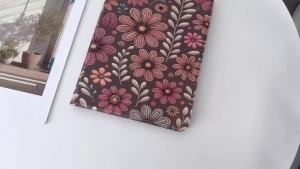
Suitable For Honor Pad 9 10 12.1 inch X8a X9A X9 X8 Pro ELN-W09 11.5 Stand Honor V9 with Pen Slot Tablet Case

5mW red/green/blue single-point pointer high power pen flashlight burner vert s inter sight infrared

SENQIAOBU | Magnetic Card Holder Phone Stand Magsafe Strong Adhesive Leather Multi-Function Desktop Universal Foldable Rotatable Standing Portable ID Card Wallet
Logitech | Logitech M650 Wireless Ergonomic Bluetooth Mouse Silent Clicks Multi-device Connection For Office Home Notebook
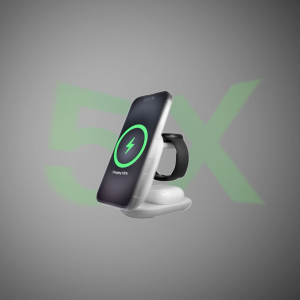
Belkin WIZ037my UltraCharge 3in1 Foldable Magnetic Charger with Qi2 25W (iphone 17/16pixel 10 pro xl)
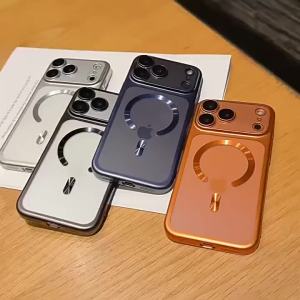
Luxury Plated Matte Magnetic Clear Case for IPhone 18 17 Air 16 15 Pro Max + for Magsafe Charge Soft TPU Shockproof Bumper Cover

New Mop Cloths Rags Pads Accessories For XiaoMi Roborock S5 Max S6 Pure S6 MaxV S5 S51 Xiaowa E25 E35 E4 Vacuum Cleaner Spare Parts

GGUU | Magnetic Protective Phone Case for iPhone 18 Pro

XVX | XVX Jelly Side Keycaps Cute Korean Crystal Pink Keycap MAO Profile for Cherry MX 61 68 104 Mechanical Keyboard Kitty Cat 119 Key

Rotatable Durable Phone Shell Hook
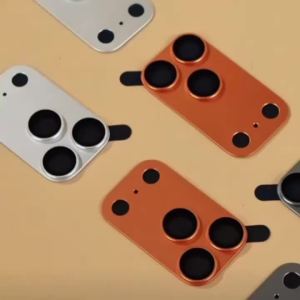
9H Tempered Glass Camera Lens ProtectorMetal Ring Full Cover Anti-Scratch HD Clear Film Shockproof Anti-Fall for iPhone 17