


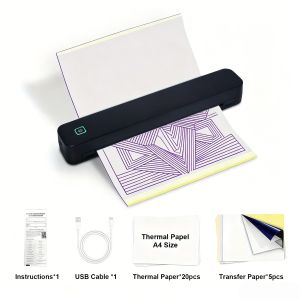
Portable A4 Thermal Printer 203DPI Support Tattoo Transfer Paper & Folded Paper with Tearing Knife
Unboxing and Initial SetupCheck all accessories after unboxing. Charge the printer fully before first use. Use the matched charging cable and standard power adapter for power supply.Press and hold the function button for 2 seconds to turn on the device. Wait for the self-check process to finish when the indicator light keeps steady, then you can start using the printer normally. Press and hold the function button again for 2 seconds to power off the device.How to Load PaperFor tattoo transfer paperOpen the printer cover gently. Place the tattoo transfer paper into the paper inlet with the coated side facing down. Pull the paper head out about 2 centimeters from the paper outlet, then close the cover tightly.For folded thermal paperArrange the folded paper neatly and put it into the paper inlet. Make sure the paper lies flat without folds or curls. Adjust the paper position properly and close the cover completely.Connect and PrintWireless Bluetooth connectionTurn on the printer and activate Bluetooth on your mobile device. Complete the pairing between the device and the printer. Select your target file and send it for printing directly.Wired USB connectionConnect the printer and your computer with a USB cable. Complete device matching on the computer side. Select files and start printing after successful connection.Basic Printing SettingsAdjust printing density according to your actual needs. For clear and delicate output, set proper printing density before starting work.When printing patterns for tattoo transfer, turn on the mirror printing mode to get correct display effect. Set appropriate print size to match your paper specification.Tattoo Transfer OperationAfter printing the tattoo pattern, take out the paper slowly. Clean the target skin area thoroughly and wipe it dry completely. Apply a thin layer of transfer paste evenly on the skin.Paste the printed pattern paper on the skin surface and press evenly for a while. Peel off the paper slowly in vertical direction after pressing. Leave the transferred pattern to dry naturally before follow-up work.Paper TearingThis printer is equipped with a built-in paper tearing blade. After printing is completed, hold the paper end and tear it along the blade edge smoothly. Do not pull the paper with excessive force.Daily MaintenanceTurn off the printer and cut off power before cleaning. Use a soft cotton swab to wipe the print head and paper inlet gently to remove dust and paper scraps. Never use sharp objects to scratch the internal parts.Place the printer in a dry and ventilated place when not in use for a long time. Avoid using or storing the device under high temperature, humid or dusty environment. Keep the printer away from direct strong sunlight.

Prime Supply_Play Life
Review

You May Also Like
HP | Compact Laser Printer A4

Marklife Bluetooth Thermal Label Printer P15 Portable Label Maker Inkless Self-Adhesive for Home/Kitchen/Office/Student/Diy Gift

Kodak | Mini2 Retro Portable Bluetooth Photo Printer 4PASS Thermal Dye
Bambu Lab PLA Metal 1Kg with Metal Surface Texture & Metallic Shine

055H Compatible Canon 055H Laser Printer Toner Cartridge for Canon ImageCLASS LBP664Cx ImageCLASS MF746Cx [theinksupply]

[SG Stock] High Quality PLA+ Filament 3D Printing for Artillery Anycubic Bambu Lab Creality Ender Elegoo

Barcode Printer TSC TE244/TE344 Barcode Label Printer 203 DPI/300 DPI( 1 year Warranty )

Phomemo LT12 Label Maker Machine Rechargeable Handheld Label Makers with QWERTY Keyboard Portable Bluetooth Labeler with & 1600+ Icons 30+ Fonts for Home Office

CX-printer | Portable Bluetooth Thermal Receipt Printer 58mm

AeroPress | Round Coffee Filters for Hand Dripping 350 Sheets

HP LaserJet MFP M141w Printer











