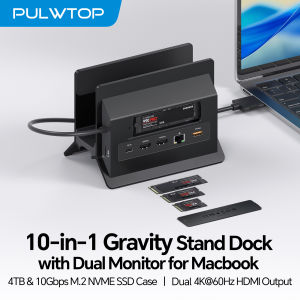
PULWTOP MacBook Docking Station with 2 HDMI 4K 60Hz USB A/C 10Gbps PD Ethernet SD/TF for MacBook Pro/Air M3/M4/M5
10-in-2 Docking Station with Vertical StandThis macbook air docking station dual monitor features M.2 NVMe SSD enclosure (Up to 4TB), 24K@60Hz HDMI, 100W PD (65W+ power supply required (not included)), 10Gbps USB-A/C (data only), Gigabit Ethernet RJ45, USB 2.0, and SD/TF card slot. Vertical laptop docking station with stand saves desk space and improves airflow. One dock replaces multiple adapters—clean, organized, and efficient.Dual 4K@60Hz DisplayExtend MacBook Pro/Air to 24K monitors via dual HDMI for ultra-clear visuals—ideal for editing, coding, and presentations. macbook pro m5 docking station compatible M4/M5 base chips, M1–M5 Pro/Max, and Intel (2016–2020). (Note: M1/M2/M3 base support single monitor only. Incompatible for Windows, MacBook Neo, or iPad.) No driver needed—plug and play.Up to 4TB M.2 SSD ExpansionBuilt-in M.2 NVMe enclosure adds up to 4TB high-speed storage to your docking station for macbook pro. Transfer large videos, photo libraries, and backups at 10Gbps. Perfect for editors, photographers, and analysts who need fast storage without external drive clutter. (SSD not included; NVMe only, not SATA.)Gigabit Ethernet & 10Gbps Data TransferThis macbook pro docking station dual monitor built-in RJ45 ensures stable, lag-free internet for video conferences and large downloads—no more spotty Wi-Fi. 10Gbps USB-C/A ports enable lightning-fast file transfers for video editing and coding. The perfect macbook air m5 docking station for professional users who demand speed and reliability.Steps of Clamshell Mode① Go to Applications → Utilities and open Terminal. ② Enter the following command and press Enter : sudo pmset -a disablesleep 1 ③ Insert administrator password and press Enter again. Once these steps are completed, you can use dual displays while your MacBook is in clamshell mode (lid closed).✳️ Important Notes: ① If the external display still doesn't show any output after running the command, restart your MacBook. ② To revert to the default sleep behavior (which will disable clamshell mode), run the following command instead: sudo pmset -a disablesleep 0

Prime Supply_Play Life
Review

You May Also Like

For iPad Air 11 M3 2025 M2 2024 M4 2026 Case Air 5 Air 4 10.9 2022 with Pencil Holder Tablet Cover For 10th A16 11th Generation
Samsung | For Samsung Luxury Card Holder Clear For Magsafe Magnetic Phone Case Samsung S26 S25 S24 Plus Ultra Bracket Full Bumper Cover
Sikai | Magnetic Braided Fast Charging Cable 240W
2.4G 5.8G WiFi 6 Router Up To 50 Users Connection Support for NSA SA Small SIM Card Slot 5G CPE Router for Game Entertainment
GameSir | Limited Edition Wireless Xbox Gamepad PC Steam Android Compatible
240W 2 in 1 USB To Type-C Cable Foldable Bracket Data Cable Type C Fast Charging Desk Holder Cord For Huawei Xiaomi17 16 Samsung
![[SG STOCK] AIMEDIA Heat-Blocking Sheet for Air Conditioner Outdoor Unit - Sticker type two sheets](https://img.lazcdn.com/g/ff/kf/S1b447d7ef2f14c8d823efe182c0e8955o.png_300x300q80.png)
[SG STOCK] AIMEDIA Heat-Blocking Sheet for Air Conditioner Outdoor Unit - Sticker type two sheets

ORICO Aluminum Alloy Phone Stand 360° Rotatable Magnetic & Clip Dual Modes Foldable Desktop Holder 800g Load-Bearing Compatible 6.9inch Phones Switch Adjustable Angle Desk Mount

Digi-Cabi Dry box with Digital Hygrometer 12L and 22L DB-012/DB-022 (2026 Design)

Nylon Loop Strap for Samsung Galaxy Fit 3 Breathable Replaceable Woven Wristband for Galaxy Fit 3 Bands Smart Watch Bracelet Bel

DMA MAKCU ESP32-S3 Arduino Development Boards High - Performance With 2PCS USB Cable Replace KMBOX Net