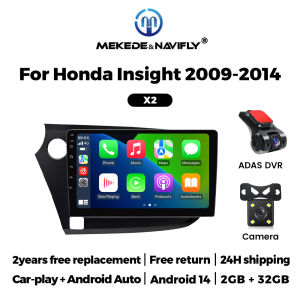
9 Inch 2 Din Wireless Carplay Android Auto For Honda Insight 2 2009-2014 Car Radio Stereo Multimedia Player GPS Navigation WIFI
9 Inch 2 Din Wireless Carplay Android Auto For Honda Insight 2 2009-2014 Car Radio Stereo Multimedia Player GPS Navigation WIFI Support wireless carplay Wireless Android AutoUse your phone in a smarter, safer way while you drive. Get directions, make calls, send and receive messages, and enjoy your favorite music. Siri & Google Assistant can help you do all of these things. All you have to do is ask. Support Steering Wheel ControlYou can use the vehicle's steering wheel buttons to answer and end calls, play music, switch modes and much more, so that you can focus on your driving. Screen Resolution 1024*600the ultra-clear screen dispaly effect is greatly improved,the screen display is more delicate. Support 1080P Videosupport the perfect APE music 3D acceleration allows fluent playback at any section of your usb quaility video. Support BT Funcitonbuilt in smart BT system,can support mobile phone bt pairing,hands-free doaling support steering wheel control listening,accompanying chat to ensure your driving safety. Support FM Radiosupport outomatic search and manual search,you can drag the icon of target station and replace it into channel list. Support GPS NavigationBuilt-in global positioning system,omni-directional map display,synchronous display real-time traffic onditions,rapid and accurate positioning. Support Reversing camera(Attention! Rear view camera is optional, please choose the package with camera to buy) Support ADAS DVR(Attention! ADAS DVR is optional, please choose the package with DVR to buy) Support Multiple Langeuages Support Change theme UI FAQ: 1.Please note!If the product contains CANBUS, if the steering wheel control does not work, please check whether the operations in the picture below have been performed. If you encounter any questions, please leave us a message in time.Thank you! If you have problems installing the rearview camera, please check the following picture, if you still can't solve the problem, please contact us through the message 3. How to connect wireless Carplay and Android Auto? For the first connection, need to turn on the phone's Bluetooth to peer with the car's Bluetooth. After the pairing is successful, the car radio will automatically jump to the R link or AutoLink interface At this time, the phone pop up a prompting message "use CarPlay with ZLink or AutoLink ",click confirm it, Then the CarPlay will be connected

Prime Supply_Play Life
Review

You May Also Like
2026 Motorcycle decorative blade wind wing side sticker For KYMCO DOWNTOWN XTOWN 125 300 125i 300i DTX360 AK550 CT250
For Citroen Xsara Picasso 2005-2012 1set Front & Rear Windshield Wiper Blades Windscreen Wipers 2006 2007 2008 2009 2010 2011
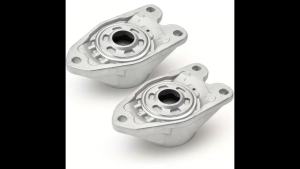
Rear Left and Right Suspension Strut Mounts 33506862725 33506791706 for BMW 228i M235i 320i 328i 328d 330i 330e 335i F22 F30 F33
4K Dual Dash Cam Front Rear Full HD 1080P Auto DVR Recorder 24H Parking Monitor Vehicle Black Box Car Camera

Car Stereo Radio MP5 Multimedia Player Wireless Carplay Android Auto BT 5.0 AM FM RDS BWC For Fiat 500 2007-2015 Car Head Unit
Osram | OSRAM 166440CW LEDriving XENON D4S LED Car Headlight HID 12/24V 45W 6000K White Canbus Free LED Bulb Replace Xenon Lamp1PAIR
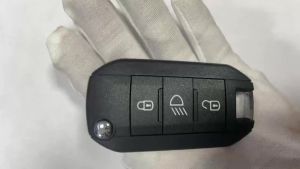
YOCASTY 433 MHz 46 Chip Flip Remote Car Key For Peugeot 208 2008 301 308 508 5008 For Citroen C-Elysee C4-Cactus Hella HU83 VA2
Drivescentz Relaxsa Car Diffuser USB Rechargeable for Car Essential Oil Black

Full Face Helmet Motorcycle Modular Helmet Motorcycle Sun Protection Helmet Personalized electric motorcycle full-face helmet with Bluetooth Full Face Helmet Motorcycle

SEAMETAL | SEAMETAL Car Phone Holder Adjustable Clip Design Dashboard Auto Lock Flexible Viewing Dashboard GPS Smartphone Support Accessory

Viladepot 15AK MIG Welding Torch 3M Cable MIG MAG Welding Equipment