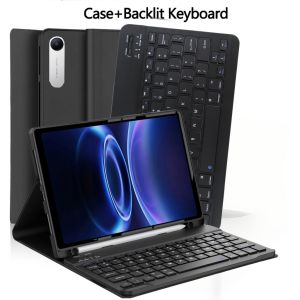
Case for Xiaomi Redmi Pad 2 SE 9.7 Inch 2026 For Redmi Pad 2 9.7 Inch 2026 Tablet Case with Pencil Holder and Bluetooth Keyboar
The tablet case in this link is only compatible with models:Redmi Pad 2 9.7 inch 2026Redmi Pad 2 SE 9.7 inch 2026How to verify tablet model1. Go to the back and find your specific model.2. Find "Settings" - Click "About" - Find "Model"3. Please purchase the correct compatible model case according to the tablet after viewing.Note:The digital tablet and stylus are not included in the package. The detailed description is for reference only. Please refer to the actual product for the color of the product.How to connect keyboard and mouse?1. Connect the mouse first, then the keyboard.2. Mouse: Push the switch to the "Bluetooth" icon and find the Bluetooth connection with the "mouse" in the device Bluetooth list.3. Keyboard: Push the switch in the upper right corner to "ON", press "Connect", and find the Bluetooth connection with "Keyboard" in the device Bluetooth list.4. Touchpad keyboard: Open the keyboard, press Fn+C, and then find the Bluetooth connection with "Keyboard" in the device Bluetooth list.FAQQ:What should I pay attention to when connecting the mouse for the first time?A:When the mouse is connected for the first time, you need to press the left button, the right button and the scroll wheel at the same time for about 3-5 seconds.Q: Is the scroll direction of the mouse USB connector and Bluetooth connection the same?A: No, they are different. When using the USB connector, the scroll wheel slides in the same direction as the computer mouse. Bluetooth connection is the opposite.Q: How to switch between different systems?A: Fn+Q=Android, Fn+W=Windows, Fn+E=IOS.Please note that please switch the system before connecting the tablet.Q:The bluetooth keyboard letters are messy?A: Please check the settings according to the prompts,a. Check whether the keyboard language set on the device is English.b. Disconnect the keyboard Bluetooth, click Ignore the connected device, reopen the Bluetooth keyboard, select system, Fn+E (IOS system).Note: Fn+Q=Android, Fn+W=Windows, Fn+E=IOSc. Press the L S Z buttons at the same time to reset the keyboardQ:How to configure the input method for different languages keyboard?A:Take the samsung tablet as example,open "Settings--"ystem"--"Language & input"--"Add New Keyboard". (For other systems, please set them in the system settings according to the tips of the iPad example.)Q:How does the mouse change teh scroll wheel sliding direction on the device?A: The mouse is connected, open "General" - "Trackpad & Mouse" - close "Natural Scrolling".

GlobalTechMart
Review

You May Also Like

Ulanzi MT55 SnapGo Backpack Strap Bag Camera Mount Mini Tripod Selfie Stick for DJI Osmo Nano/Action 6/Insta360 Go Ultra

Power Bank TPB1 5000mAh Transparent Style Emergency Mini PD 22.5W Fast Charge Pocket Power Bank Keychain Mini Power Bank

Dual Phone Mobile Phone Step Shaker Desk Walking Swing Shaker Mobile Phone Stand Holder Phone Step Shaker

EELHOE | Type C USB 3.1 Female to Micro USB 3.1 Male Extension Cable Fast Data Sync Charger Cable for Phone Tablet

(SG Seller) Lavette Univesal phone lanyard nylon sports strap neck rope mobile phone strap adjustable
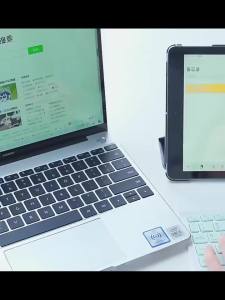
2026 New Bluetooth Wireless Keyboard Mouse For IOS Android Windows Tablet For iPad Mini Pro Keyboard Multi Functional Operation

Ambrosi | Magnetic Full Coverage Protective Phone Case for iPhone 18 Pro Max

NEEWER 67mm CPL Filter for Phone with Cold Shoe Phone Clip Compatible with iPhone 16 15 Pro Max Plus Samsung S24 S23 Ultra

Tulip Pearl Pendant Shell Pattern Case for Samsung S26 Ultra S25 Edge S24 Plus S23 FE S22 A55 A54 A53 A52 A52S A07 A06 A05 A05S

16mm 18mm 20mm 22mm 0.6mm Mesh Milanese Watch Strap Quick Release Replacement Bracelet Folding Buckle Stainless Steel Watch Band
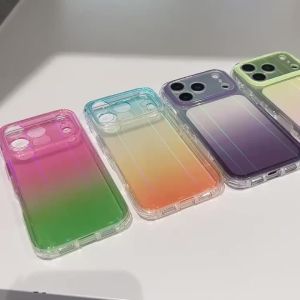
Colorful Gradient Transparent Aurora Glitter Phone Case for iPhone 17 16 15 Pro Max Lens Camera Protection Shockproof Back Cover