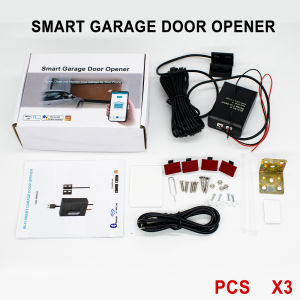
1-3pcs Tuya Smart WiFi Garage Door Opener Remote Open/Close via App Works with Alexa No Hub Required
You may encounter these problemDo you always drive to work and forget to close the door?Your kid forgot to bring his keys when he went out to playThere is a courier and you need to go downstairs by yourselfThere's a party at home, a friend is driving, and you need to go downstairs to open the garage doorIf you run into these problems regularly, you need a smart switch like this to control your garage doorAre you tired of the inconvenience of traditional switches?then you need such a smart switch.Make your life smarter and more relaxedNote before Order, please test compatibilityPlease check if your garage controller is compatible with our module.Take a wire with both ends stripped or a straightened-out paper clip to short-circuit the wall button terminal on the opener (I marked with red color). If the garage door opens or closes, it can work with our smart controller.Garage door opener controller features:WiFi Smart Garage Door Controller and Garage Open Close Monitor Compatible With Alexa Echo , Google Home voice control No Hub RequireREMOTE MONITORING: You can open or close the door by the APP. You can check the garage door open or closed state in real time. You can authorize multiple people to access your garage. EASY TO USE: Instantly control the garage door by tapping the TUYA or SMART LIFE app on your smartphone. Just connect the smart opener to the 2.4G WiFi network.VOICE CONTROL: You can activate your garage door opener by placing a voice command to your Alexa or Google Assistant device or driving near the garage door WIDE COMPATIBILITY: You can only use one controller per garage door opener. Compatible with most general garage door openers.Please check the our list.TIMER FUNCTION: You can set schedules to open and close your garage door. Quick & easy installation as well without the need of a professional. No Hidden MonCOUNTDONW FUNCTION: You can set the countdown time to close or open the garage door.EASY ADD DEVICE:1.The garage door will be activated when added successfully (when the blue LED light stop blinking), so keep your door closed first.Power up the garage, and the ren light and blue light flash alternatively.2. Launch "Smart Life" or "Tuay Smart" APP. Tap the icon '+' on the top right corner.3. Select the "All Devices", then select the "Wi-Fi Connector" type.4. Tap "Confirm indicator rapidly blink"5. Input the correct 2.4G Wi-Fi passwords. Then, tap confirm.6.It will auto-connect with the device. Once the process is completed,it will prompt you that you can rename the device. Enter a new name and press'Save'.Smart Wifi Garage Door Opener ControllerJust one of this Garge door opener controller to make the garage smart,without any change , to open and close the garage door by phone ,by schedules ,by voice (work with alexa & google home)etc.Smartlife / Tuyasmart APP ControlAvailavle in google & IOSReal-time feedbackGarage Door Open/Close APP Message push & HistoryNo matter where you are,You will get the APP message push when your Garage door opened/closed, and you can check the Garage door running history.SchedulesAuto open or close the garage with your schedules or countdown. Automatically detects the status of the garage door more safer without false running.Support Alexa and Google Assistant to open/close Garage door by voiceYou should add this Garage door controller to work with tuyasmart or smartlife APP , and Binding it with Amazon Alexa or Google Assistant to achieve voice control. We have voice code protection,when you open the Garage door.Share Device With Your FamilyAfter the family member registering a eWeLink account, You can authorize device control to familys by "share device" in the APPEasy to installJust aked you connnect the red & black wire with the same port as your wall switch/consloe .and Install the wired door sensor on your garage door

GlobalTechMart
Review

You May Also Like

BEIOUMINGDI | Custom High-end Luxury Waterproof Door Number Plate
DC 12V&24V Warning Indicator Light LED Flashing FlashLight Lamp Security Alarm for Car Truck Bus Swing Sliding Gate Red Orange

GP Lithium Coin CR2025 Cell Battery (Card of 5)
BESTH | Single Cold Quick Open Home Use Washing Machine Water Tap 1/4 inch
EELHOE | 1 Piece Transparent Oil Can Oiler 250ml/350ml Lubrication Oil Plastic Machine Pump High Pressure Pump Oiler Grease
Scimagic Dickert Gate Door Keyfob Hand Transmitter Garage Door Remote Control 27MHz MAHS27 MAHS27-01 MAHS27-04 27.015MHz
Professional Hot Melt Glue 11mm Sticks Digital Temperature Control 300W/800W Silicone Glue for Woodworking.
【🇸🇬 Ready Stock】Digital Lock Door Lock Fingerprint Lock Smart Scramble Pin Code Lock IC card Keyless Bluetooth Lock Mobile Phone Unlock Smart Password Wooden Door Lock
NANWEI | Cordless Brushless Home Impact Drill
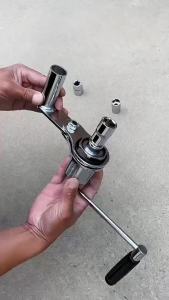
NiuXiang | Torque Multiplier Wrench Set for Lug Nut Remover Labor-Saving Nut Disassembly Hand Tool with 17mm/19mm/21mm/22mm Sockets
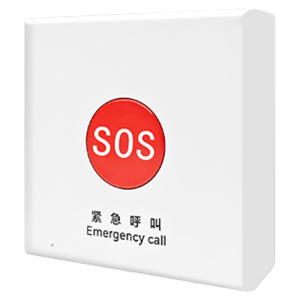
Elderly Emergency Call Button Remote Notification Cord-Pull Alarm