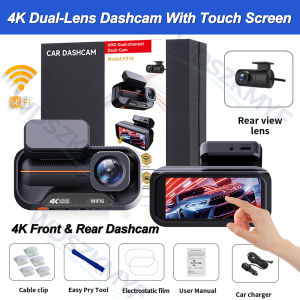
4K+4K Dual Dash Cam with 3.69" Touch Screen Front and Rear with WiFi App Car DVR Video Recorder G-Sensor Car Security System
Please note that, to cater for customers who do not require a rear camera, our product is available in two options:1. 4K single lens with touchscreen only; does not include the 4K rear camera accessory2. Dual-lens: 4K single lens with touchscreen + 4K rear camera includedDear customer, if you require the dual-lens version, please ensure you place an order for the option that includes the rear camera. The options that do not include the rear camera are clearly labelled in our product images to assist with your selection. If you wish to purchase the dual-lens version but select the single-lens option, you will receive the single-lens version corresponding to your order, which may be disappointing. Therefore, please ensure you check your order carefully. Thank you for your patience in reading this.New 4K+4K Dual Dash Cam Front and Rear, WiFi App, 3.69" Touch Screen, 170°+140° Wide Angle, Loop Recording, G-Sensor, 24H Parking ModeFunction:1. Dual 4K Ultra-HD Recording — Front & Rear Records simultaneously in 4K on both the front and rear cameras, capturing sharp, detailed footage of the road ahead and behind, so key moments and license plate details stay clearly visible.2. 170° Front + 140° Rear Ultra-Wide Angle The 170° front lens and 140° rear lens cover multiple lanes and significantly reduce blind spots, giving you fuller front-and-rear road coverage on every drive.3. ️ 3.69" HD Touch Screen Navigate menus, preview live footage and review recordings directly on the large 3.69-inch HD touch display — quick, intuitive control without complicated buttons.4. Built-in WiFi + Companion APP Connect your phone via built-in WiFi to view live video, download and share recordings, and adjust camera settings anytime through the companion APP.5. Loop Recording & G-Sensor Collision Detection &️ 24-Hour Parking Mode Continuous loop recording automatically overwrites the oldest files so storage never fills up, while the built-in G-sensor detects impacts and automatically locks & protects the critical clip from being overwritten.Supports 24-hour parking surveillance when connected to an additional 24H hardwire kit (sold separately). The package also includes a pry tool and cable installation kit for clean, discreet wire routing.About WIFI Connection:Before connecting to the DVR on the phone, it is necessary to install the WIFI connection app "Viidure APP" in advance.You can search for "Viidure" installation in the Apple App Store or Google App Market.Steps:(1) In standby mode, long press the "M" key to enter the DVR menu and enter the WIFl setting menu;(2)In the wifi menu of the DVR, check to obtain the wifi SSID name and password;(3)Open the "Viidure" APP on your phone, enter the configuration mode, turn on the wifi function of the phone, follow the prompts to find the SSID wifi signal of the DVR and enter the password to connect;(4)After successful configuration, you can connect and operate the DVR through the "Viidure" APP.About Formatting The Memory Card:When installing a memory card for the first time, be sure to format the memory card on the DVR. After formatting, the DVR can correctly match the memory card.Formatting Steps: After installing the memory card, please enter the DVR menu, find the format option, and click to format the memory card.(Important: Formatting the memory card on the computer is an incorrect operation. Please be sure to format the memory card on the DVR's menu option.)About The Reversing Assist Function:If the kit you ordered includes a rearview camera and you need to implement the reversing assist function, you need to connect the red signal wire of the rearview camera to the car's reversing light (the light will come on when reversing). If you don't need the reverse assist function, just disconnect the red signal wire and leave it unconnected.About 24-Hour Parking Monitoring:If you need the 24 hour parking monitoring function, you can order the corresponding Buck Line accessories to replace the car charger.Through Buck Line, the DVR power can be obtained directly from the car battery or car ACC, so that the DVR can maintain normal recording work even when the car is turned off.(Since different car models have different battery interfaces or ACC interfaces, it is not recommended to install it by yourself. It is recommended to find a professional to install the Buck Line.)Real 4K +4K Front & Rear Dashcam With WIFI170° Front + 140° Rear Ultra-Wide Angle3.69" HD Touch Screenquick, intuitive control without complicated buttonsSuper Night VisionBuilt-in Wi-Fi & APP ControlBUILT-IN WIFIFUNCTION : Smart dash cam built-in WiFi module, support APP control (Work with Android and iOS devices)24-Hour Parking MonitoringBuilt-in G-sensor activates automatic recording when a sudden shake or collision is detected. When emergency video is recorded, a voice will alert you when you return to the car. In addition,supports time-lapse recording, which maximizes storage usage and ensures that no moments of evidence are missed.Friendly reminder: parking monitoring needs to be configured with a special buck cable for use, otherwise 24-hour monitoring is not possibleBuilt-in G-sensorWhen your car is subjected to an impact or other emergency,the G sensor is triggered, so that the recorder immediately records and locks the video.Loop- Cycle RecordingWhen the TF card is full,it will automatically delete former video and keep recording all the timeInstallation Diagram1.Secure the recorder to the windshield of the vehicle , recommended near the rearview mirror area2.Hide the power cord in the window gap along the red line in the figure above 3.Insert the car charge wire into the cigarette lighter, connect the power supply, and complete the installation3.Rear camera if you need reverse camera function please connect the red wire, the red wire connects to the power supply of the reverse light behind the car.4.All car recorders need to be connected to the power supply to use, please understand the small battery safety design of the recorder. The battery of electrical appliances in the car is not allowed to be installed too large.To protect your privacy, the TF card needs to be formatted for the first time. There are two solutions:1. Insert the TF card correctly into the dash cam, open the camera settings, find the storage card format, confirm that the formatting is complete, and then restart the camera to use.2.Connect to the mobile application, search for settings in the mobile application, format the memory card, confirm formatting is complete, and then restart the camera to use it. Sincere wishes to you and your family.

Prime Supply_Play Life
Review

You May Also Like
2 PCS Car Headrest Cover Personalized Funny Car Seat Full Face Mask Ski Mask Wrap Protection for Auto Front Seat Rest
2 Pcs LED Headlight Low Beam Halo Ring DRL Projector Lens For Can-Am Outlander Max 650/800/850/1000R 2018 2019 2020 2021 2022
BFGoodrich KO2 AT All Terrain Tyres 265/75/16 USED 1 piece Cash and Carry NO DELIVERY
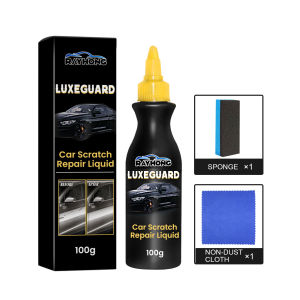
Rayhong Car Paint Repair Car Scratch And Swirl Remover Auto Scratch Repair Tool Car Scratches Repair Polishing Agent Anti Scratch Liquid Car Scratch Remover for Autos Body Paint Scratch Care Auto Car Care Polishing and Polishing Compound Agent 100ml
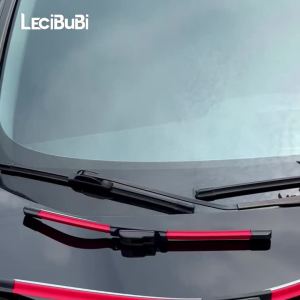
2pcs For Renault Arkana 2018-2023 2019 2020 2021 2022 Front Windshield Wiper Blades Windscreen Wipers
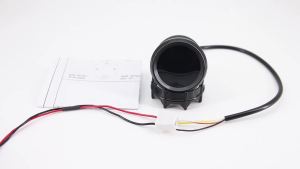
RYSJM | 240-33ohm Fuel Float Sensor+Car Fuel Level Gauge 2" 52mm with 10 LED Light Oil Tank Level Indicator for 12V Automotive Car Meter

【Long-Lasting Protection】Automotive Ceramic Coating Nano Plating Agent Automotive Nano Coating Agent 2in1Coating Hydrophobic And Anti-Stati Car Car Paint Maintenance Coating Agent 汽车镀膜剂
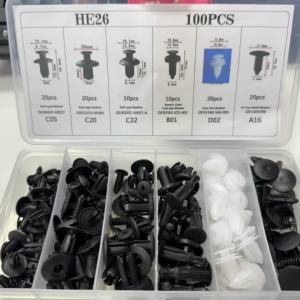
PINMOAP 1/101PCS Car Retainer Clips Kit with Trim Removal Pliers Auto Push Pin Fasteners Door Panel Bumper Fender Assortment

ALLKODO | Prolonged Fragrance Pink Car Perfume

RYSJM | 52mm Car Digital Gauge Air-Fuel Ratio Meter Turbo Boost PSI BAR Oil Pressure Water Temp Voltmeter Tachometer With Warning Light

Yitong Yellow Car Wiper Washer Fluid Reservoir Tank Cap Vehicle Accessory Perfect Fit For Subaru Forester Crosstrek 86615FJ000