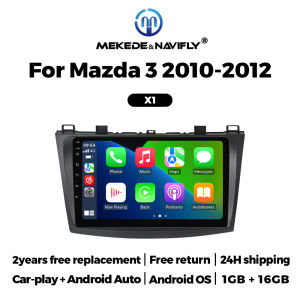
Android OS 9Inch Wireless Carplay Android Auto For Mazda 3 2010-2012 Car Radio Stereo Multimedia Player Head Unit GPS Navigation
Android OS 9Inch Wireless Carplay Android Auto For Mazda 3 2010-2012 Car Radio Stereo Multimedia Player Head Unit GPS NavigationSupport multiple 10+ main menu switching, the latest main menu will make driving easier and cars cooler.Both X1 and X2 models support wireless and wired CarPlay and Android Auto functions.FM radio, need to connect to the original car radio antenna. Support automatic search and manual search.Support steering wheel controls, control music or use the hands-free calling function to ensure safety and focus on the road ahead.The resolution is 1024*600, the ultra-clear screen display effect is greatly improved, and the screen display is more delicate.1080P video decoder, True Color 24 HD- Display.Support perfect APE music 3D acceleration allows fluent playback at any section of your USB/SD quality video.Built-in smart Bluetooth system, supports mobile phone Bluetooth pairing.GPS Navigation,Built-in global positioning system, omni-directional map display,synchronous display real-time traffic conditions, rapid and accurate positioning.The reversing image and rear view image quality are clearer than ordinary cameras. (Note: If the rear view camera is not included, please click on the package that includes the camera to purchase)ADAS DVR, anti-collision warning driving recorder, front vehicle distance prediction, front vehicle anti-collision warning, lane departure warning, make driving safer. (Note: DVR is not included, please click to purchase)Multiple languages: English, German, French, Spanish, Italian, Portuguese, Russian, Dutch, Polish, Japanese, Simplified Chinese, Traditional Chinese, Arabic, Korean, Vietnamese, Ukrainian, Brazilian Portuguese, Greek, Android system language, etc.1. How to connect the rear view camera?1) Red cable 2 connects to backlight "+"2) Black cable connects to "GND"3) Reverse detection cable 4 (brown) connects to red cable 3 extending from the video output cable, please connect as shown below.How to set up the steering wheel control?A. If you buy a unit with a CanBus Box:Before starting the setup, please confirm that the CAN Bus box and the 8-pin serial cable are connected to the multimedia.B. Then please refer to the pictures to set up your model.2. if your buy the unit haven't the canbus box, setting the steering wheelcontrol please refer photo go do it.

Prime Supply_Play Life
Review

You May Also Like

TOKUSET | Dedicated Car Cleaning Cloth Superfine Fiber Thickened Absorbent Lint-Free

✨𝗦𝗚 𝗦𝗧𝗢𝗖𝗞✨ Car glass oil film cleaner / Front windshield cleaner / Car window car glass maintenance / Car glass oil film remover 玻璃油膜清洁剂 汽车油膜去除剂
WIFI&APP Car Dvr 1080P Dash Cam for Cars 2/3 Channel Camera Recorder Front inside / Rear View Camera for Vehicle Night vision

RQZN | Vacuum Magnetic Adjustable Car Phone Mount

YOCASTY Remote Car Key PCF7947A PCF7946A 46 CHIP 433Mhz For Renault Wind Clio Modus Kangoo Master Twingo Trafic 2004 - 2016
58908-32050 Center Console Lid Latch for Toyota Armrest Repair 2-Pack

TeamAutoCare TAC6244 100 Pieces Automotive Mini Blade Fuse 30A Replacement Kit with Storage Case and Fuse Puller for Cars Trucks Motorcycles

DELIHUA | Foldable Car Trunk Organizer Storage Box

Osram | High Brightness 12V Car Halogen Bulbs
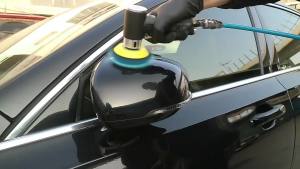
New Orbit Air Sander Mini Pneumatic 1/2/3 Grinding Machine Set for Car Polishing High Speed Air Powered Polisher Air Tool

{SG stock}Premium Microfibre Cleaning Cloth / Car Cleaning Towel