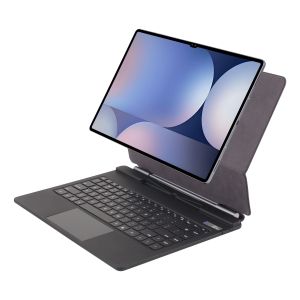
New Magic Keyboard Case for Samsung Galaxy Tab S11 Ultra 14.6inch S10/S9/S8Ultra Bluetooth Touch Backlight Magnetic Tablet Cover
New Magic Keyboard Case for Samsung Galaxy Tab S11 Ultra 14.6inch S10/S9/S8Ultra Bluetooth Touch Backlight Magnetic Tablet CoverFor Samsung Galaxy S11 S10 Ultra/S9 Ultra/S8 Ultra 14.6 Inch Magic KeyboardMagnetic separation, backlight,touch panel,multi angle support, Wireless Bluetoothconnection.Note 1:You need to upgrade the system to version 14.5 or higher to use the touchpad.Note 2:Please check in the size and detail model of your Tablet. it is very importtant ! ! ! Note 3:After Open the Power, Please Click "Fn" and "C" 【Fn+C】Button Together to Open the Keyboard's Bluetooth. It is Very Important.Product Details:1. Number of buttons: 842. Battery: Lithium battery 500mAh3. Stand-by time: 150 days4. Working Time: 5 hours (with backlit on),350 hours (with backlit off)5. Working Voltage: 3.0 - 4.2V6. Charging current:<225 mA7. Effective distance: 10 meters8. Charge Port: Type-c9. Material: Anti fouling and durable PU material10. Key life:3 million11. Charging times: 3 hours12. Color: Black13. Modulation system: GFSK How To Verify Your Tablet Model1.Turn iPad tablet to the back find your specific model,Par exemple: SM-****2.Find the "Settings"--Click the "About"--Find the "Model"3.Please select the correct model number for your tablet purchase after viewing it.Applicable Models:For Samsung Galaxy Tab S10 UItra 14.6 inch(SM-X920 SM-X926B SM-X926)2024 . For Samsung Galaxy Tab S9 UItra 14.6 inch(SM-X910 SM-X916B SM-X918U)2023 . For Samsung Galaxy Tab S8 UItra 14.6 inch(SM-X900、SM-X906)2022 .Note:These models are all universal.Note: Tablet and stylus are not included in the packaging!!Attention PleaseEnglish versionkeyboard : There are English letters on the keyboard only.Multi-language versionkeyboard : English letters and carved language letters together ..(Due to the difference in the number of keyboard keys compared to a normal office keyboard, some special character engraving positions are the same, which is a normal phenomenon)The keyboard Core defaults to English, and the characters engraved on the keyboard are only a Surface display.so in some countries, even if the input method is switched, the special symbols do not necessarily match the keyboard function layout(You can hold down the Shift combination).If you mind, please do not purchase!!.【1】1. After connecting Bluetooth, open your iPad - Settings - Keyboard - Add New Keyboard【1-1】Input method switching: control+spacebar.(Choose the language you need)【3】For detailed instructions, please read the user manual. If you have any questions, you can contact "Online Services" for consultation .The resolution of the machine is different, and there may be color differences in the images, which is a normal phenomenon. The actual product received shall prevail(Pictures are for reference only)

Global Merch Park
Review

You May Also Like

BZBC | Wall Mounted Headphone Stand Headphone Hanger

xilixili | Aluminum Alloy Metal iPhone 15 Pro Max Case Z-Shaped Frameless Protective Cover Stand Shell Heat Dissipation Magnetic Simple 2024 New Model
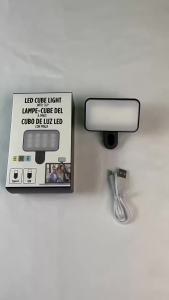
Portable Mini Selfie Fill Light Rechargeable 3 Modes Adjustable Brightness Clip On For Mobile Phone Computer Fill Light

Mofii | Wireless Office & Gaming Mouse Pink Cartoon

Case for Redmi Pad 2 11 Inch 2025 Bluetooth Keyboard Case for Xiaomi Redmi Pad 2 11-inch

TOUGLESY | Air Conditioner Compressor Start Capacitor
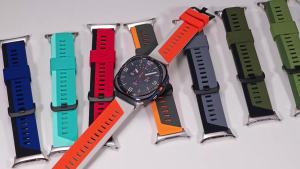
Soft Silicone Strap for Samsung Galaxy Watch 9 8 40mm 44mm/8Classic 46mm Sports Wristband for Galaxy Watch Ultra 2 7 2025 47mm

KIUAOCAI | Klein Blue Gradient FPS Gaming E-sports Mouse Pad XL

Obu screen holder with Adjustable Ball Joint and Durable ASA Material for Heat UV and Weather Resistance.

ZUZG Stainless Steel Universal Magnetic Metal Plate Ring For Magsafe Wireless Charger Iron Sheet Sticker Magnet Car Phone Holder

Compatible with AirPods 5th / 4th / Pro 2 / 3rd Generation Earphone Case For MagSafe Magnetic Automatic Lock With Phone Stand For AirPods Pro 3 / 2 / 1 Military Shockproof Full Body Cover With Keychain