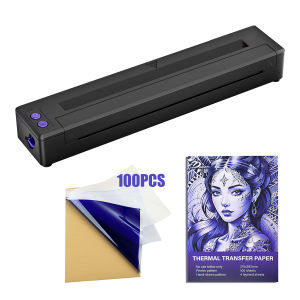
P19 Wireless Tattoo Template Printer or 20/100PCS Transfer Paper - Portable A4 Thermal Printer Pattern HD Transfer Tool
Item: Tattoo Transfer MachineColor: BlackMaterial: ABSInterface Type: Bluetooth/USBResolving power: 203dpiEffective printing width: 210MMInput: 5V-2ASupport System: Android & ios & WindowsBattery capacity: 2500mAhSize: 4458 290mmType: Tattoo Thermal Printer MachineName: Bluetooth Stencil Printer CopierFeatures:1. Great Design: This tattoo transfer printer is compatible with a wide range of devices, including smartphones and computers, giving you the flexibility to transfer designs from a variety of sources. Whether you're working on a custom design or printing an existing one, this machine has you covered.2. Hign Quality Transfer: Our Tattoo Printer uses advanced technology to ensure that your transfers are of the highest quality possible. This means that your tattoos will look crisp, clean, and professional. Our tattoo printer machine is the perfect choice for any tattoo artist looking to deliver accurate, high-quality transfers of their designs onto the skin.3. Power Battary: The 2500mAh battery in this tattoo transfer machine provides plenty of power to complete multiple transfers on a single charge, so you can work without worrying about running out of battery.4. Protable: The Portable Thermal Printer Tattoo is lightweight and compact, making it easy to take with you wherever you go. It's perfect for traveling tattoo artists or those who need to work in different locations.5. Easy To Use:The intuitive interface and user-friendly design of the thermal tattoo stencil printer make it easy to use, even for those who are new to tattooing.How to use:You can print the pattern what you want easily and quickly after a few easy steps. And the app will update various patterns in time for users' reference.Download the exclusive APP "Tattoo Printer" in App store or Google Play, install, and open it.Step1: Press down with both hands to ensure tight closure.Step2: Tear off yellow transparent paper.Step3: Insert paper through the hole, with the yellow paper facing upwards.Step4: Click the button in the upper left corner to enter the device connection screen.Step5: Click to make a Bluetooth connection (ensure Bluetooth is turned on).Step6: Click to select the image you want to print, click the print button in the upper right corner to print.Step7: Confirm the desired parameters and click Print to proceed.Step8: Start printing.

GlobalTechMart
Review

You May Also Like

Phomemo P12pro Bluetooth Label Printer Portable Mini Inkless Sticker Maker MachineGreat For Iron-On Name LabelsGift Box Satin RibbonClothes TagHome Kitchen Storage
Zodzi D30 Wireless Label Printer Inkless Bluetooth Thermal Label Maker Adhesive Label Sticker Machine DIY Barcode QR Code Tape
For HP 963 963XL Combo Ink Cartridge for OfficeJet Pro 9010 9010e 9012 9012e 9014 9014e 9020 9025 9022

DR2455 Drum or TN2480 Toner (with Original Sensor) TN-2480 DR-2455 for Brother HL-L2375DW DCP-L2535DW DCP-L2550DW MFC-L2715DW MFC-L2750DW

[SG Stock] Bambu Lab PETG-CF Filament

Bambu Lab A1 3D Printer Support Multi-Color 3D Printing High Speed & Precision Full-Auto Calibration & Active Flow Rate Compensation

MeeGoo Portable Thermal A4 Printer HD Inkless Printing Wireless Bluetooth Photo Document Printer Compatible Phone/PC for Travel/ Business/School/Home

PLA 3D Printer Filament | 330 Metres Filament | 3D Printing Filament

Brother SP-1 A4 Sublimation Printer | 4 Colors Ink Cartridges CMYK | Wireless | Artspira

[✅SG Ready Stock] Portable Printer Mini Photo Search Question Printer Student Wrong Question Printer Stationery School

Niimbot | Medical Label Printer for Hospital Wristbands and Stickers