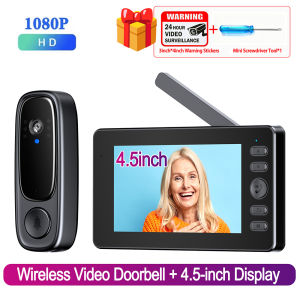
Wireless Wifi Doorbell Camera FHD 1080P Video Intercom Doorbell 4.5in IPS Screen Home Security Door Bell IR Night Vision
2.4G Wireless HD Video Doorbell【Visual Intercom Doorbell with Camera】Video intercom. No subscriptions, no need to download the app, no network or Wi-Fi required. Operating principle: 2.4 GHz wireless Bluetooth connection, one-button pairing, quick and simple, very easy to use. The HD camera clearly recognizes your face. No need to open the door or use a traditional cat's eye viewer to clearly see outsiders and visitors.【This smart visual doorbell features two-way audio for conversations with visitors】True two-way intercom—no need to hold down the call button. Answer the call with a single press and speak freely. You don't need to leave your home to communicate with visitors, effectively protecting your home's security. Especially suitable for families with the elderly and children.【The wireless visual video intercom is equipped with an 1800 mAh rechargeable battery】 - After a full charge, normal use lasts up to about 2 months; the battery is long-lasting and durable, and when no one presses the doorbell, the device enters standby mode. The screen's built-in battery capacity is only 400 mAh, so it must be connected to a power source. 170° viewing angle, wide field of view.【Multifunctional Doorbell】Visual doorbell with two-way communication, can be installed outdoors. Outdoor use: 1. Video recording: After inserting the SD card, if someone presses the doorbell, the video doorbell will automatically record video (supports 8-32G high-speed memory card). It supports triggering the outdoor doorbell via the screen. Even if no one rings the doorbell, you can view live outdoor footage on the screen. Indoor use: The screen should be installed in the entryway or living room and powered via a power outlet【No need to download an app】 So there's no need to worry about hacking and protecting your home's security. The display needs to remain connected to power; the doorbell can be installed outdoors without connecting to power (it must be removed to charge when the power runs out).Specification:Name: Smart video doorbellDisplay: 4.5-inch IPS screenRecording resolution: 1280720Viewing angle: 170°Battery capacity: 1800 mAhNight vision type: infrared night visionStorage mode: built-in + externalConnection mode: Bluetooth interconnectionAudio information: built-in speaker, microphoneWIFI mode: 2.4G private protocol, transmission distance 1-150 metersPower supply: DC5V/1AInstallation method: can be punched or pastedPower supply method: outdoor doorbell charging, indoor display USB plug-inPacking included:1 * Display1 * Outdoor Doorbell1 * Charging Cable2 * Install the Backplate 1NailsWireless Video Doorbell + 4.5-inch DisplayThe doorbell is battery-powered and requires no cables; a full charge lasts 3–4 months. The indoor screen must be connected to a 5V/1A power adapter and supports direct connection to a power bank or other USB power source.True two-way intercomno need to hold down the call button. Answer the call with a single press and speak freely.Why choose our app-free doorbell?1. Convenience: No need to connect to any app; simple operation and plug-and-play functionality mean you don’t have to worry about elderly family members or children at home being unable to see visitors because they don’t know how to use an app.2. Security: With no apps or Wi-Fi connections, video streams are more secure, and you don’t have to worry about hackers stealing your footage.3. No Monthly Fees: There are no monthly app subscription fees or any hidden costs.100W, 170° wide-angle HD lensAutomatic Infrared Night VisionPhoto & Video RecordingSupports automatic photo capture with a button press; video recording requires a TF memory card (not included in the standard package)Extended Battery LifeThe doorbell comes with a built-in 1800mAh high-capacity battery and features low power consumption. When fully charged, it can last up to 3–4 months.Button Function GuideHow to Use It?First, connect the screen to a power source and turn it on. Generally, the screen and doorbell are already paired. To test, press the doorbell to see if the screen displays a video feed. When the doorbell is pressed, the screen will emit a ringtone and display the video feed. Press the call button on the screen to start the call; press it again to end the call and close the video feed.

Global Merch Park
Review

You May Also Like

PRESSURE PERTFORMER RUBY 3FN SHOWER HEAD-SET 00800-00840

NIANXU | Precision Hand Saw Folding Saw for Woodworking

🇸🇬 [In Stock]Baby Ear Protection Suitable for Babies and Toddlers for Up to 36 Months Sleeping Headwear Soundproof Earmuffs

IONTOOL Heavy Duty Powerful 1000N.m Brushless Cordless Impact Wrench for Auto Repair Truck Maintenance and DIY Projects Tool

WEIKAMAYI | Anti-Collision Door Pad Anti Bump Sticker Silicone Wall Pad

2-in-1 Blow & Vacuum Cordless Turbo Air Duster 1200000RPM 8000mAh Power Bank Stepless Speed for Car Detailing Keyboard Outdoor

OKKFINE 5m/Roll Floor PEVA Tape Waterproof Strong Adhesive Anti-slip Tape Rubber Kitchen Stairs Grip Sticker
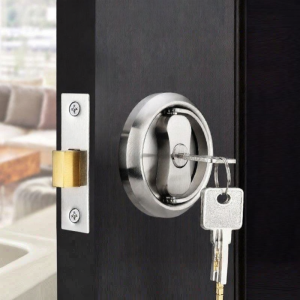
Stainless Steel Invisible Security Door Lock
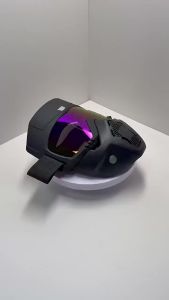
High Performance Harley Off Road Bike Riding Mask with Goggles Anti Splash Anti Glare UV Radiation Protection for Outdoor Skiing
2.5X/3.5X Dental Surgical Loupes Binocular Magnifier-Ultra-Light 320-420mm Optical Headlight for Dentist Tools&Lab Surgery Tools
IR Night Vision 3MP 2K HD 180° Video Doorbell Peephole Camera Two-Way Audio Motion Detect Tuya App Dual WiFi EU/US/UK/AU Plug