

Sale Controller 5-24V Switch RF Wireless Remote Switch WirelessDimmer Hot for LED Strip Light

Sale Controller 5-24V Switch RF Wireless Remote Switch WirelessDimmer Hot for LED Strip Light
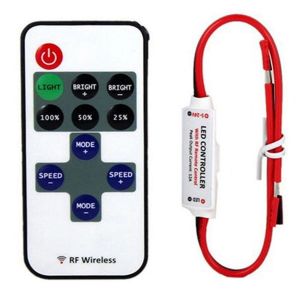
Switch to dynamic mode from lighting mode, or switch between different dynamic modes.3/8/9. Dimmer Adjust Shortcuts 2. Lighting mode 10/11. Brightness Adjust (Dimmer) Switch to 100%, 50%, or 25% brightness lighting mode.4/6. Dynamic Mode Adjust Press this key to turn on unit or switch to standby mode. Unit will turn on and restore to previous status at powering on moment. Adjust lighting mode brightness. Press BRIGHT+ to increase brightness and press BRIGHT- to decreaseSwitch to lighting mode from dynamic mode.5/7. Speed AdjustAdjust playing speed of dynamic modes. Press SPEED+ to increase seed and press SPEED- to decrease. Instructions for RF Wireless Remote1.Turn On/ Standby

ACEKOGO Car Accessories
Seller ratings 96%
Review

Oops
This video has no reviews.
You May Also Like

00:37
KOSPET TANK T4C GPS Round Smartwatch

00:25
LIGE | LIGE New 4K HD Smart Sunglasses Sports Anti-shake Shooting & Recording 800W Camera Goggles AI Voice Q&A BT Call Smart Sunglasses

00:57
NEW 2025 AL-GPT Health Watch ECG+PPG Uric Acid Blood Pressure Body Analysis HD Call LED Flashlight Smart Watch Women Men’s

00:57
LIGE AI Smart Glasses 8MP HD Camera Photo Video Recording Waterproof Bluetooth Call AI Voice Translation 270mAh Battery Voice Assistant Music Sunglasses

00:45
New Outdoor Sports Smart Watch Men 1.95 inch Heart Rate Blood Oxygen Waterproof BT Call Smartwatch Mens Gift For Android IOS
01:09
220V-230V AC Tuya Wifi Sliding Gate Motor Control Board LED Indication Electric Door Motor Circuit Board 433mhz Remote Control
00:51
XIAODU | Smart Baby Monitor Speaker

00:51
Smart Watch Bluetooth Call 1.69 Inch Full Touch Mens And Womens Fitness Sleep Tracker Heart Rate Exercise Watch

01:04
GUHUAVMI | 8G+128GB RAM 5G SIM Card Smart Watch Android 10.1 OS Phone WIFI GPS 900W HD Camera 2.4"AMOLED Screen 2100mah Battery Smartwatch

01:32
Xiaomi | NEW Xiaomi Router BE3600 Pro WiFi 7 Dual-Band Qualcomm quad-core Gaming Acceleration 3570Mbps Dual WAN LAN Mesh Network Repeater

00:30
2026 New Square Sport Smartwatch for Android/IOS Heart Rate/Sleep Monitor Fitness Tracker BT Call Smart Watch For Men Women Gift

01:03
MiTag Bluetooth TrackerKeys Finder and Pet Locator for Keys Bags and MoreWater-ResistantPhone FinderiOS Compatible
Hot Search
Women s Reading Glasses Best Rated Productspower tools makitaMiDeer | Child Friendly Water Washable Coloring Pensnvidia shield proAj Home Supplydicota laptop bagliverpool t shirtcanon lp e6 batterymen running singletcream for shingles scartouch n go card reload pinlabubu handphone standjubah for men 8xluniqlo messenger bagwall mounted sensor taps










