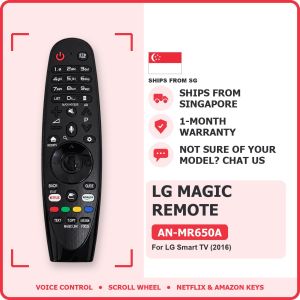
LG Magic Remote Control AN-MR650A | For LG Smart TV webOS | Voice and Scroll Wheel | Singapore Local Seller | 1-Month Warranty
LG MAGIC REMOTE AN-MR650A: replacement for LG Smart TV (2016 models)🤔 WHAT IS A MAGIC REMOTE?A Magic Remote works like a computer mouse for your LG Smart TV: point it at the screen and a pointer moves where you point. Use the scroll wheel to scroll, and talk to the TV with the voice button to search (where the model has voice). It also has all the normal TV buttons.📺 WHICH LG TVs DOES IT SUPPORT?✅ LG Smart TVs from 2016 that use a Magic Remote (webOS)✅ OLED: G6, E6, C6, B6 (models OLED65G6, OLED55B6)✅ Super UHD: UH9500, UH8500, UH7700 (models 65UH9500, 55UH8500)✅ UHD 4K: UH6550, UH6500, UH6350, UH6300, UH6150, UH6100 (models 55UH6500)✅ Full HD Smart: LH5700, LH5750⚠️ Magic Remotes are made for TVs of a certain year. Please check your TV model before you buy.🔎 HOW TO CHECK IN 10 SECONDS1. Look at the sticker at the back of your TV for the model number (for example 55UM7300PTA).2. Match the series letters with the list above.3. Not sure? Chat us a photo of the TV sticker. We check for you before you buy.❌ NOT FOR• Older LG TVs without Magic Remote support• Other TV brands• Mouse pointer (this version has voice only, no on-screen pointer)⚙️ SPECS• Model: AN-MR650A• Type: Bluetooth (pairs with the TV) plus infrared• Functions: Voice control, scroll wheel, streaming app buttons (NO mouse pointer)• Power: 2 × AA batteries (not included). Note: AA, the bigger size• Colour: black• Condition: brand new replacement remote🎮 MAIN BUTTONS AND WHAT THEY DO• Power: TV on/off• Volume and Channel: louder/softer, next channel• Wheel (OK): press to select, roll to scroll• Home: opens the LG home screen with your apps• Back: go back one step• Mic: hold and speak to search (models with voice)• Netflix / Prime buttons: open the app in one press (models that have them)📖 HOW TO USE (ONE-TIME PAIRING, 5 SECONDS)1. Put in 2 × AA batteries (not included).2. Turn on the TV and point the remote at it.3. Press the Wheel (OK) button once. The TV shows "Pairing complete".4. If it doesn't pair, hold Home + Back together for 5 seconds, then press the Wheel again.🔋 BATTERIES2 × AA batteries (not included)📦 IN THE BOX1 × LG Magic Remote (AN-MR650A) only (batteries not included)✅ Elecworks Singapore: local ready stock, fast delivery, 1-month warranty📷 PRODUCT PHOTOS

Elecworks Singapore
Review

You May Also Like
2X 893MAX Garage Door Openers / Gate Remote Control For Billion Code 390MHz Security+ 390 MHz 315MHz Security+2.0
Logitech | Logitech G305 Multi‑Function Wireless Mouse With Transfer Adapter Cable Gaming Mice For E‑sports Competition Office File Arrange

100 PCS 62×89mm Japanese Size Protective Sleeves for YGO Card Game Cards Frosted Card Sleeves Cover for Sports Cards

Bandai | Anime Golden Hair Warrior Bright Flame Effect Print Mouse Pad Rubber Non-Slip Base Smooth Surface for Gaming and Office Deskto
OLED Pantall For iPhone X XR XS Max LCD Incell For iphone 11 12 13 Pro Max 13 Mini 14 Plus LCD Display Screen Digitizer Assembly

Adjustable 360° Magnetic Phone Mount with Vacuum Suction Cup – Folding Swivel Stand for Car Gym Mirror or Home Use

JINHUAN | Rotatable Adjustable Multi-function Metal Phone Tablet Stand

Metal Strap For Huawei Band 10 9 8 Luxury Stainless Steel Replaceable Bracelet Wristband For Huawei Band 8/9/10 Accessories Belt

【Farewell Collection】Customised Wooden Phone Stand Free Engraving Christmas Birthday Icon Logo Event Farewell Corporate Gift

SENDEM Mini Capsule Power Bank 5000mAh 2-in-1 Portable Charger Mobile Phone External Battery Fast Charging Powerbank
(SG) LionShield 3C/CCC Certified 5000mAh / 10000mAh 3 in 1 Magnetic Wireless Power Bank PD 20W Fast Charging Powerbank