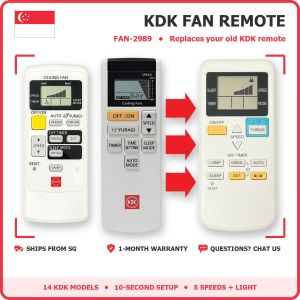
KDK Ceiling Fan Remote Control FAN-2989 | Fits 14 KDK Fan Models | Easy Setup | Singapore Local Seller | 1-Month Warranty
KDK CEILING FAN REMOTE CONTROL (FAN-2989): 1 remote for 14 KDK fan models🤔 WHAT IS THIS?A replacement remote for KDK ceiling fans. One remote works with 14 KDK fan models: you choose your fan model once (10 seconds, steps below) and it works like your old remote.🌀 WHICH FAN IS THIS REMOTE FOR?✅ KDK ceiling fans: V56VK, K14Z9, V60WK, K15Z9, R60VW, K15U2, Z60WS, K15Y6, U48FP, K12UX, U60FW, K15UW, W56WV, K14ZW✅ Easy 10-second setup: you set the remote to your fan model yourself (steps below and in the photos).✅ The options show which models it fits. All options are the same remote.🔎 HOW TO CHECK IN 10 SECONDS1. Look at the fan model on the fan motor or the box (for example V60WK), or the code on your old remote (for example K15Z9).2. Not sure? Chat us a photo. We check for you before you buy.❌ NOT FOR• KDK fans without a remote receiver• Other fan brands⚙️ SPECS• Model: FAN-2989 multi-model KDK remote• Type: Infrared (IR), point at the fan• Power: 2 × AAA batteries (not included)• Display: LCD screen• Fan speeds: 5 levels• Light: On/Off (on fans with a light)• Condition: brand new replacement remote🎛️ BUTTONS AND WHAT THEY DO• On/Off: fan on and off• Speed 1-5: slow to fast• Light: fan light on/off (fans with a light)• Timer: fan turns off by itself after the time you set• Auto / Sleep: the fan changes speed by itself for comfortable sleep• SET and LOCK: used once to choose your fan model📖 SETUP (do this once, about 10 seconds)1. Put in 2 × AAA batteries (not included).2. Find the mode number for your fan model: • Mode 00: V56VK, K14Z9, R60VW, K15U2 • Mode 46: Z60WS, K15Y6 • Mode 47: V60WK, K15Z9 • Mode 48: U48FP, K12UX, U60FW, K15UW, W56WV, K14ZW3. Set the mode number: press and hold SET until numbers appear on the screen. Use the up / down arrows to choose your mode number, then press SET again to confirm. The remote is ready to use.4. Lock the mode number (recommended): press and hold the LOCK button. This saves your mode number, so you don't need to set it again after changing batteries.🔋 BATTERIES2 × AAA batteries (not included)📦 IN THE BOX1 × KDK fan remote FAN-2989 (you set it to your fan model with the steps above) only (batteries not included)✅ Elecworks Singapore: local ready stock, fast delivery, 1-month warranty📷 PRODUCT PHOTOS

Elecworks Singapore
Review

You May Also Like

K&F CONCEPT Magnetic Phone Stand Mobile Phone Holder Invisible and Lightweight Back Sticker Storage Foldable Bracket with Magnetic Ring for all phones

Juewei | Apple Air Bluetooth Earphones Pro Charging Case Single Rechargeable Battery
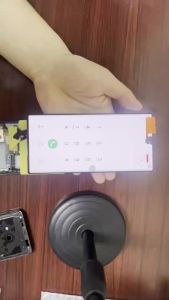
AMOLED Defect Burn Point Line for Samsung S22 Ultra S908B Touch Screen for S22 Ultra Display with Back Glass

POWERA | Wireless Dual Hall Trigger Controller
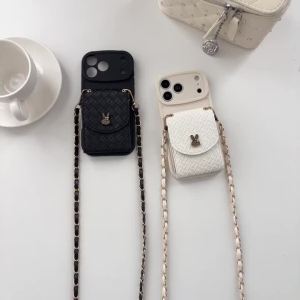
szhaiyu | Crossbody Weave Leather Card Holder Wallet Phone Case for IPhone 17 Air 18 17 16 15 14 Plus 13 12 11 Pro Max Protection Cover
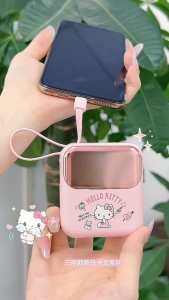
Sanrio Co-Branded Power Bank 10000mAh 22.5W Fast Charging Digital Display Slim Portable

womier | Womier RD75 Aluminum Wireless Mechanical Keyboard QMK/VIA Tri-Mode Hot-Swappable Custom Gaming Keyboard for Windows/Mac/PC
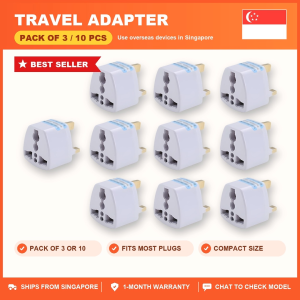
Travel Adapter to Singapore 3 Pin Plug | Pack of 3 or 10 | China US EU AU to SG Converter | Singapore Local Seller | 1-Month Warranty

KVZUVUU | Full Protection Phone Case for iPhone 11 12 13 14 15 16 Pro Max 17

【Hot Sale】Artifical Pearl KeyChains Anti-lost Cell Phone Pendant DIY Handmade Keychain Keyring Bag Hanging Chain Ornaments Pendant Jewelry Accessories
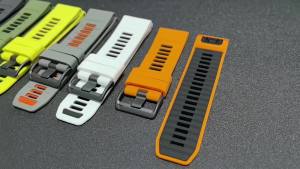
Fenix8 Watch Band For Garmin Fenix 8 Pro 47mm 51mm E 7 7X 6 6X/Epix Pro/Enduro 3 Silicone Strap 22/26mm QuickFit Sports Bracelet