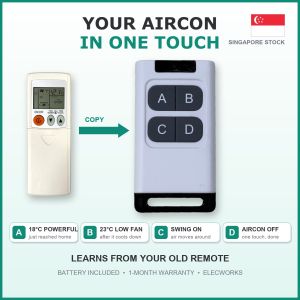
Fan Remote Control Universal | IR Learning Remote Copy for Aircon TV TV Box Soundbar Projector LED Light | Aircon Remote 8 Presets | Battery Included | Singapore Local Seller | 1-Month Warranty
LEARNING REMOTE CONTROL - COPY YOUR AIRCON / TV / FAN REMOTE1-touch presets: save your favourite settings once, use them with one press.🔋 BATTERY INCLUDED: 27A 12V battery already inside. Ready stock in Singapore.🤔 WHAT IS IT?A small 4-button UNIVERSAL remote that COPIES (learns) buttons from the remote you already have.Works with most brands of aircon, TV and fan, as long as the old remote is infrared (IR).After copying, pressing its button does the same thing as the old remote.You can copy a whole aircon setting (temperature + mode + fan) into ONE button.💡 EXAMPLE: HOW PEOPLE USE IT (you choose your own settings)A = Just reached home: 18°C, Powerful, High fan (cools the room fast)B = Room is cool now: 23°C, Low fan (quiet, saves power)C = Swing on (cool air reaches the whole room)D = Aircon offNo more pressing many buttons every day. Also great for elderly parents.For TV: A = TV on/off, B = volume up, C = volume down, D = mute.✅ WORKS WITH (infrared / IR remotes, the kind you point at the machine)Aircon, TV, fan, TV box / set-top box, sound bar, projector, IR LED lights❌ DOES NOT WORK WITHGate / garage remotes, car keys, Bluetooth remotes, voice or pointer remotes,or any remote that works without pointing (RF)Not sure? Chat with us and send a photo of your remote.📖 EASY TUTORIAL: SAVE BUTTONS 1-4 (RED LIGHT)Before you start: put both remotes close together, front to front, as shown in the video.1. Press A two times fast. The light turns RED (red = buttons A to D).2. Press and HOLD the button you want to save into (e.g. A) for 3 seconds. The red light comes on.3. On your OLD remote, press the button you want to copy, once.(Aircon: first set the old remote to the setting you like, e.g. 18°C Powerful High fan,then press its ON or TEMP button to send that whole setting.)4. Press C to leave learning mode.5. Test: point at your aircon or TV and press A. Done!📖 SAVE 4 MORE (BUTTONS 5-8, GREEN LIGHT)1. Press B two times fast. The light turns GREEN.2. Hold the button (e.g. A) for 3 seconds.3. Green light on: press the button on your old remote once.4. Press C to finish. In green mode, A B C D are presets 5 to 8.📖 ERASE EVERYTHINGHold A for 8 seconds. All saved buttons are cleared.🎬 Watch the tutorial video in this listing for the full steps.📦 SPECS- 4 buttons x 2 modes = up to 8 presets- Range: 5 - 8 metres- Battery: 27A 12V (included, already inside)- Your old remote is needed once, to copy the buttons📦 IN THE BOX1 x 4-button learning remote1 x 27A 12V battery (included, already inside)✅ Elecworks Singapore: local ready stock, fast delivery, 1-month warranty

Elecworks Singapore
Review

You May Also Like

Mofii | Stylish Wireless Keyboard and Mouse Set
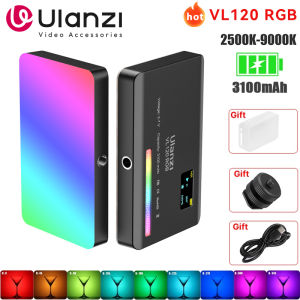
Ulanzi VL120 Full Color RGB Video Light 2500K-9000K LED Photography Lighting Dimmable Camera Light Live Videography Fill Lamp
Anti-Slip PU Leather Half Case for Leica Q/Q2/Q3 - Camera Grip Cover with for Travel Photography

YOUSIDUN | is suitable for Apple 18promax mobile phone case iPhone18pro protective case ultra-thin frosted transparent anti-fall all-inclusive soft 17promax16pro purple 17
2026 Hot selling FUSITU Large Camera Shoulder Bag Camera Case Video Camera Bag with Padded Dividers Compatible for Canon Nikon Sony DSLR SLR Lens
Magnetic Quick Release Adapter Base for DJI Osmo Action 5 Pro 4 3 Universal 1/4" Tripod Screw Mounting Hole Camera Accessory

xiaotian | Lazy Multifunction Magnetic Stand Metal Adjustable Arm
Nitecore NB Air (5000mAh 2.4A 18W)
Hagibis | Full-Function Car Charging & Data Sync Cable Type-C

Ulanzi Falcam F22 Quick Release Super Clamp Handlebar Bike Mount for Camera F22A4801

Butterfly Engraved Silicone Strap for Women Apple Watch Series 12/11/10/9/8/7/6/5/SE & Ultra 3/2/1 38-49mm