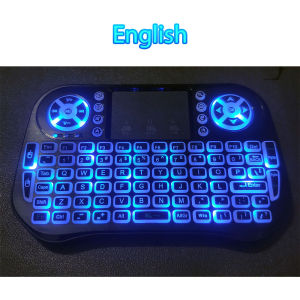
Wireless Mini Keyboard Dual Mode BT4.2 2.4G Air Mouse Remote Control Backlit 7 Color Touchpad for Android TV Box PC Projector
Wireless Mini Keyboard Dual Mode BT4.2 2.4G Air Mouse Remote Control Backlit 7 color Touchpad for Android TV Box PC Projector - Backlit Keyboard Languages Version (Optional)-English/Russian/Spanish/French/Portuguese Versions-Wireless mouse 2.4G Wireless Connection Range: radius 3 m- Fn+F2: Open or Close Keyboard (Backlight/ Backlit) or Change Backlight color,after the backlight is lit up,Fn+Swipe the touch pad can switch between 7 colors.- Fn+ Space: Speed up the mouse move- Fn+ F11: Full screen to browser- Fn+F1(RF): Activation keysSupport System:-Windows 2000.XP. Vista.Windows CE.Windows 7-11. Android-Mac OS X. - Linux (Debian-3.1. Redhat-9.0 Ubuntu-8.10 Fedora-7.0 tested)Package include:1 x Wireless Keyboard1 x Wireless receiver1 x User manual1 x Rechargeable lithium battery 1 x USB charge cableNote:How to switch to BT mode?1.Long press "Fn"+"F3" keys,when the LED turns to flash quickly,mini keyboard enters the prepairing.2.Click "Add search new devices” on the main device,for example, computer,you will find this mini keyboard's name "BT KeyBoard".Select "BT KeyBoard" to match and connect this mini keyboard.How to switch to USB receiver mode?1.Insert the USB receiver into the host device, such as a computer.2.Long press "Fn"+"F1" keys,when the LED turns to flash quickly,mini keyboard enters the pairing mode,and then complete USB receiver matching. 3,how can i change the language?answer: you need to set your device's(smart tv/android box,ect) physical keyboard match with the keyboard that you buy.for eample h96 max android box:firstly, connect usb receiver to the h96 max,turn on keyboardSecondly, clink settings-Device preferences---more settings---System---Languages & input---Physical keyboard---2.4G Composite Device---SET UP KEYBOARD LAYOUTS---russian/french/spanish/Portuguese/EnglishPS:Frenchcustomsers can installAZERTY.appto your device directly on web or goolge play.Notice:there are many android tv boxes/ smart tvs in the world, the detail setting physical keyboard steps needs to ask your device supplier, if you set your device physcial keyboard layouts and supports third party physical keyboard,it 100% works.4,how to repair the USB receiver?Answer: insert usb to computer usb port, The distance between the USB receiver and the keyboard cannot exceed 1 cm,pressing FN+F1 3 seconds.the yellow light not flash means connected.5,How to adjust the cursor speed ?Answer: Pressing FN+Speace to speed up and down.

GlobalTechMart
Review

You May Also Like
New Magic Keyboard Case for Samsung Galaxy Tab S11 Ultra 14.6inch S10/S9/S8Ultra Bluetooth Touch Backlight Magnetic Tablet Cover
Heat Dissipation Metal Magnetic Holder Phone Case for Samsung S26 S25 S24 Ultra For Magsafe Shockproof Stand Holder Back Cover

Silicone Strap For Garmin Venu 4 45mm 41mm Smart Watch Band Sports Wristband Bracelet

Free Standing Floor TV Stand TV Bracket Height Adjustable For 40-85 Inches LED LCD NEXT DAY DELIVERY
Screen Protector Hard PC Shell for OnePlus Watch 2 OPPO Watch X Tempered Glass Smart Watch Bumper Cover Protector Accessories
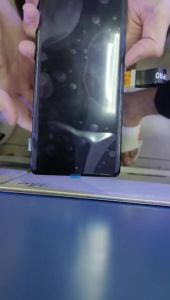
6.7" New ELI-NX9 LCD For Huawei Honor 200 LCD ELI-AN00 Display Screen Touch Digitizer Assembly with frame for honor200 Display
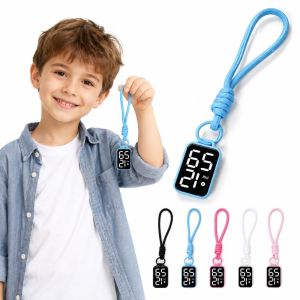
GTRBFDS LED Pocket Watch Keychain Digital Display Big Numbers Electronic Hanging Watch Practical Multipurpose Digital Watch Kid Adult

ED Acrylic Chinese Style Butterfly Pendant DIY Handmade Phone Charm Calligraphy Mobile Phone Strap Mobile Phone Lanyard Trinket Retro Beaded Phone Chain Mobile Phone Accessories
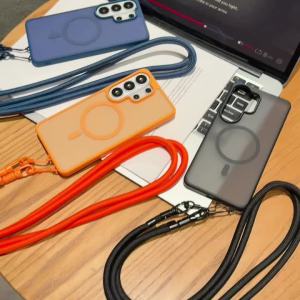
Magnetic Case For Samsung Galaxy A57 A37 A17 A56 S25 FE S26 Ultra Matte Skin Shockproof Adjustable Crossbody Lanyard Strap Cover

CHECKON | Tempered Glass Full Adhesive Screen Protector for OnePlus 13 and Ace 3

inphic | Silent Mechanical Wired Mouse