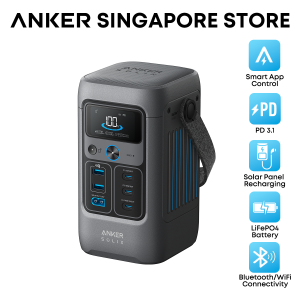
Anker SOLIX C200 DC 60000mAh/192Wh Power Bank 200W Portable Generator 5-Port Power Station A1727
Anker Official By Tech House1. 02-K2 Changi Airport T2 (Near T2 Departure Hall Roll 1)2. B2-K3 Changi Airport T3 (In front of Kopitiam)3. 02-K2 Novena Square4. 02-439 Suntec City (Tower 5)5. 01-23 Chinatown Point6. 02-38A Junction 87. 04-03 Tampines Mall8. B1-44 Westgate9. B1 Push Cart 21 Jurong Point (Near Starhub)10. 03-21/22 Jurong Point JP211. 03-K02 Causeway Point12. 03-18 Compass One13. 02-216A VivoCity14. 04-K1/K2 Serangoon NEX15. 02-K4 Parkway Parade16. Takashimaya Level 3 Mens Department(Bulk purchase is available, please chat with us)Specs:Model: A1727Cell Capacity: 192Wh (60000mAh)Total Ports: 5Solar Panel Input: 11-28V 8.2A Max (100W Max)USB-C3 Input: 9V 3A / 15V 3A / 20V 5A / 28V 5A (140W Max)USB-A Output (each port): 5V 2.4A (12W)USB-C1 Output: 5V 3A (15W Max)USB-C2 Output: 5V 3A / 9V 3A / 15V 3A / 20V 5A (100W Max)USB-C3 Output: 5V 3A / 9V 3A / 15V 3A / 20V 5A / 28V 5A (140W Max)USB-A and USB-C1 Total Output: 5V 4A (20W)Total Output: 200W MaxDischarging Temperature: -20°C-40°C / -4°F-104°FCharging Temperature: 0°C-40°C / 32°F-104°FDimension: 10.0×11.0×18.5 cm / 3.94×4.33×7.28 inNet Weight: 1.9 kg / 4.2 lbUSB Power Distribution Details:· Since the total output of USB-A1, USB-A2 and USB-C1 is 20W, the table below treats them as one interface(USBA1&A2&C1);The total output of this product is 200W. Please be careful when using multiple interfaces.1 Port:USB-A1/A2: 12WUSB-C1: 15WUSB-C2: 100WUSB-C3: 140W2 Ports:USB-C2+USB-A1&A2&C1: 100W+20WUSB-C3+USB-A1&A2&C1: 140W+20WUSB-C2+USB-C3: 100W + 100W3 Ports: USB-C2+USB-C3+USB-A1&A2&C1: 60W+100W+20WNote:- Only the USB-C3 port can be used to recharge. Use an 18W or higher wall charger (9V-28V).- Use the included 140W USB-C cable and your own 140W adapter for the best chargingexperience.- Only use 11V-28V solar panels with an XT60 connector. Incompatible with Anker SOLIX PS30 (or other 5V~3A USB-C panels), PS200, and PS400. Using incompatible panels will damage the power station and will not be covered under warranty.FAQS:Q1: Does Anker SOLIX C200 DC Portable Power Station come with a charger? What type of charger is needed?Anker SOLIX C200 DC does not include a charger. Use any USB-C PD charger with 18W (9V⎓2A) or higher output. For full-speed charging, a 140W charging port is required. (Note that only the and USB-C3 ports can be used.)Q2: What should I keep in mind when using a solar charger to charge Anker SOLIX C200 DC Portable Power Station?Only use 11-28V solar panels with an XT60 connector. It is incompatible with Anker SOLIX PS30 (or other 5V~3A USB-C panels), PS200, PS400. We recommend 100W or 60W Anker Solar Panels.Warning: Anker Panels over 100W will cause a device malfunction.Q3: Can the USB-C ports be used to charge Anker SOLIX C200 DC Portable Power Station (input only), or are they output only?The USB-C1 and USB-C2 ports are output only. The USB-C3 supports output or input. Q4: How do I reset Anker SOLIX C200 DC Portable Power Station?If your power station isn't working correctly, insert a paper clip or pin into the reset hole for 1 second for a factory reset.

Anker
You May Also Like
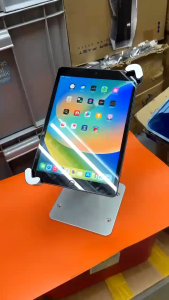
【🔥SG SELLER🔥】RICHMENTGADGET Anti-Theft Desktop Tablet Kiosk Stand Holder Heavy Duty Countertop Tablet POS Display Mount with Security Lock and Key Compatible iPad Pro/Air/Mini Galaxy Tabs Surface More 7-11" Tablets

JSAUX FlipGo Horizon Monitor Snap-On Tri-screens Workstation Portable Laptop Screen Extender

Fashion Laptop Pure Color Skin for Vivobook 16 M1603Q X1603Z Pro16 K6602Z M5606W K6604J K3605V 2022 2023 2024 Notebook PC
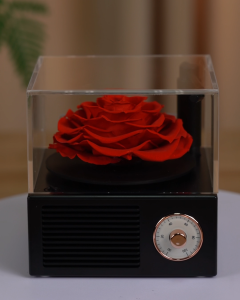
【Local Seller】Gramophone Music Box Preserved Flower Rose Eternal Flower Bluetooth Speaker Gifts
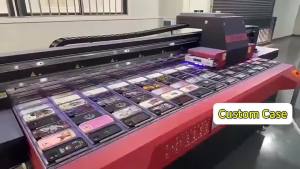
Potdemiel | Dark Mandala Tile Double Layer Hard Shell for iPhone 17 16 15 14 Plus 13 Pro Max Anti-Drop Shockproof PC Case

Logitech K400 Plus Black TV Plus Unifying Keyboard with Android Keys and Integrated Touchpad TV-Connected PC

Magnetic Rubber Band For Amazfit Active Max Smart Watch Strap Silicone Band Sport Wristband Bracelet

Sikai | Magnetic Charging Adapter for Z-series Watches
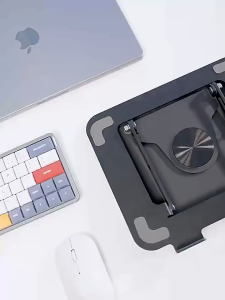
Upgrade 360° Metal Rotating Laptop Stand Foldable Laptop Stand Adjustable Foldable Tablet Stand 10-17 inches Devices

For FindX9 Pro Case ZROTEVE Ultra Slim Matte Hard PC Cover For Oppo Find X9 Pro X8 Ultra FindX8 5G Global Shockproof Phone Cases
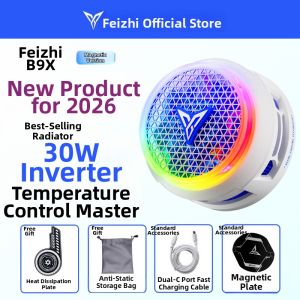
Flydigi | Magnetic Cooling Gaming Phone Radiator