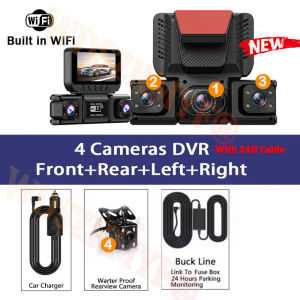
New Quad Lens Car Camera 360° Coverage 4CH WIFI dashcam 1080P 24H Parking Monitor G-Sensor Night Vision Car Security Accessory
Q: Does the camera require a connection cable?A: Yes, please understand that all 100% dashcams on the market require a connection cable (Reason: To prevent lithium batteries from overheating in high-temperature vehicle interiors).After connecting the cable, you can perform a hidden installation by tucking the cable under the soft trim strip along the edge of the roof-door panel.4 Lens 1080P Dash Cam 360° Panoramic Recording | WiFi Phone Connection | 24H Parking Monitor | Portable 3M Bracket Car DVR CameraFunction:------360° Panoramic Recording with Compact DesignEquipped with 4 high-quality 4 lenses and 1080P resolution. Left and right lenses support manual 180° rotation for full coverage without blind spots. Ultra-small and lightweight body ensures it does not block the view, portable and unobtrusive for daily driving.------WiFi & 0-Data Phone TransmissionBuilt-in WiFi for fast connection with smartphone APP. Easily view real-time footage, playback and download video clips directly to your phone. Support zero-data transmission, making it convenient to save and share driving records anytime and anywhere.------24H Parking Monitoring (Optional Hardwire)Support 24-hour all-day parking protection with hardwire kit. When the vehicle is turned off, the dash cam stays in standby mode. Once collision or vibration is detected, it automatically wakes up and records evidence videos to protect your car at all times.------Intelligent Loop RecordingAdopts automatic loop recording technology. When the memory card is full, it will overwrite the oldest unlocked videos to ensure uninterrupted recording. No need to manually delete files frequently, simple and practical for long-term use.------Portable & Flexible 3M MountComes with a strong 3M adhesive bracket supporting 90° angle adjustment. Tool-free installation, firm and stable. The portable and detachable design allows quick installation or removal, suitable for different cars and easy to carry around.4 Channels Front & Rear & Inside CameraWhen all four lenses are turned on simultaneously, the image quality will be compressed to 1080P+720P*3Super Night VisionBuilt-in Wi-Fi & APP ControlBUILT-IN WIFIFUNCTION : Smart dash cam built-in WiFi module, support APP control (Work with Android and iOS devices)Reverse imageWhen hanging in the "R" gear, the screen will automatically switch Reverse image, and the accurate inverted auxiliary line provides you with better parking prediction.24-Hour Parking MonitoringBuilt-in G-sensor activates automatic recording when a sudden shake or collision is detected. When emergency video is recorded, a voice will alert you when you return to the car. In addition,supports time-lapse recording, which maximizes storage usage and ensures that no moments of evidence are missed.Friendly reminder: parking monitoring needs to be configured with a special buck cable for use, otherwise 24-hour monitoring is not possibleBuilt-in G-sensorWhen your car is subjected to an impact or other emergency,the G sensor is triggered, so that the recorder immediately records and locks the video.Loop- Cycle RecordingWhen the TF card is full,it will automatically delete former video and keep recording all the timeInstallation Diagram1.Secure the recorder to the windshield of the vehicle , recommended near the rearview mirror area2.Hide the power cord in the window gap along the red line in the figure above 3.Insert the car charge wire into the cigarette lighter, connect the power supply, and complete the installation3.Rear camera if you need reverse camera function please connect the red wire, the red wire connects to the power supply of the reverse light behind the car.4.All car recorders need to be connected to the power supply to use, please understand the small battery safety design of the recorder. The battery of electrical appliances in the car is not allowed to be installed too large.To protect your privacy, the TF card needs to be formatted for the first time. There are two solutions:1. Insert the TF card correctly into the dash cam, open the camera settings, find the storage card format, confirm that the formatting is complete, and then restart the camera to use.2.Connect to the mobile application, search for settings in the mobile application, format the memory card, confirm formatting is complete, and then restart the camera to use it. Sincere wishes to you and your family.

Prime Supply_Play Life
Review

You May Also Like
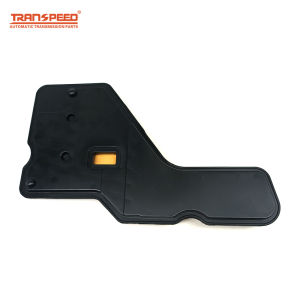
TRANSPEED 4T40E 4T45E Automatic Transmission 24221762 Oil Filter For BUICK CHEVROLET PONTIAC OLDSMOBILE

Car Nano Coating Car Coating Fantastic XML Automotive Coating for 500ml (Ready Stock)
Android 13 AI Box Wireless CarPlay For BMW ID6 ID7 ID8 ID9 For VW Audi Kia Fiat Ford Toyota QCM6125 TouchScreen 4G WIFI GPS HDMI
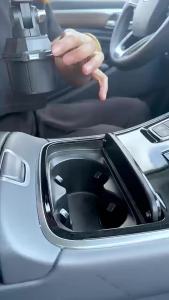
car Magnetic Mobile phone stand 360-degree rotation Adjustable Arm Universal Car Cup Holder Tablet & Phone Mount for iPad Pro
H6 Car Head Up Display Projector Holder 6 inch Universal Phone Navigation Smartphone Holder gps Head Up Display bracket foldable
for Tesla NEW Model Y YL Juniper 2025 2026 Gear Lever Protective Cover Silicone Steering Wheel Pocket Gear Steering Toggle Case
Vinyl Wrap Magnets Heavy Duty Magnetic Gripper Tools for Car Wrapping Window Tint Sign Vinyl Film Stickers Install Tool 2-10pcs
15W Wireless Car Charger Phone Holder Automatic Clamping Mount Fast Charging Stand 90° Rotation Hands Free Car Mount for iPhone Samsung
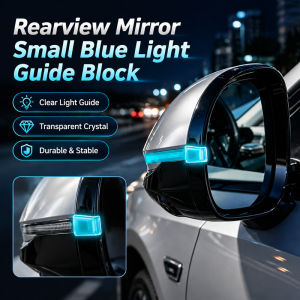
Rearview Mirror LED Light Guide for Car Safety Enhancement
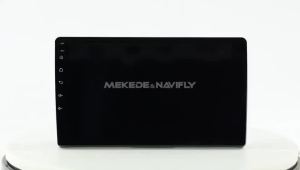
MEKEDE 2 Din CarPlay For Mercedes Benz Smart Fortwo 451 2010 - 2015 Car Radio Multimedia Autoradio Intelligent Car Audio System

Baseus Air Pump Portable Wireless Car Compressor for Car Bike Bicycle Motorcycles Rechargeable Digital Electric Tire Inflator