


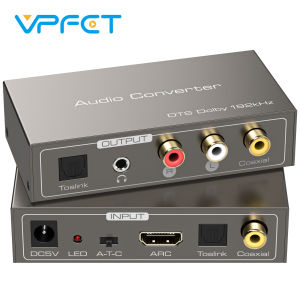
HDMI ARC Audio Converter ARC to Optical Coaxial RCA 3.5mm AUX Adapter DTS Dolby AC3 LPCM Decoder for TV Soundbar Home TheaterBest selling 2026
If you have any questions, please contact us first and we will answer you professionally! HDMI ARC Audio Converter — Multi-Interface Input/Output Solution This versatile audio converter supports ARC, optical (Toslink), and coaxial inputs, and can output to optical, coaxial, and analog stereo devices, making it easy to connect your TV or audio source to an amplifier, speakers, or headphone system. With its compact design and plug-and-play functionality, it’s the ideal choice for upgrading your home theater and audio systems. Key Features Multiple Input Interfaces • HDMI ARC Input • Toslink Optical Input • Coaxial Input Multiple Audio Outputs • Toslink Optical Output • Coaxial Output • RCA Left/Right Channel Outputs (L/R) • 3.5mm AUX Output Input Source Selection Select ARC, optical, or coaxial input via the switch button or DIP switch. Supports Major Audio Formats • Toslink/Coaxial Output: DTS / Dolby-AC3 / DSD / LPCM • Analog R/L and 3.5mm Output: LPCM 2.0 Power-Off Memory Function Automatically resumes the previous operating state after power is restored. Safety Protection Design Built-in overvoltage protection prevents damage caused by incompatible power sources. Compact and Portable Design Easy to install and space-saving. DC 5V Power Supply️ Note: • RCA (R/L) and 3.5mm AUX support LPCM 2.0 only • Dolby and DTS are supported only via optical or coaxial output ARC Usage Tips When using the ARC feature, please use a standard 19+1 HDMI High-Speed cable and ensure that the ARC feature is enabled on your TV.️ Operation and Connection ARC Input Mode 1. Connect the audio source to the ARC input port 2. Set the input selector switch to “A” 3. Connect the output to the audio receiver 4. Connect to a 5V power source Optical Input Mode (Toslink) 1. Connect the audio source to the optical input port 2. Set the input selector switch to “T” 3. Connect the output to the audio device 4. Connect to a 5V power source Coaxial Input Mode 1. Connect the audio source to the coaxial input port 2. Set the input selector switch to “C” 3. Connect the output to the audio device 4. Connect to a 5V power source User Guide • Up to three input sources can be connected simultaneously • The output port supports only one input signal at a time • Plug-and-play; no drivers required Package List: • Audio Converter ×1 • USB to 5.5mm DC Power Cable ×1 • HDMI ARC Audio Cable ×1 • User Manual ×1

huily Cameras
Review

You May Also Like

XUANWEI | Privacy Full Screen Protector Film
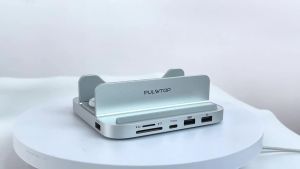
PULWTOP 9 in 1 Aluminum Vertical USB-C Hub for Mac Mini M6 M5 Pro M4/M4 Pro Hub Stand 2xUSB-A 2.0 3.5mm Audio SD/TF

Bandai | Pikachu Pokemon Mouse Pad HD Printing Anime Kawaii XXL PC Gaming Keyboard Overlock Mousepad Office Accessorie Non-slip Desk Mat

For iPhone 1514 13 12 11 Pro Max 15 14 Plus Case 360 Full Protective Silicone Front+Back Shockproof Soft Phone Cover

Ulanzi MT88 Tripod Selfie Stick Mini Stand with Backpack Clip for Action Camera DJI Pocket 3 Insta360 X5 Xiaomi Cellphone Camera

imobile | Suitable for Redmi Note17Pro mobile phone case RedmiNote17 protective cover new Xiaomi Redmi liquid silicone lens all-inclusive anti-fall pr0 simple soft shell high-end solid color for and

Fashion Retro Leopard Print Leather Phone Case For Samsung A57 A56 5G A55 A17 A27 A37 A07 A54 A53 A35 A34 A26 A25 A06 Case Cover

Kase | Adjustable ND Filter + CPL Polarizer 8 Stops
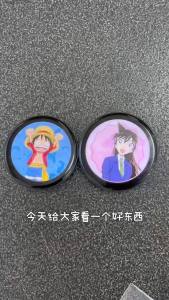
Anime E-Badge Display Pin Dynamic ElectronicBadge Anime Merchandise Digital Display Badge Dynamic Gift For Otaku Fans Friends M3

Bandai | Bag Pendant Cartoon Sweet High-End Backpack Keychain Phone Leather Hanging Chain As A Birthday Gift For Girlfriend
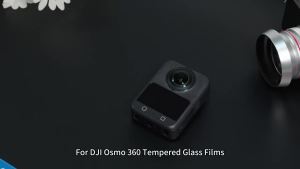
PULUZ | For DJI Osmo 360 / 360 II Film Camera Screen Protector Explosion-proof Tempered Glass Films











